# Install Azure-Cli on Mac
Table of Contents
Introduction
Are you ready to delve into the exciting realm of Azure AI?
Whether you’re a seasoned developer or just starting your journey in the world of artificial intelligence, Microsoft Build offers a transformative opportunity to harness the power of AI.
Recently I came across several good tutorials on Microsoft website, e.g. “CLOUD SKILLS CHALLENGE: Microsoft Build: Build multimodal Generative AI experiences”.
I enjoyed the learning on it. But I found out the very first step many people might seem as a challange: get az command work on Mac!
So I decided to write down all my fix.
Let’s go!
Resolution
I am following up “Install Azure on Mac”.
Run command:
brew update && brew install azure-cliBut it failed with permission issue on openssl package:
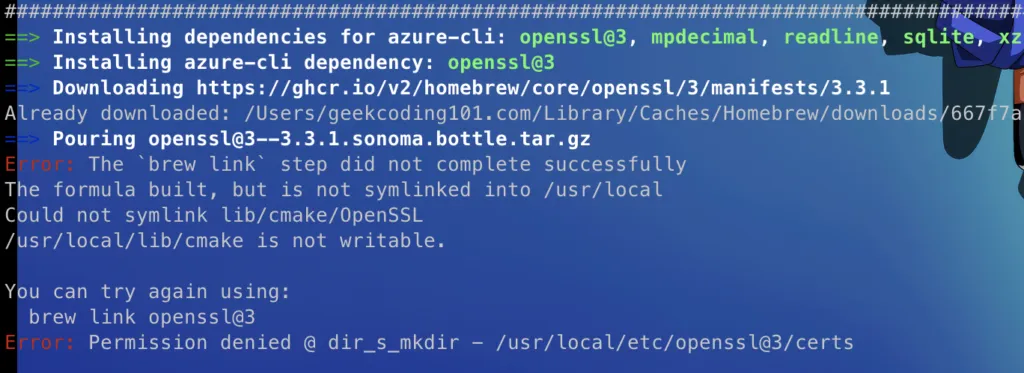
Figure 1: OpenSSL Permission Issue
I fixed it by changing the permission of /usr/local/lib to current user, but it’s not enough.
I hit Python permission issue at a different location:

Figure 2: Python Permission Issue
So I had to apply the permission to /usr/local. So the command is:
brew unlink python@3.11sudo chown -R "$USER":admin /usr/local/The screenshot of brew unlink command:

Figure 3: Brew Unlink Existing Python
Finally it finished installation successfully!

Figure 4: Installation Success
Well done!
Ps. You’re welcome to access my other AI Insights blog posts at here.