
# What Is an AI Agent? How to Build One from Scratch in Python
Table of Contents
“Agent” Is Everywhere. What Does It Actually Mean?
Every product launch in 2026 seems to include the word agent: coding agents, browser agents, research agents, “agentic workflows”. In my Agentic Frameworks guide I compared the big frameworks for building them. But before you pick a framework, it’s worth understanding what an agent really is, because the core idea fits in about 50 lines of Python. In this post we’ll define it, look at the loop that powers every agent, and build one from scratch. 🚀
What Is an AI Agent?
An AI agent is a system where a large language model decides its own next steps and takes actions through tools in a loop, until a goal is reached.
Compare three levels:
| Chatbot | Workflow | Agent | |
|---|---|---|---|
| Who decides the steps? | Nobody, one answer | You, in code | The model |
| Can it act? | No | Yes, fixed actions | Yes, picks its own actions |
| Example | ”Explain OAuth" | "Summarize every new ticket, then post to Slack" | "Find out why the build is failing and fix it” |
A good rule of thumb: if you can draw the flowchart in advance, build a workflow; it’s cheaper, faster and more predictable. Reach for an agent when the path depends on what the model discovers along the way, like debugging, research, or cleaning up messy data.
The Four Ingredients of an Agent
- A model that can reason and request tool calls (Claude, GPT, Gemini, open models…).
- Tools: functions the model may call, described by a name, a description and a JSON Schema. (An MCP server is just a standard way to package tools.)
- The loop: call the model → run the tools it asked for → send the results back → repeat until it stops asking.
- Guardrails: limits on steps, cost and what tools can touch, plus human approval for risky actions.
Memory, planning and multi-agent setups are refinements on top of these four. Everything else is detail.
The Agent Loop
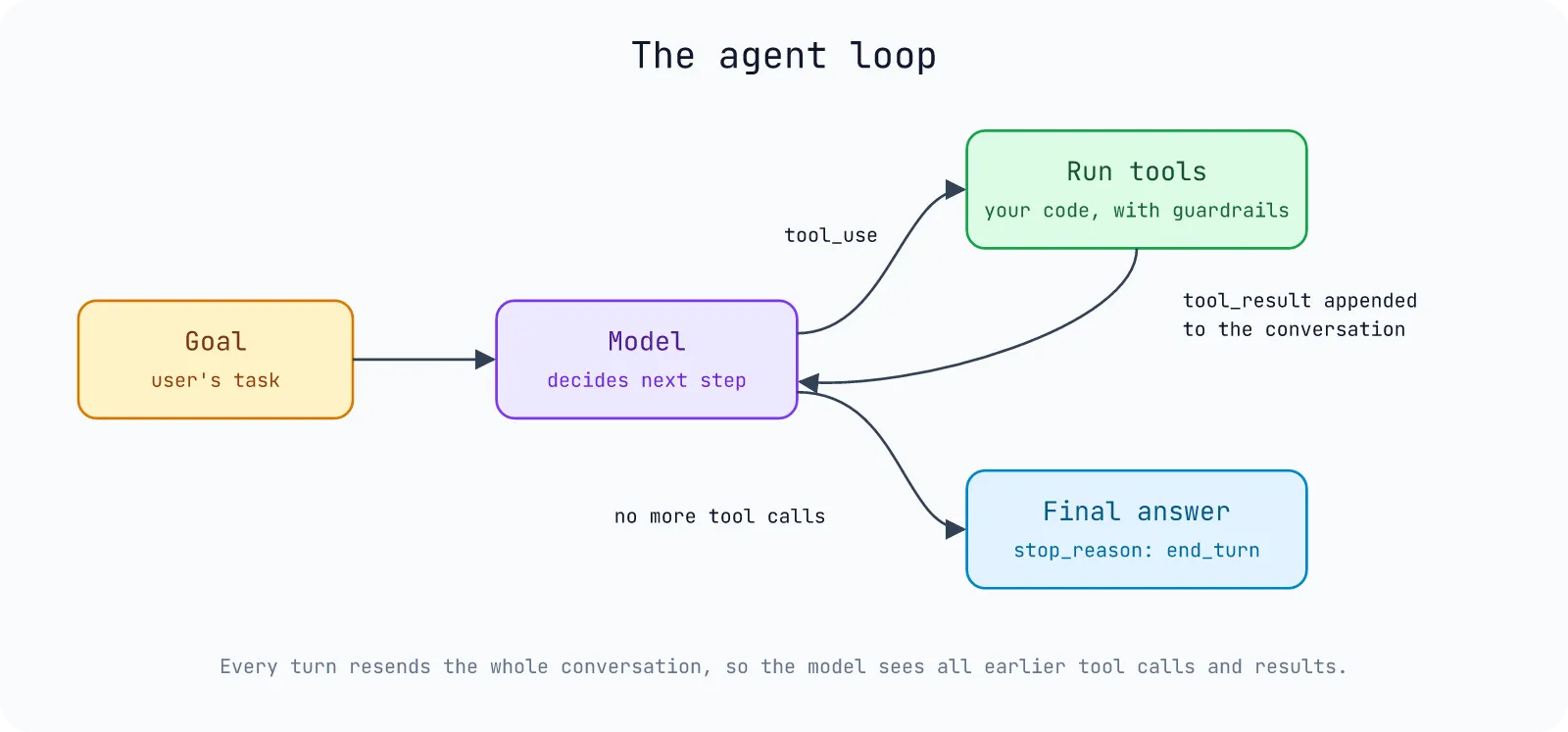
The model never runs anything itself. It asks for a tool call (in the Claude API, a tool_use block with stop_reason: "tool_use"), your code runs it, and you send back a tool_result. The whole conversation, including every tool call and result, is resent on each turn, which is how the agent “remembers” what it already did.
Build an Agent from Scratch
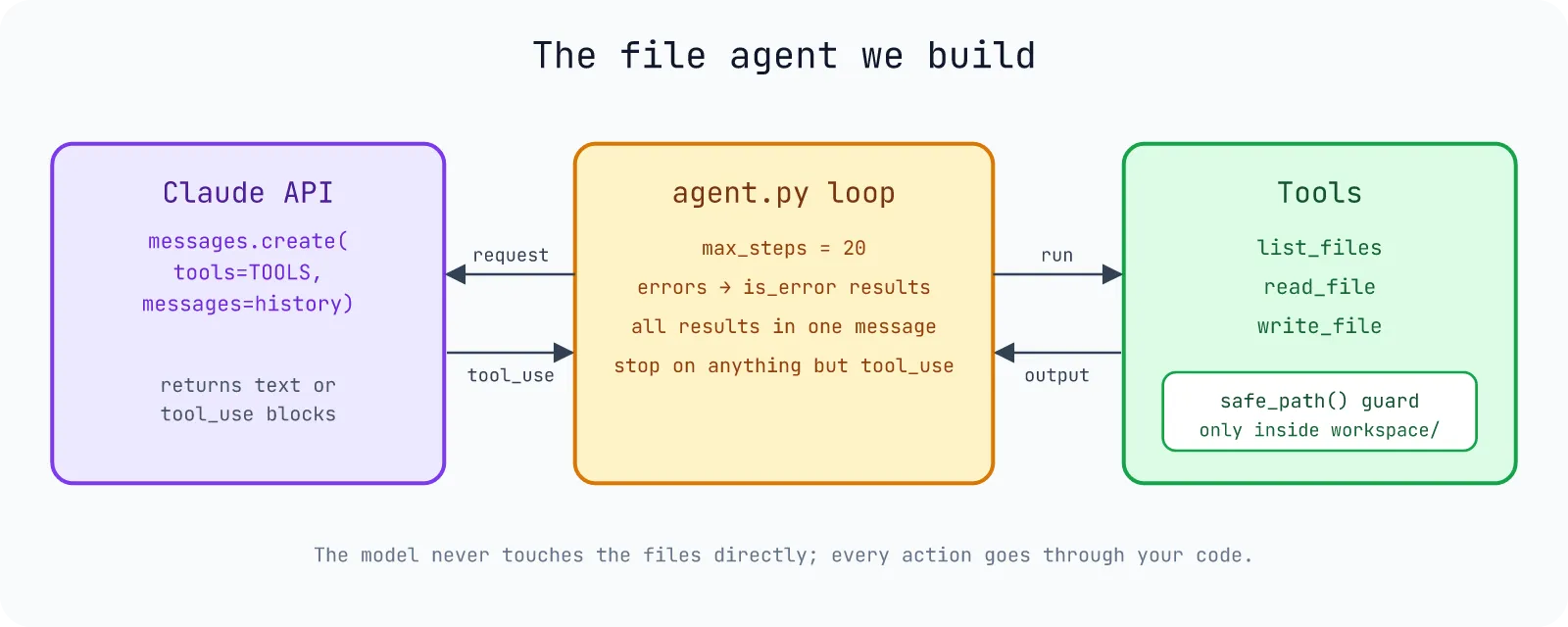
Let’s build a small file agent: it can list, read and write text files inside a workspace/ folder, and we’ll ask it to clean up a messy to-do list. I’m using the official Anthropic Python SDK, but the same loop works with any provider that supports tool calling.
Setup
uv init file-agentcd file-agentuv add anthropicexport ANTHROPIC_API_KEY=sk-ant-... # from platform.claude.comThe Complete Agent
Save this as agent.py:
"""A minimal AI agent: Claude plus three file tools, in a loop."""from pathlib import Path
import anthropic
WORKDIR = Path("workspace").resolve()WORKDIR.mkdir(exist_ok=True)
client = anthropic.Anthropic()  # reads ANTHROPIC_API_KEY from the environment
TOOLS = [    {        "name": "list_files",        "description": "List the files in the workspace folder.",        "input_schema": {"type": "object", "properties": {}, "additionalProperties": False},    },    {        "name": "read_file",        "description": "Read a text file from the workspace folder.",        "input_schema": {            "type": "object",            "properties": {"path": {"type": "string", "description": "File name inside the workspace"}},            "required": ["path"],            "additionalProperties": False,        },    },    {        "name": "write_file",        "description": "Create or overwrite a text file in the workspace folder.",        "input_schema": {            "type": "object",            "properties": {                "path": {"type": "string", "description": "File name inside the workspace"},                "content": {"type": "string", "description": "Full new content of the file"},            },            "required": ["path", "content"],            "additionalProperties": False,        },    },]

def safe_path(name: str) -> Path:    """Resolve a file name inside WORKDIR and refuse anything that escapes it."""    path = (WORKDIR / name).resolve()    if not path.is_relative_to(WORKDIR):        raise ValueError(f"{name} is outside the workspace")    return path

def run_tool(name: str, args: dict) -> str:    if name == "list_files":        return "\n".join(p.name for p in sorted(WORKDIR.iterdir())) or "(empty)"    if name == "read_file":        return safe_path(args["path"]).read_text(encoding="utf-8")    if name == "write_file":        safe_path(args["path"]).write_text(args["content"], encoding="utf-8")        return f"Wrote {len(args['content'])} characters to {args['path']}"    raise ValueError(f"Unknown tool {name}")

def run_agent(task: str, max_steps: int = 20) -> str:    messages = [{"role": "user", "content": task}]    for step in range(max_steps):        response = client.messages.create(            model="claude-opus-5-5",            max_tokens=16000,            system="You are a careful assistant that works on files in a workspace folder. "            "Look at what exists before changing anything.",            tools=TOOLS,            messages=messages,        )        # Keep the whole assistant turn (text, thinking and tool calls) in the history.        messages.append({"role": "assistant", "content": response.content})
        if response.stop_reason != "tool_use":            # end_turn (done), max_tokens, refusal...: stop and return what we have.            return "".join(b.text for b in response.content if b.type == "text")
        results = []        for block in response.content:            if block.type != "tool_use":                continue            print(f"[step {step}] {block.name}({block.input})")            try:                output, is_error = run_tool(block.name, block.input), False            except Exception as e:  # report failures to the model instead of crashing                output, is_error = f"Error: {e}", True            results.append({"type": "tool_result", "tool_use_id": block.id, "content": output, "is_error": is_error})        # All results of one turn go back together in a single user message.        messages.append({"role": "user", "content": results})    return "Stopped: too many steps."

if __name__ == "__main__": (WORKDIR / "todo.txt").write_text("buy milk\nwrite blog post about agents\nbuy milk\n", encoding="utf-8") print(run_agent("Clean up todo.txt: remove duplicates, sort it, and save the result as todo-clean.txt."))uv run agent.pyHere is a real run (anthropic 2.1.0, Python 3.12.12, uv 0.12.3; the wording of the final answer changes from run to run, since the model writes it):
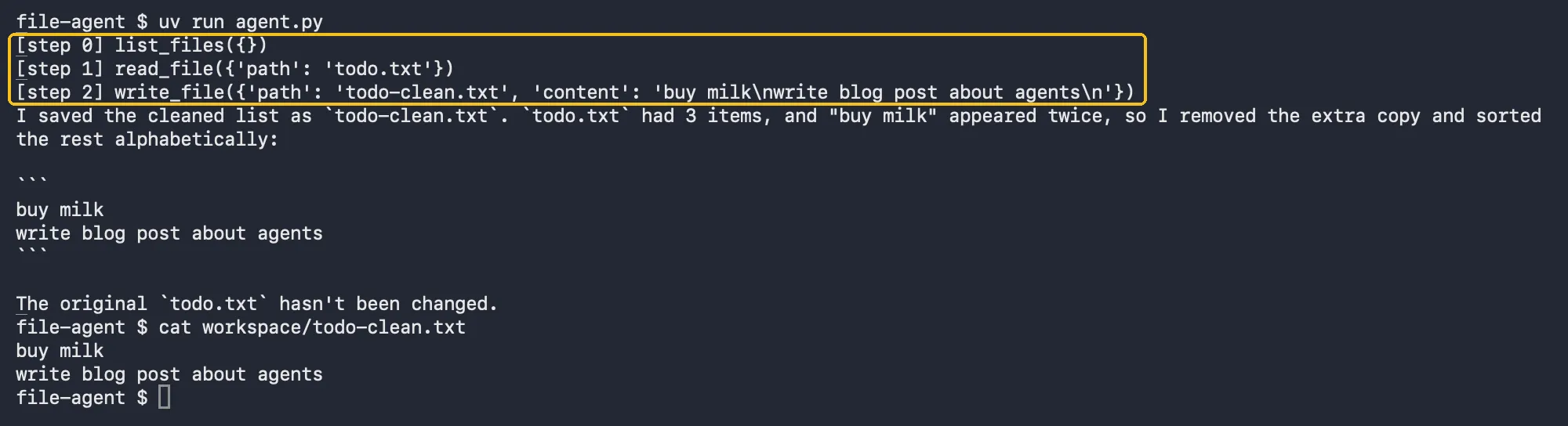
[step 0] list_files({})[step 1] read_file({'path': 'todo.txt'})[step 2] write_file({'path': 'todo-clean.txt', 'content': 'buy milk\nwrite blog post about agents\n'})I saved the cleaned list as `todo-clean.txt`. `todo.txt` had 3 items, and "buy milk" appeared twice, so I removed the extra copy and sorted the rest alphabetically: ...Nobody told it to call list_files first or to read before writing. It decided that, partly because the system prompt says to look before changing anything.
Walking Through the Important Parts
Tool definitions are prompts. The model only knows a tool through its name, description and input_schema. Clear descriptions (“Full new content of the file”) prevent most wrong calls. additionalProperties: False keeps the model from inventing parameters.
Append the whole assistant turn. messages.append({"role": "assistant", "content": response.content}) keeps the text, any thinking blocks and the tool_use blocks exactly as returned. Extracting only the text would break the next request, because every tool_result must match a tool_use id from the previous turn.
Return all results together. One assistant turn can contain several tool calls (the model reads two files in parallel, for example). Send all their results back in one user message.
Errors are results, not crashes. When a tool fails, we send "is_error": True with the message. The model reads it and usually recovers, for example by listing files after guessing a wrong name.
Stop on anything but tool_use. end_turn means done, but max_tokens or refusal also end the loop here instead of spinning forever.
safe_path is the guardrail. The model chooses file names, so never trust them: resolving the path and checking it stays inside WORKDIR blocks ../../.ssh/id_rsa-style escapes. Together with max_steps, this is the minimum safety every agent needs.
The Shortcut: Let the SDK Run the Loop
Once you understand the loop, you don’t have to write it every time. The Anthropic SDK’s tool runner (beta) builds the schemas from type hints and docstrings and runs the loop for you. Save this next to agent.py as agent_runner.py:
import anthropicfrom anthropic import beta_tool
from agent import WORKDIR, safe_path
client = anthropic.Anthropic()

@beta_tooldef list_files() -> str:    """List the files in the workspace folder."""    return "\n".join(p.name for p in sorted(WORKDIR.iterdir())) or "(empty)"

@beta_tooldef read_file(path: str) -> str:    """Read a text file from the workspace folder.
    Args:        path: File name inside the workspace.    """    return safe_path(path).read_text(encoding="utf-8")

@beta_tooldef write_file(path: str, content: str) -> str:    """Create or overwrite a text file in the workspace folder.
    Args:        path: File name inside the workspace.        content: Full new content of the file.    """    safe_path(path).write_text(content, encoding="utf-8")    return f"Wrote {len(content)} characters to {path}"

runner = client.beta.messages.tool_runner( model="claude-opus-5-5", max_tokens=16000, tools=[list_files, read_file, write_file], messages=[{"role": "user", "content": "Clean up todo.txt: remove duplicates, sort it, save as todo-clean.txt."}],)final = runner.until_done()print(final.content[-1].text)uv run agent_runner.pySame task, same tools, no loop of your own:
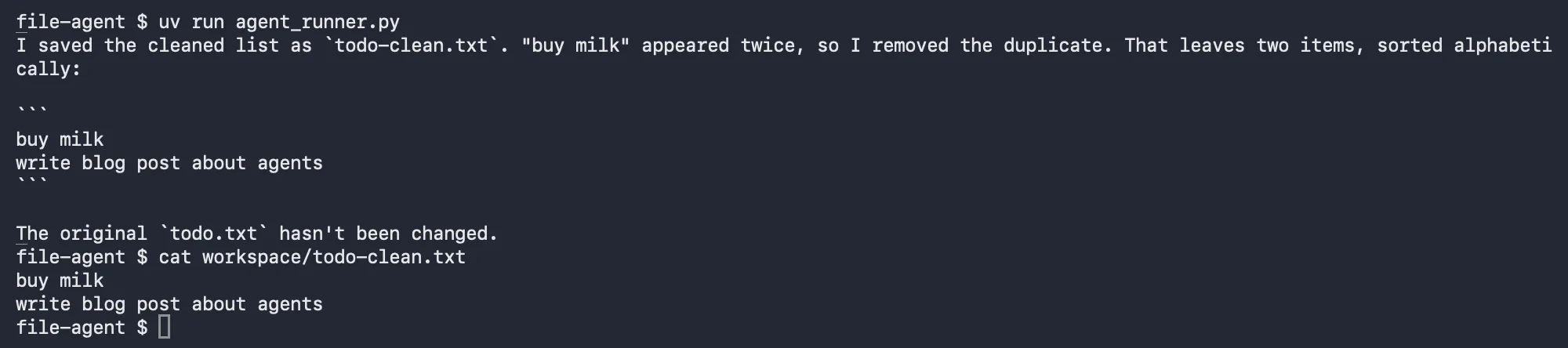
Frameworks like LangGraph, CrewAI, the OpenAI Agents SDK or Google ADK add more on top (state graphs, multiple agents, tracing, deployment), but underneath they all run this same loop.
Making Agents Production-Ready
- Cap steps and cost. Always keep a
max_steps, and log token usage per run. - Human in the loop for risky tools. Deleting files, sending email, spending money or pushing code should require confirmation.
- Least privilege. Give each agent only the tools it needs. A research agent doesn’t need
write_file. - Watch for prompt injection. Anything a tool reads (web pages, emails, files) lands in the model’s context and may contain instructions. Don’t combine “reads untrusted content” and “can take irreversible actions” without a human gate.
- Evaluate. Collect 20-50 real tasks with known good outcomes and re-run them whenever you change the prompt, tools or model.
FAQ
What is the difference between an AI agent and a chatbot?
A chatbot answers one message at a time. An agent pursues a goal across many steps, choosing and calling tools, reading the results and deciding what to do next on its own.
Do I need a framework to build an AI agent?
No. As shown above, a working agent is a loop around a model API plus a few tool functions. Frameworks help once you need persistence, multiple agents, tracing or deployment.
What is agentic AI?
“Agentic AI” describes systems with this agent behavior: models that plan, use tools and act with some autonomy, as opposed to single-shot text generation.
How is MCP related to AI agents?
MCP standardizes how agents get tools. Instead of writing read_file yourself, your agent can connect to an existing MCP server for files, GitHub, databases and more. See What Is an MCP Server?