GeekCoding101
Terraform meta-arguments are special arguments that Terraform itself reads, not the provider. They change how a block is managed:
- how many copies to create (
count,for_each) - which provider configuration to use (
provider,providers) - in what order things happen (
depends_on) - how updates and deletes are handled (
lifecycle)
They work the same way in every resource block, whatever the provider. Some also work in module and data blocks, and that “where is this allowed?” question is where most of the confusion comes from.
I’ve always found Terraform meta-arguments a bit confusing at first glance. count and for_each are easy enough. But connection, provisioner, depends_on, source and lifecycle look straightforward and then behave unexpectedly in different contexts. So this post breaks each one down: what it does, where you can use it, a practical example, and the gotchas I’d want someone to tell me about.
A note on naming: Terraform’s docs list
depends_on,count,for_each,provider/providersandlifecycleas the meta-arguments.provisioner,connectionand a module’ssource/versionare documented separately. They still play the same “Terraform reads this, not the provider” role, so I cover them here too.
The examples below use the built-in terraform_data resource and the local and kubernetes providers. You can run most of them on your own machine without a cloud account.
Terraform Meta-Arguments Table
| Meta-argument | Allowed in | What it does |
|---|---|---|
count | resource, module, data | Create N instances from a number. |
for_each | resource, module, data | Create one instance per key of a map or set of strings. |
provider | resource, data | Pick a specific (aliased) provider configuration. |
providers | module | Pass provider configurations into a child module. |
depends_on | resource, module, data | Declare a dependency Terraform can’t see from references. |
lifecycle | resource (data: conditions only) | Control replacement, deletion, ignored changes and checks. |
provisioner | resource | Run a local or remote command at create or destroy time. |
connection | resource or provisioner | Tell remote provisioners how to reach the machine (SSH/WinRM). |
source / version | module | Where to load the module from, and which version (registry). |
You can’t use count and for_each in the same block.
Usage
🧮 Terraform meta-arguments: count
resource "local_file" "note" { count = 3 filename = "${path.module}/note-${count.index}.txt" content = "This is note ${count.index}"}✅ Creates multiple instances from a simple integer. You reference them as local_file.note[0], local_file.note[1] and so on.
⚠️ Attention Notes:
count.indexstarts from 0.- The value must be known at plan time.
- Instances are tracked by position. If you drive
countfrom a list and remove an item from the middle, every later instance shifts index and gets replaced. For named collections, usefor_each. count = var.enabled ? 1 : 0is the common way to make a resource or module optional. The Advanced Usage section below relies on it.- Not supported in
providerblocks.
🔁 Terraform meta-arguments: for_each
# Set of strings: each.key and each.value are the sameresource "kubernetes_namespace" "env" {  for_each = toset(["dev", "staging", "prod"])
  metadata {    name = each.key  }}
# Map: each.key is the key, each.value is the valueresource "local_file" "config" {  for_each = {    dev  = "debug"    prod = "warn"  }
  filename = "${path.module}/${each.key}.conf"  content  = "log_level=${each.value}"}
✅ More flexible than count. It accepts a map or a set of strings, and instances are tracked by key, e.g. kubernetes_namespace.env["prod"].
⚠️ Attention Notes:
- With a set,
each.keyandeach.valueare identical. With a map,each.valueholds the map value. - Keys must be unique and known at plan time. A list must be converted with
toset()first. - Removing one key only destroys that one instance. Nothing else shifts.
- A good fit for managing multiple named resources, e.g. per environment.
🧩 Terraform meta-arguments: provider and providers
provider "kubernetes" {  config_path    = "~/.kube/config"  config_context = "staging"  alias          = "staging"}
provider "kubernetes" {  config_path    = "~/.kube/config"  config_context = "prod"  alias          = "prod"}
# In a resource (or data) block: providerresource "kubernetes_namespace" "team" {  provider = kubernetes.prod
  metadata {    name = "team-a"  }}
# In a module block: providers (a map)module "app" {  source = "./modules/app"
  providers = {    kubernetes = kubernetes.staging  }}
✅ Lets you target a specific provider configuration when more than one is defined, e.g. two clusters or two regions.
⚠️ Attention Notes:
- Use
aliasto tell configurations of the same provider apart. A resource without aproviderargument uses the un-aliased (default) configuration. providerworks in resource and data blocks. Module blocks useproviders(plural) instead, a map from the child’s provider name to one of your configurations.- The value is a bare reference (
kubernetes.prod), not a string, and it can’t come from a variable.
🔗 Terraform meta-arguments: depends_on
Most dependencies are implicit. If one resource references another’s attribute, Terraform already knows the order. Adding depends_on on top of a reference does nothing.
You need depends_on when the dependency is hidden, for example when a command reads a file that Terraform created but the command never references it:
resource "local_file" "kubeconfig" {  filename = "${path.module}/kubeconfig"  content  = var.kubeconfig_content}
resource "terraform_data" "apply_manifests" {  provisioner "local-exec" {    # The path is a plain string, so Terraform can't see the dependency    command = "kubectl --kubeconfig ./kubeconfig apply -f ./manifests"  }
  depends_on = [local_file.kubeconfig]}
✅ Ensures ordering when Terraform can’t infer it from references.
⚠️ Attention Notes:
- Use it for hidden dependencies, typically scripts,
local-exec/remote-exec, or side effects outside Terraform. - Can be used in resource, module and data blocks.
- On a module, it makes everything in the module wait for the dependency. Use it sparingly.
- On a data source, reading can be deferred until apply when the dependency has pending changes. Your plan will then show more “known after apply” values.
♻️ Terraform meta-arguments: lifecycle
resource "kubernetes_namespace" "prod" {  metadata {    name = "prod"  }
lifecycle { prevent_destroy = true ignore_changes = [metadata[0].annotations] }}| Lifecycle argument | Default | Description |
|---|---|---|
create_before_destroy | false | Create the replacement before destroying the old object, to reduce downtime. The new object must be able to coexist with the old one, e.g. no fixed unique name. |
prevent_destroy | false | Terraform errors out on any plan that would destroy this resource. |
ignore_changes | [] | Ignore differences in the listed attributes in future plans. Useful for fields changed outside Terraform. all ignores every attribute. |
replace_triggered_by | [] | Replace this resource when a referenced managed resource (or its attribute) changes. Added in Terraform 1.2. |
precondition / postcondition | none | Custom checks with an error message, evaluated before or after the change. Added in Terraform 1.2. |
replace_triggered_by only accepts references to managed resources, not plain variables. The usual trick is to route the variable through terraform_data:
resource "terraform_data" "app_version" {  input = var.app_version}
resource "kubernetes_config_map" "app" {  metadata {    name = "app-config"  }
  data = {    version = var.app_version  }
  lifecycle {    replace_triggered_by = [terraform_data.app_version]  }}
✅ Fine-tunes how Terraform handles changes, replacement and destruction.
⚠️ Attention Notes:
prevent_destroyhelps protect critical infra. It only works while the block is in your config, though: delete the resource block and Terraform will plan to destroy it.ignore_changesstops Terraform from fighting external tools over certain fields. It can also hide drift you actually care about, so keep the list short.- Values inside
lifecyclemust be literals. You can’t setprevent_destroy = var.protect. - Supported in resource blocks. Data blocks only accept
precondition/postcondition, and module blocks don’t acceptlifecycleat all.
💻 Terraform meta-arguments: provisioner
resource "terraform_data" "example" {  provisioner "local-exec" {    command = "echo Hello, Terraform!"  }
  provisioner "local-exec" {    when    = destroy    command = "echo Goodbye, Terraform!"  }}
✅ Runs a script or command when a resource is created, or at destroy time with when = destroy.
⚠️ Attention Notes:
- There are two common types:
local-exec, which runs on the machine running Terraform, andremote-exec, which runs on the target overconnection. - Not idempotent: Terraform can’t track what the command did, and it won’t re-run it on later applies unless the resource is replaced.
- If a creation-time provisioner fails, the resource is marked tainted and replaced on the next apply. Use
on_failure = continueto change that. - HashiCorp treats provisioners as a last resort. Prefer provider features, cloud-init or a config management tool when you can.
terraform_datais built into Terraform (1.4+). The oldernull_resourcedoes the same job but needs thenullprovider.
🔐 Terraform meta-arguments: connection
resource "terraform_data" "remote" {  provisioner "remote-exec" {    inline = ["echo Connected!"]  }
  connection {    type        = "ssh"    user        = "ubuntu"    host        = var.server_ip    private_key = file("~/.ssh/id_rsa")  }}
✅ Tells remote-exec (and the file provisioner) how to reach a VM or server.
⚠️ Attention Notes:
- Goes inside a resource block, applying to all its provisioners, or inside a single provisioner block.
- Requires valid credentials and a reachable host.
- Supported types:
sshandwinrm. - Inside a real VM resource you can use
self(e.g.host = self.<ip_attribute>) to point at the machine being created. - Mostly used in VM provisioning, not in cloud-native workflows.
📦 Terraform meta-arguments: source (for modules)
# Local pathmodule "network" {  source = "./modules/network"}
# Git repository, sub-directory, pinned to a tagmodule "network_git" {  source = "git::https://example.com/org/terraform-modules.git//network?ref=v1.2.0"}
# Terraform Registry, with a version constraintmodule "network_registry" {  source  = "<NAMESPACE>/<NAME>/<PROVIDER>"  version = "~> 1.0"}
✅ Tells Terraform where to find the module: local path, registry, Git and other supported sources.
⚠️ Attention Notes:
- Only valid in module blocks.
sourcedoesn’t support variables or other expressions. It must be a literal string, becauseterraform initneeds it before anything is evaluated.versiononly works with registry modules. For Git, pin with?ref=.- After changing
source, runterraform initagain.
Advanced Usage: a Wrapper Module That Switches Providers
I built this example to understand a few things together:
- what a module really is
- how variables flow from the root module into child modules
- an advanced use of
count - how to work around the rule that
sourcecan’t use variables - how
terraform_datawithlocal-execworks
The trick for the source limitation: you can’t choose the module path with a variable. You can, however, declare every candidate module with its own static source and use count to switch each one on or off.
Directory Structure
❯ tree.├── main.tf├── modules│ ├── azure_module│ │ └── main.tf│ ├── gcp_module│ │ └── main.tf│ └── wrapper│ ├── main.tf│ └── variables.tf└── variables.tfCode Walkthrough
# main.tf (root)module "cloud_infra" { source = "./modules/wrapper" provider_type = var.provider_type}# variables.tf (root)variable "provider_type" { description = "Which cloud provider to use: 'azure' or 'gcp'" type = string default = "azure"}module "azure" { source = "../azure_module" count = var.provider_type == "azure" ? 1 : 0}
module "gcp" { source = "../gcp_module" count = var.provider_type == "gcp" ? 1 : 0}variable "provider_type" { description = "Cloud provider type: azure or gcp" type = string
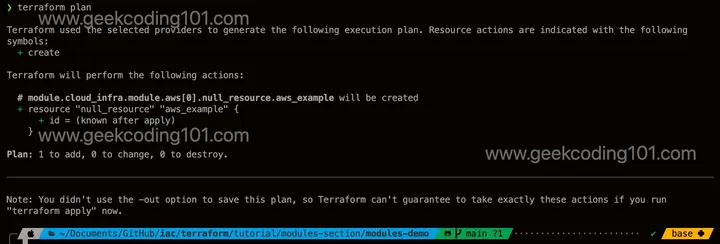
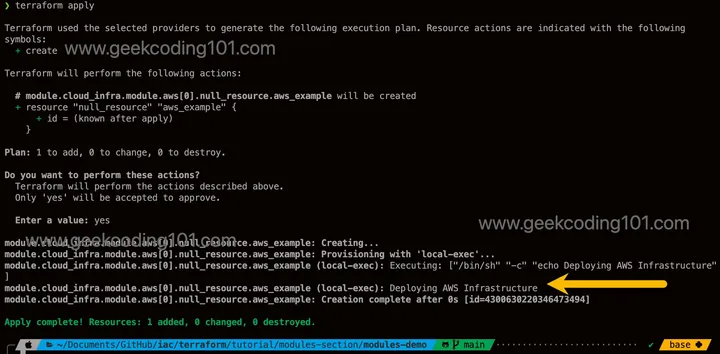
validation { condition = contains(["azure", "gcp"], var.provider_type) error_message = "provider_type must be \"azure\" or \"gcp\"." }}resource "terraform_data" "azure_example" { provisioner "local-exec" { command = "echo Deploying Azure Infrastructure" }}resource "terraform_data" "gcp_example" { provisioner "local-exec" { command = "echo Deploying GCP Infrastructure" }}Run terraform init, then terraform plan and terraform apply. Only the module that matches provider_type is created. Switch the variable with terraform apply -var="provider_type=gcp" and Terraform destroys one instance and creates the other.
Takeaways
This is a small example to illustrate a wrapper module, but the pattern has real-world value.
Modular abstraction
- The root module only says what to deploy, not how each provider does it.
- A single variable (
provider_type) switches between providers.
Wrapper logic in its own module
- The wrapper decides which provider-specific module to enable based on the input.
- This keeps conditional logic out of the root module.
Directory structure reflects cloud providers
- Each cloud has its own submodule with isolated logic.
- Code stays clean, and resources from different clouds never mix in the same files.
Static sources, dynamic selection
- Every
sourcepath is a fixed string. The flexibility comes fromcount, which enables exactly one module. - The choice is fixed at plan/apply time, but flexible from a design perspective.
- Because the modules use
count, refer to their outputs with an index, e.g.module.azure[0]. Guard those references, since the index is empty when the module is disabled.
Encapsulation of variables
provider_typeis declared at every module level that needs it.- Configuration flows cleanly from root → wrapper → cloud module.
Easy to extend
- To add another provider, add a new folder and one more module block in the wrapper. The root module doesn’t change.
terraform initdownloads the providers for every declared module, enabled or not. With real provider resources, each submodule’s provider must still be installable.
FAQ
What’s the difference between count and for_each in Terraform?
count creates instances from a number and tracks them by index ([0], [1]…). for_each creates one instance per key of a map or set and tracks them by key (["prod"]). Removing an item from the middle of a count list shifts the indexes and replaces later instances. With for_each, only the removed key is affected.
Can I use a variable in a module’s source?
No. source must be a literal string, because Terraform resolves it during terraform init, before variables are evaluated. Declare each module with a static source and toggle it with count, as in the wrapper example above.
When do I actually need depends_on?
Only when there’s a dependency Terraform can’t see from references, such as a script or provisioner that relies on something another resource created. If you already reference the other resource’s attributes, depends_on adds nothing.
Can I use lifecycle in a module block?
No. lifecycle works in resource blocks, and data blocks accept only precondition/postcondition inside it. To protect resources in a module, put lifecycle on the resources inside the module.
Should I use null_resource or terraform_data?
On Terraform 1.4 or later, terraform_data is built in and needs no extra provider. null_resource still works but needs the null provider.
Summary
Terraform meta-arguments look simple until real-world use cases hit. That’s especially true of where each one is allowed: provider vs providers, and lifecycle in resources but not modules. This post covered each one with an explanation, a runnable example and the gotchas to watch for. It also included a wrapper-module demo that switches between provider-specific modules using static sources and count. Whether you’re new to Terraform modules or sharpening your understanding of meta-argument behavior, I hope it brings some clarity to the chaos.
info I’ve pushed the Terraform scripts from this post to GitHub: 👉 https://github.com/geekcoding101/iac/tree/main/terraform/tutorial 🚀
tip Preparing for the HashiCorp Certified: Terraform Associate (003) exam? Meta-arguments come up a lot. Check out my post Terraform Associate 003 Exam: How to Prepare.
info Into Kubernetes too? My Kubernetes series builds a local cluster step by step:
- Part 1: networking plan and base VM image
- Part 2: local DNS and NTP servers
- Part 3: cluster setup with Flannel, one master and four workers
- Part 4: NodePort vs ClusterIP
- Part 5: ExternalName and LoadBalancer services