# Subnet Cheat Sheet (CIDR Chart /0–/32)
Look up any prefix from /0 to /32, or paste a subnet mask to get its CIDR notation, wildcard mask and host count.
Need the network, broadcast and host range for a specific address? Use the subnet calculator.
| CIDR | Subnet mask | Wildcard | Total addresses | Usable hosts | /24 networks |
|---|---|---|---|---|---|
| /0 | 0.0.0.0 | 255.255.255.255 | 4,294,967,296 | 4,294,967,294 | 16777216 |
| /1 | 128.0.0.0 | 127.255.255.255 | 2,147,483,648 | 2,147,483,646 | 8388608 |
| /2 | 192.0.0.0 | 63.255.255.255 | 1,073,741,824 | 1,073,741,822 | 4194304 |
| /3 | 224.0.0.0 | 31.255.255.255 | 536,870,912 | 536,870,910 | 2097152 |
| /4 | 240.0.0.0 | 15.255.255.255 | 268,435,456 | 268,435,454 | 1048576 |
| /5 | 248.0.0.0 | 7.255.255.255 | 134,217,728 | 134,217,726 | 524288 |
| /6 | 252.0.0.0 | 3.255.255.255 | 67,108,864 | 67,108,862 | 262144 |
| /7 | 254.0.0.0 | 1.255.255.255 | 33,554,432 | 33,554,430 | 131072 |
| /8 | 255.0.0.0 | 0.255.255.255 | 16,777,216 | 16,777,214 | 65536 |
| /9 | 255.128.0.0 | 0.127.255.255 | 8,388,608 | 8,388,606 | 32768 |
| /10 | 255.192.0.0 | 0.63.255.255 | 4,194,304 | 4,194,302 | 16384 |
| /11 | 255.224.0.0 | 0.31.255.255 | 2,097,152 | 2,097,150 | 8192 |
| /12 | 255.240.0.0 | 0.15.255.255 | 1,048,576 | 1,048,574 | 4096 |
| /13 | 255.248.0.0 | 0.7.255.255 | 524,288 | 524,286 | 2048 |
| /14 | 255.252.0.0 | 0.3.255.255 | 262,144 | 262,142 | 1024 |
| /15 | 255.254.0.0 | 0.1.255.255 | 131,072 | 131,070 | 512 |
| /16 | 255.255.0.0 | 0.0.255.255 | 65,536 | 65,534 | 256 |
| /17 | 255.255.128.0 | 0.0.127.255 | 32,768 | 32,766 | 128 |
| /18 | 255.255.192.0 | 0.0.63.255 | 16,384 | 16,382 | 64 |
| /19 | 255.255.224.0 | 0.0.31.255 | 8,192 | 8,190 | 32 |
| /20 | 255.255.240.0 | 0.0.15.255 | 4,096 | 4,094 | 16 |
| /21 | 255.255.248.0 | 0.0.7.255 | 2,048 | 2,046 | 8 |
| /22 | 255.255.252.0 | 0.0.3.255 | 1,024 | 1,022 | 4 |
| /23 | 255.255.254.0 | 0.0.1.255 | 512 | 510 | 2 |
| /24 | 255.255.255.0 | 0.0.0.255 | 256 | 254 | 1 |
| /25 | 255.255.255.128 | 0.0.0.127 | 128 | 126 | 1/2 |
| /26 | 255.255.255.192 | 0.0.0.63 | 64 | 62 | 1/4 |
| /27 | 255.255.255.224 | 0.0.0.31 | 32 | 30 | 1/8 |
| /28 | 255.255.255.240 | 0.0.0.15 | 16 | 14 | 1/16 |
| /29 | 255.255.255.248 | 0.0.0.7 | 8 | 6 | 1/32 |
| /30 | 255.255.255.252 | 0.0.0.3 | 4 | 2 | 1/64 |
| /31 | 255.255.255.254 | 0.0.0.1 | 2 | 2 | 1/128 |
| /32 | 255.255.255.255 | 0.0.0.0 | 1 | 1 | 1/256 |
Usable hosts: /31 = 2 (point-to-point links, RFC 3021), /32 = 1 (a single host), every other prefix = total minus network and broadcast.
How to read the CIDR chart
Every row in the chart above is one prefix length. The prefix is the number of leading bits of an IPv4 address that identify the network. The remaining bits identify hosts inside it. That single number drives every other column:
- Subnet mask: the prefix written as four octets. A /27 has 27 one bits, so the mask is
11111111.11111111.11111111.11100000, which is 255.255.255.224. - Wildcard: the mask with every bit flipped. For /27 that is 0.0.0.31. Routers and ACL syntaxes use it to say “ignore these bits”.
- Total addresses: 2 to the power of (32 minus the prefix). A /27 leaves 5 host bits, so 2^5 = 32.
- Usable hosts: total minus two, because the first address is the network address and the last is the broadcast address. Two prefixes are special: a /31 has 2 usable addresses (RFC 3021 point-to-point links) and a /32 has 1.
- /24 networks: how many ordinary 256-address blocks fit in the prefix. A /16 contains 256 of them, a /20 contains 16, and a /26 is a quarter of one.
If you only remember one thing: each step in the prefix halves or doubles the block. A /25 is half a /24, a /23 is two of them.
The table is also available as text. Use the “Copy table as Markdown” or “Copy table as CSV” button above it to paste the whole chart into a wiki, a README or a spreadsheet.
CIDR notation explained
CIDR (Classless Inter-Domain Routing) notation writes an address followed by a slash and the prefix length: 192.168.1.0/27. It replaced the old class A, B and C system, where the mask was implied by the first octet. With classes you could only have /8, /16 or /24 networks. With CIDR any length from /0 to /32 is allowed, so an organization can get a block that matches what it actually needs. The scheme is defined in RFC 4632.
The notation has two jobs:
- Describing a network.
10.0.0.0/22is every address from 10.0.0.0 to 10.0.3.255, 1,024 addresses in total. - Describing an interface.
192.168.1.77/27says “this host is 192.168.1.77 and its subnet is the /27 that contains it”. Here that subnet is 192.168.1.64/27.
Converting between a prefix and a mask is just counting ones. 255 is eight ones, 0 is eight zeros, and any other octet has to be one of nine values: 0, 128, 192, 224, 240, 248, 252, 254 or 255. If an octet is anything else (say 255.255.255.100), it is not a valid subnet mask, and the converter above will tell you so. The same goes for masks with a gap such as 255.0.255.0.
Mental math: block size and the interesting octet
You do not need the table memorized. You need one trick: find the interesting octet, which is the first octet that is not 255 or 0 in the mask. Then:
block size = 256 − (mask value in the interesting octet)
The block size is how far apart the networks are in that octet. Memorize the eight values and you can read any mask:
| Mask octet | Binary | Block size (“magic number”) | Prefix added in this octet |
|---|---|---|---|
| 128 | 10000000 | 128 | +1 |
| 192 | 11000000 | 64 | +2 |
| 224 | 11100000 | 32 | +3 |
| 240 | 11110000 | 16 | +4 |
| 248 | 11111000 | 8 | +5 |
| 252 | 11111100 | 4 | +6 |
| 254 | 11111110 | 2 | +7 |
| 255 | 11111111 | 1 | +8 |
The last column is what you add to 0, 8, 16 or 24 depending on which octet it is. 255.255.255.224 has three full octets (24) plus 224 (+3), so it is /27. 255.255.240.0 has two full octets (16) plus 240 (+4), so it is /20.
The block size is always a power of two, which is why host counts in the chart are 4, 8, 16, 32, 64, 128, 256 and so on. Useful anchors:
- /24 = 256 addresses, /23 = 512, /22 = 1,024, /21 = 2,048, /20 = 4,096.
- /16 = 65,536 addresses, /8 = 16,777,216.
- When the interesting octet is the third one, the block size is in units of 256 addresses. A /20 mask is 255.255.240.0, block size 16 in the third octet, so networks start at x.x.0.0, x.x.16.0, x.x.32.0 and so on.
Worked example: a /27 inside 192.168.1.0/24
Say you need to split 192.168.1.0/24 into small subnets of at most 30 hosts each.
- Pick the prefix. 30 hosts needs 32 addresses (30 plus network and broadcast), which is 5 host bits, so the prefix is 32 − 5 = /27.
- Write the mask. 27 = 24 + 3, and three bits in the last octet is 224. The mask is 255.255.255.224.
- Find the block size. 256 − 224 = 32.
- List the subnets. Start at 0 and add 32 until you pass 255. You get 8 subnets of 32 addresses (a /24 holds 2^3 = 8 of them).
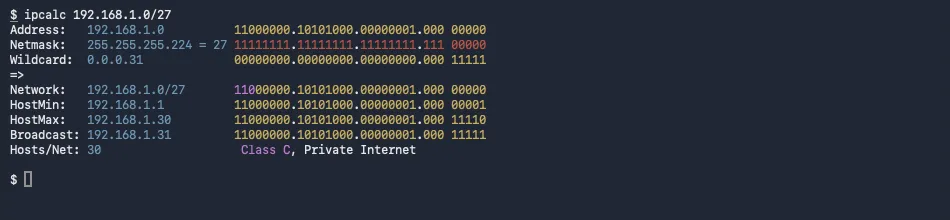
You can confirm this on a real machine. The ipcalc tool (on macOS, brew install ipcalc) shows the mask, wildcard, range and broadcast for one network:
And Python’s standard library can list all the /27 subnets in the /24:
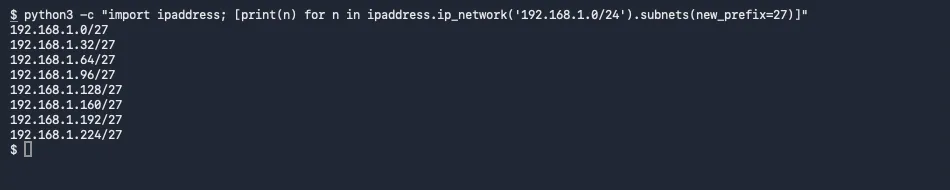
Each line is the network address of one subnet. The usable range of the second subnet, 192.168.1.32/27, is .33 to .62 with .63 as the broadcast address.
Which subnet does a host belong to?
For 192.168.1.77/27, divide the last octet by the block size and drop the remainder: 77 ÷ 32 = 2.4, so the network starts at 2 × 32 = 64. The network address is 192.168.1.64, the broadcast is 64 + 32 − 1 = 95 (192.168.1.95), and the usable range is 192.168.1.65 to 192.168.1.94. If you need this for many addresses, use the subnet calculator instead of doing it by hand.
Common subnet sizes and where you see them
| Prefix | Mask | Usable hosts | Typical use |
|---|---|---|---|
| /8 | 255.0.0.0 | 16,777,214 | The 10.0.0.0/8 private block; very large internal networks |
| /16 | 255.255.0.0 | 65,534 | A site or VPC-sized network, Kubernetes pod CIDRs such as 10.244.0.0/16 |
| /20 – /22 | 255.255.240.0 – 255.255.252.0 | 4,094 – 1,022 | Larger campus or cloud subnets |
| /24 | 255.255.255.0 | 254 | The default home or office LAN, one VLAN |
| /26 – /28 | 255.255.255.192 – .240 | 62 – 14 | Small server segments, DMZs, management networks |
| /29 | 255.255.255.248 | 6 | Small static blocks from an ISP |
| /30 | 255.255.255.252 | 2 | Classic point-to-point links between two routers |
| /31 | 255.255.255.254 | 2 (RFC 3021) | Point-to-point links without wasting two addresses |
| /32 | 255.255.255.255 | 1 | One host: loopbacks, host routes, single-IP firewall rules |
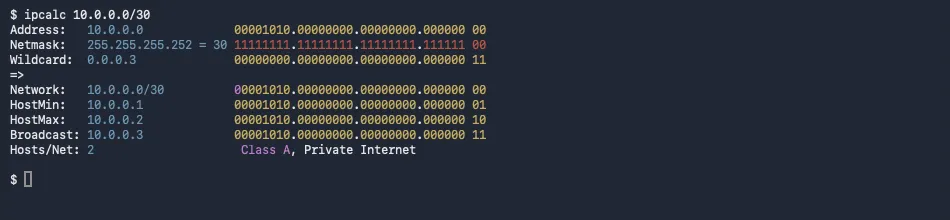
A /30 is the smallest subnet that follows the “minus two” rule and still has usable hosts: four addresses, two of them usable. This is what ipcalc prints for it:
For the address ranges that are reserved for private networks, such as 10.0.0.0/8, 172.16.0.0/12 and 192.168.0.0/16, see the private IP address ranges page. If you are sizing a Kubernetes cluster, the pod and service CIDRs follow exactly the same arithmetic. The Kubernetes cluster setup post uses --pod-network-cidr=10.244.0.0/16 and --service-cidr=10.96.0.0/12.
A note on IPv6
IPv6 uses the same slash notation, but over 128 bits. A single LAN is conventionally a /64: the lower 64 bits are the interface identifier, and subnetting happens above that. There is no broadcast address and nobody counts usable hosts. An ISP typically delegates a /56 or /48 to a customer, which leaves 8 or 16 bits to carve into /64 subnets. The rest of this page is IPv4 only.
Common mistakes
- Forgetting the minus two. A /24 has 256 addresses but 254 hosts. Sizing a subnet for exactly 30 devices as a /27 leaves no headroom, because /27 only holds 30 hosts and you still need the gateway. Plan for growth and pick the next size up.
- Treating /31 and /32 like everything else. Applying “total minus two” to /31 gives zero and to /32 gives minus one, which is nonsense. A /31 has 2 usable addresses on point-to-point links, and a /32 is one host.
- Mixing up mask and wildcard. 0.0.0.255 is the wildcard for a /24, and 255.255.255.0 is its mask. Entering one where the other is expected silently matches the wrong range in an ACL.
- Non-contiguous masks. 255.255.255.1 or 255.0.255.0 are not valid subnet masks in CIDR. The converter above rejects them.
- Starting a subnet at the wrong address. A /27 must start at a multiple of 32 in the last octet. 192.168.1.40/27 is not a network address. The network that contains it is 192.168.1.32/27.
- Reading the third octet as hosts. For prefixes shorter than /24 the block size is in the third or second octet. A /22 has a block size of 4 in the third octet (255.255.252.0), so the networks are x.x.0.0, x.x.4.0, x.x.8.0 and each one spans four /24s.
- Overlapping subnets. 10.0.0.0/24 and 10.0.0.128/25 overlap, because the /25 sits inside the /24. Overlaps are the usual cause of “VPN works but this one network does not”.
Verify from the command line
Use a tool you trust rather than your own arithmetic when it matters. Two options that work on any Mac or Linux machine:
ipcalc prints everything for one network. Install it with brew install ipcalc on macOS, or from your Linux distribution. Use ipcalc 192.168.1.0/27 as in the screenshot above.
Python ships with the ipaddress module, so no install is needed. To turn a prefix into a mask:

The same module also gives you .hostmask (the wildcard), .num_addresses, .broadcast_address and .subnets(new_prefix=...). This is a good way to double-check a chart you copied from somewhere, including this one: the table on this page is generated from the same arithmetic, and its output is tested against Python’s ipaddress for every prefix from /0 to /32.
On BSD and macOS, ifconfig shows the netmask of an interface as hex, for example 0xffffff00 for a /24, which is 255.255.255.0 written as 32 bits. The converter above shows the hex form of every mask in its “Mask in hex” row, so you can translate it back. On Linux, ip -4 addr prints the prefix directly in CIDR form.
Related tools
To calculate a specific network (network address, broadcast, first and last host for a given IP and prefix), use the subnet calculator. To check whether an address is private, loopback or link-local, see private IP address ranges.
Frequently asked questions
What is a /24 subnet mask?
A /24 prefix means the first 24 bits are the network part, so the subnet mask is 255.255.255.0. It has 256 addresses and 254 usable hosts, for example 192.168.1.1 to 192.168.1.254 in 192.168.1.0/24.
How many hosts are in a /27?
A /27 has 32 addresses in total and 30 usable hosts. The mask is 255.255.255.224 and the block size in the last octet is 32, so networks start at .0, .32, .64, .96 and so on.
What does /32 mean?
A /32 is a single address: all 32 bits are fixed, the mask is 255.255.255.255 and the block holds exactly one host. It is used for host routes, loopback addresses and firewall rules that match one machine.
How do I convert a subnet mask to CIDR?
Count the 1 bits in the mask. 255.255.255.0 is 24 ones, so /24. For a mask like 255.255.255.224, the first three octets give 24 and 224 is 11100000 in binary, which adds 3, so /27. A valid mask has all its 1 bits first and all its 0 bits after, with no gaps.
What is a wildcard mask?
A wildcard mask is the subnet mask with every bit flipped. The /27 mask 255.255.255.224 becomes the wildcard 0.0.0.31. Cisco-style ACLs and OSPF network statements use wildcards, where 0 means the bit must match and 1 means it is ignored.
When is a /31 used?
A /31 has two addresses and, under RFC 3021, both are usable. It is meant for point-to-point links between two routers, which saves the two addresses a /30 wastes on network and broadcast. Some older equipment still expects a /30.
Why are usable hosts two fewer than total addresses?
In a normal subnet the first address is the network address and the last is the broadcast address, so neither can be assigned to a host. A /24 therefore has 256 - 2 = 254 usable hosts. The exceptions are /31 (2 usable) and /32 (1).
What is the difference between CIDR and a subnet mask?
They describe the same thing in two notations. CIDR notation writes the number of network bits after a slash (/27), the subnet mask writes the same bits as a dotted value (255.255.255.224). The converter at the top of this page translates between them.