
# Secure by Design Part 1: STRIDE Threat Modeling Explained
Table of Contents
Intro: Why Every App Needs Threat Modeling And Why STRIDE
I’ve been meaning to write this post for a long time. Not because STRIDE Threat Modeling are the hottest buzzwords in cybersecurity—they aren’t. And not because threat modeling is some shiny new technique—it’s not. But because if you’re building or defending any system—especially something as deceptively simple as a chat app—threat modeling is non-negotiable.
Whether you’re knee-deep in SecOps, defining IAM policies, tuning your SIEM, or crafting detection logic, you’ve got one mission: protect the stuff that matters. That means user data, privacy, service uptime, and reputation and so on. And if we don’t design with threats in mind, we’re just building breach bait with good intentions.
So why STRIDE?
Because STRIDE gives us a practical lens to view risk before the attacker does. Instead of reacting to CVEs or chasing zero-days, STRIDE helps you think like a malicious actor while you’re still sketching your architecture in a whiteboard session or writing that controller code.
In this post, I am going to use STRIDE threat modeling to walk through a seemingly simple application—a chat app—and uncover the kinds of security holes that quietly turn into breach reports. You’ll see just how quickly things go sideways when we forget to ask, “What could go wrong here?”
But first, let’s talk about the app we’re modeling.
Our Target: A Chat App
Let’s keep it humble. No machine learning, no blockchain, no AI buzzwords glued onto CRUD. Just a straightforward web-based chat application.
Here’s what it does:
-
User Registration: Email + password
-
Login System: Username/password auth, session cookies
-
User Directory: Displays online users
-
1:1 Messaging: Users can send and receive messages
-
Message History: Stored and retrievable
-
Admin Panel: Hidden route, unknown to regular users
Now, this setup probably feels familiar. It’s the backbone of a thousand hackathons and product MVPs. But here’s the truth: simple apps are hacker candy.
Why? Because developers often make the same assumptions:
-
“It’s just a prototype.”
-
“Who would even try to attack this?”
-
“We’ll add security later.”
Later never comes. And these “low-risk” features? They can become pivot points for privilege escalation, data leaks, or full compromise. One misconfigured route or weak endpoint can become your next Incident Report ticket.
So before we start breaking things (in Part 2), let’s apply STRIDE threat modeling—a time-tested threat modeling framework from Microsoft—to map out what could go wrong across this app’s lifecycle.
Next stop: breaking down each of the six STRIDE categories and how they apply to this seemingly innocent app.
STRIDE: A Bit of History, Tools, and Fun Facts
Before we tear our chat app apart threat by threat, it’s worth pausing to talk about where STRIDE came from—and why it’s still standing strong in today’s security architecture playbook.
Where Did STRIDE Threat Modeling Come From?
STRIDE was developed by Microsoft in the early 2000s, as part of their Trustworthy Computing Initiative—yes, that era when Windows XP was everyone’s favorite backdoor. 😅
The goal? Give developers and architects a lightweight, repeatable way to ask:
“What could go wrong here?”
Rather than just tossing in a firewall and calling it a day, STRIDE forced teams to think in terms of threat categories—not just patches and alerts. It came bundled into the Microsoft SDL (Security Development Lifecycle) and has been a part of secure-by-design processes ever since.
And you know what? It still holds up, especially in a world dominated by microservices, APIs, cloud, and third-party integrations.
Tools That Support STRIDE Threat Modeling
You don’t have to scribble on whiteboards or use napkins (though, respect if you do). Here are a few tools to actually implement STRIDE modeling in your workflows:
| Tool | Description | Good For |
|---|---|---|
| OWASP Threat Dragon | Open-source threat modeling tool with STRIDE templates | Visual modeling, diagrams |
| Microsoft Threat Modeling Tool | Free tool from Microsoft for STRIDE-based modeling | Deep STRIDE threat modeling templates, flow diagrams |
| IriusRisk | Paid tool for automated threat modeling and compliance mapping | Enterprise threat modeling at scale |
| Draw.io + STRIDE Cards | DIY visual modeling using STRIDE cards | Lightweight teams, whiteboard replacements |
Pro Tip: If you already use architecture diagrams in tools like Lucidchart or Miro, just layer STRIDE annotations on top. It’s easier than reinventing the wheel with a new platform.
STRIDE Breakdown – Mapping Threats to Chat App Feature
STRIDE stands for Spoofing, Tampering, Repudiation, Information Disclosure, Denial of Service, and Elevation of Privilege.
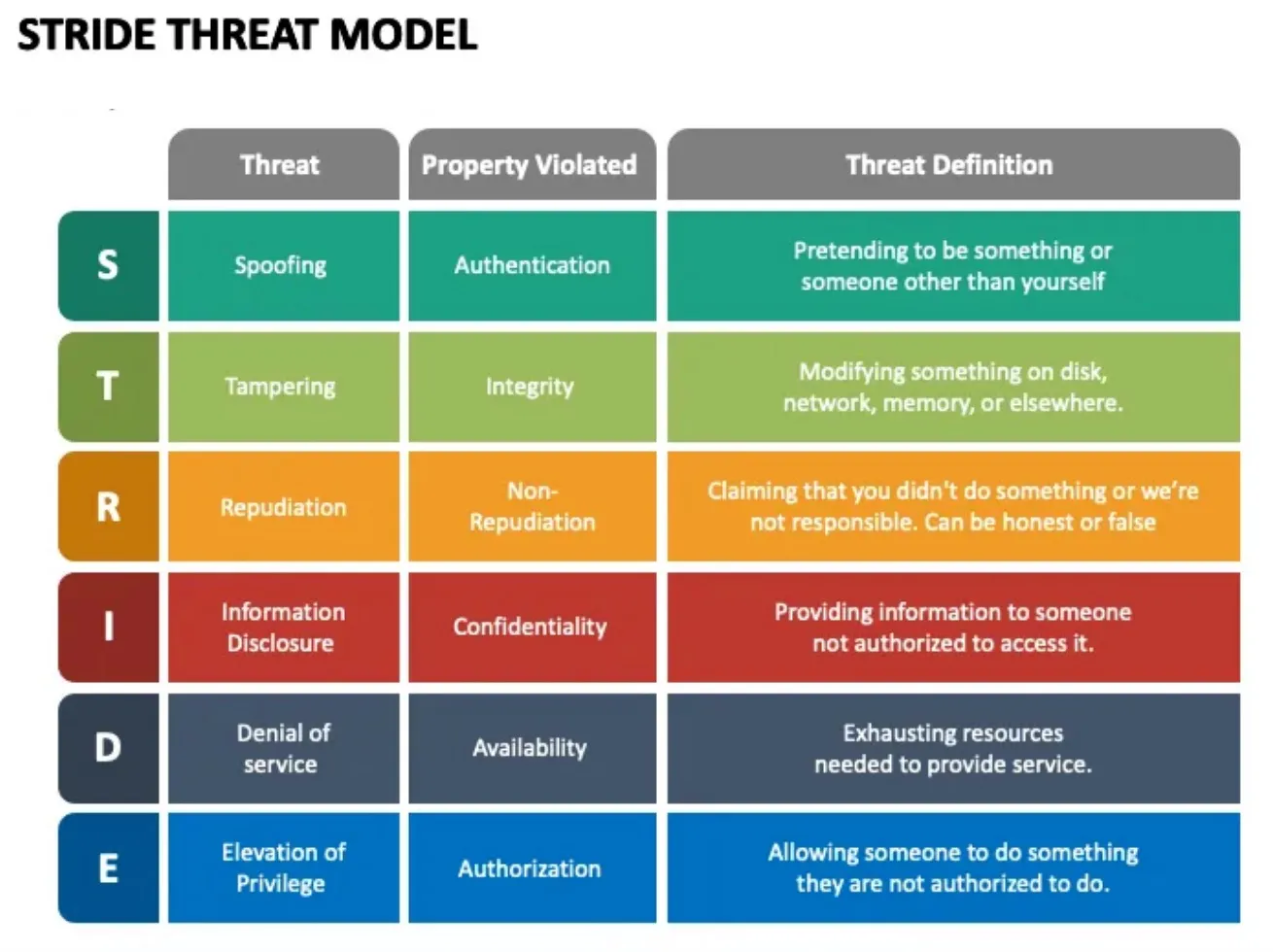
It’s the OG threat modeling framework for secure-by-design thinking.
For each category, we’ll look at:
-
What it means
-
Real-world relevance
-
How it applies to our chat app
-
How to detect it
-
How to prevent or mitigate
Let’s dive in.
S – Spoofing Identity
What It Means
Spoofing is about pretending to be someone you’re not. Usually, that’s about faking identity—think unauthorized login attempts, session impersonation, or token theft.
It doesn’t have to be high-tech. A weak password policy or default admin credentials are all it takes.
Real-World Relevance
-
Credential stuffing from leaked password dumps
-
Session hijacking via stolen cookies
-
Social engineering leading to unauthorized access
Chat App Example
-
Attacker tries logging in as
adminwith common passwords likeadmin123orpassword. -
Registration page reveals whether a username/email is already taken (“User already exists”) → helps confirm valid accounts.
-
Session cookie doesn’t use
HttpOnlyorSecureflags → attacker injects JS and steals session.
How to Detect
-
Unusual login attempts across many usernames
-
Brute-force behavior from single IPs
-
Session reuse across different IPs/devices
How to Prevent
-
Enforce strong passwords and rate-limiting
-
Use MFA (seriously, just do it)
-
Harden sessions:
HttpOnly,Secure,SameSite=Strict -
Generic error messages (“Login failed”) to prevent enumeration
-
Alert on login anomalies (e.g., geolocation or timing mismatches)
T – Tampering with Data
What It Means
Tampering is about unauthorized modification of data—altering messages, modifying user roles, or injecting parameters to mess with system behavior.
This could be at-rest (modifying DB records), in-transit (MITM), or even through insecure APIs.
Real-World Relevance
-
Changing prices on e-commerce sites
-
Modifying permissions via API injection
-
Overwriting user data via insecure endpoints
Chat App Example
-
User crafts a
PUT /api/messages/1234call to edit someone else’s message -
Sends chat message with embedded
<script>tag to execute JS on recipient’s browser -
Manually edits session data in localStorage to escalate role from
usertoadmin
How to Detect
-
Unexpected mutations in data logs
-
Sudden role changes or message edits by unauthorized users
-
Parameter tampering attempts in logs (via WAF or API gateway)
How to Prevent
-
Use digital signatures or hash checks for message integrity (e.g., HMAC)
-
Implement strict authorization checks at the server, not just UI
-
Sanitize inputs (yes, again—this never gets old)
-
Disable client-side trust for roles or permissions
R – Repudiation
What It Means
Repudiation is when an attacker performs actions without accountability—then denies them. If the system doesn’t log properly, they get away clean.
It’s like someone deleting all your Slack messages and saying, “Wasn’t me.”
Real-World Relevance
-
Lack of logs in cloud misconfigurations
-
Insider threats covering their tracks
-
Attackers disabling or deleting logs post-compromise
Chat App Example
-
User deletes messages with no audit trail—no record of who said what
-
Admin bans a user but there’s no timestamp or log of that action
-
A rogue employee reads DMs and no one knows because access wasn’t logged
How to Detect
-
You can’t… unless you already had good logging in place
-
Look for missing data in activity logs
-
Use external systems (like SIEM) to detect deletions or gaps
How to Prevent
-
Immutable logging (e.g., append-only logs with checksum verification)
-
Log all sensitive actions: logins, deletions, permission changes
-
Store logs off-host (e.g., centralized logging with ELK or Loki)
-
Use timestamping + user context in every log event
I – Information Disclosure
What It Means
This is about leaking data to unauthorized users. Could be PII, secrets, internal APIs, or even error messages that give away the goods.
It doesn’t need to be a SQL injection. Sometimes it’s just poorly scoped permissions.
Real-World Relevance
-
Exposed S3 buckets
-
Leaky APIs showing internal user info
-
Stack traces returned in production
Chat App Example
-
User accesses
/api/messages?id=4001and gets another user’s message because there’s no ownership check -
API returns full user records including email and IPs
-
Error page reveals server paths or tech stack via verbose stack trace
How to Detect
-
Data leak detection in outbound logs
-
DLP (Data Loss Prevention) tools for sensitive data patterns
-
Review of access control on all endpoints and APIs
How to Prevent
-
Apply object-level access controls (don’t trust “just the route”)
-
Strip metadata from responses
-
Mask sensitive data (e.g., show part of an email, not all)
-
Disable detailed errors in production
D – Denial of Service (DoS)
What It Means
DoS means making a system unavailable or unusable—intentionally or accidentally—usually by overwhelming it.
This isn’t just about traffic floods. It includes logic bombs, resource exhaustion, and malformed input that crashes the app.
Real-World Relevance
-
Spamming forms or chat endpoints
-
Flooding chat with emojis or large payloads
-
Abuse of nested JSON to crash parsers
Chat App Example
-
Bot sends thousands of messages per second → server CPU maxes out
-
Large message payloads (10MB+ text blobs) crash DB or front-end
-
Abuse of emoji reactions to spam notifications
How to Detect
-
Rate spikes on endpoints (monitor RPS/latency)
-
Alerts for memory, CPU, or queue overflows
-
App crashes tied to malformed input
How to Prevent
-
Rate limiting per IP/token/user (e.g., using Redis buckets)
-
Set max body size on requests
-
Queue-based processing (isolate spikes from core logic)
-
CAPTCHAs on forms and registration
E – Elevation of Privilege
What It Means
This one’s the crown jewel of attacks. EoP is when a normal user gains higher privileges—like becoming an admin, impersonating other users, or accessing restricted areas.
This often comes from missing authorization checks or client-side trust.
Real-World Relevance
-
IDOR (Insecure Direct Object Reference)
-
Hidden admin features discovered by poking URLs
-
JWT manipulation (changing
role: user→role: admin)
Chat App Example
-
Regular user discovers
/admin/usersroute and sees admin dashboard -
API lets any authenticated user call
DELETE /users/{id}without role check -
JWT token is unsigned or uses symmetric secret → attacker creates valid “admin” token
How to Detect
-
Auth bypass attempts in logs
-
Use of admin-only routes by regular users
-
Role mismatches between session vs behavior
How to Prevent
-
Enforce role-based access on the backend (never rely on frontend auth)
-
Use signed JWTs with asymmetric encryption (RS256 > HS256)
-
Scope tokens tightly (expiration, audience, permissions)
-
Always fail securely—deny access by default
Interesting STRIDE Facts (Because Nerding Out Is Fun)
-
Mnemonic Origins: STRIDE threat modeling is a backronym—it was created to map common threat types to the core properties of secure systems (authentication, integrity, non-repudiation, confidentiality, availability, and authorization).
-
“D” Is Sneaky: Denial of Service in STRIDE isn’t always massive traffic floods. It includes logic bombs and resource starvation too. Your app doesn’t have to go down in flames to be considered under DoS threat.
-
STRIDE Is Not a Checklist: It’s a thinking framework, not a compliance sheet. The real power is in using it to uncover flaws in the design before they hit production.
-
STRIDE + DFD = 🔥: It’s most effective when paired with data flow diagrams (DFDs). You model how data flows through your app, then apply STRIDE to each element (data store, process, external entity, etc.).
STRIDE’s Secret Superpower
Most threat modeling frameworks require heavy lifting or lots of training. STRIDE hits that sweet spot: easy enough for a dev to use, powerful enough for a security architect to trust.
The beauty? You can use it on anything—from a serverless app to a Kubernetes cluster to, yep, our friendly chat app.
If you’re building features faster than you’re threat modeling, you’re building features that might become attack surfaces. STRIDE slows you down just enough to build wisely.
Final Thoughts on STRIDE Threat Modeling
STRIDE threat modeling isn’t just academic. It’s a conversation starter. A design reviewer. A build-time bodyguard.
Every time you launch a new feature or review a pull request, ask:
-
S – Could someone fake an identity here?
-
T – Can they change something they shouldn’t?
-
R – Will we know who did what?
-
I – Are we leaking anything useful?
-
D – Can someone take this down with a hammer?
-
E – What happens if a normal user pushes the limits?
Apply this mindset to each part of your system—auth, storage, API, UI, admin tools, and even logs.
Your future self (and your customers) will thank you.
More references: