# Kubernetes Control Plane Components Explained
Table of Contents
Intro: So… What Powers the Kubernetes Brain?
Everyone loves to show off their YAML-fu and talk about Pods and Deployments, but what’s actually running behind the scenes? What’s keeping track of all your services, secrets, and scheduled chaos? Today I’d like to bring your a quick introduction about the Kubernetes control plane components—the brains of the operation. It’s made of several server-side components that work together like an orchestra of background daemons with trust issues and strict roles.
In this post, we’ll demystify each core server running in a Kubernetes control plane:
✅ etcd
✅ kube-apiserver
✅ kube-scheduler
✅ kube-controller-manager
✅ cloud-controller-manager
✅ kubelet
✅ kube-proxy
✅ coredns
✅ Optional players (metrics-server, CRI, CSI, etc.)
Let’s start with the foundation: how these pieces talk.
🧩 Kubernetes Architecture in a Nutshell
Kubernetes has two main types of nodes:
-
Control Plane Nodes (aka “masters”): run the brain (scheduler, API, etc.)
-
Worker Nodes: run your actual workloads (pods)
Think of the control plane as mission control and the worker nodes as spacecraft. One issues orders, the other executes.
They talk over HTTP/gRPC and communicate securely via TLS.
Now let’s break down the core components—what they are, what they do, and how they fit together.
🔐 1. Kubernetes Control Plane Components - etcd
What it is:
A distributed key-value store used to store all cluster data: objects, state, configs.
Think of it as:
The brain’s hard disk.
What lives inside etcd?
-
Pod definitions
-
ConfigMaps
-
Secrets
-
Cluster state
-
Node info
-
RoleBindings, CRDs, everything
Backed by:
etcd (from CoreOS), written in Go, uses the Raft consensus algorithm for HA and consistency.
Why it matters:
You never talk to etcd directly. The API server does only.
🧭 2. Kubernetes Control Plane Components - kube-apiserver
What it is:
The main RESTful API that all clients (kubectl, controllers, kubelet) talk to.
Think of it as:
The gatekeeper and translator.
Responsibilities:
-
Validates incoming requests
-
Authenticates + authorizes them
-
Talks to etcd to read/write state
-
Notifies other components via the Watch API
It’s stateless, and often run behind a load balancer for HA.
⏱ 3. Kubernetes Control Plane Components - kube-scheduler
What it is:
Assigns unscheduled pods to nodes, based on constraints.
Think of it as:
The Tinder for workloads. It matches pods to nodes based on:
-
CPU/memory availability
-
Node taints/tolerations
-
Affinity rules
-
Pod priority
-
Custom scoring plugins
The flow:
-
A pod is created with no
nodeName. -
API server stores it in etcd.
-
Scheduler sees it, scores possible nodes.
-
It picks a winner and updates the pod with
nodeName.
🧙 4. Kubernetes Control Plane Components - kube-controller-manager
What it is:
A daemon that runs many controllers in one binary.
Think of it as:
The cluster babysitter—constantly checking for drift and correcting it.
Runs controllers for:
-
Deployments
-
Replicasets
-
Nodes (watching for crashes)
-
Endpoints
-
Persistent Volumes
-
Certificates
How it works:
Each controller watches a specific object type via the API server and ensures the desired state matches reality. If not, it acts.
☁️ 5. Kubernetes Control Plane Components - cloud-controller-manager
What it is:
An optional component for clusters running on public clouds (AWS, GCP, Azure).
Think of it as:
The bridge between Kubernetes and your cloud infrastructure.
Responsibilities:
-
Creating LoadBalancers
-
Managing cloud-based node info
-
Attaching volumes (via CSI)
-
Updating routes
You won’t see this in bare-metal clusters unless you set up external integrations manually.
🧍 6. Kubernetes Control Plane Components - kubelet
What it is:
A daemon that runs on every worker node.
Think of it as:
The node’s supervisor.
What it does:
-
Watches for pods assigned to its node
-
Pulls container images via the CRI
-
Starts/stops containers using container runtimes (containerd, CRI-O)
-
Sends status updates back to API server
Important:
kubelet does not manage containers you started outside of Kubernetes.
🌐 7. Kubernetes Control Plane Components - kube-proxy
What it is:
Runs on each node to implement service networking.
Think of it as:
A port-forwarding ninja that handles cluster IP routing rules.
Modes:
-
iptables (legacy, still common)
-
ipvs (newer, faster, uses Linux’s IPVS)
-
eBPF (if you’re fancy and using Cilium)
What it does:
-
Maintains network rules to forward traffic to the correct pod behind a Service
-
Enables internal DNS (via CoreDNS)
-
Helps implement ClusterIP, NodePort, LoadBalancer behavior
🧠 8. Kubernetes Control Plane Components - CoreDNS
What it is:
Default DNS service in Kubernetes.
Think of it as:
Your cluster’s internal phone book.
What it does:
-
Resolves pod/service names to cluster IPs
-
Works with kube-dns-compatible tools
-
Responds to all
*.svc.cluster.localdomain lookups
Runs as a Deployment + Service, just like any other app—because Kubernetes eats its own dog food.
🛠 Supporting Components
| Component | Role |
|---|---|
| metrics-server | Collects CPU/mem stats for autoscaling (HPA) |
| CRI runtimes (containerd, CRI-O) | Interface between kubelet and container engines |
| CSI drivers | Handle volume mounting for storage backends |
| CNI plugins | Provide networking (Calico, Flannel, Cilium, etc.) |
| Admission controllers | API gatekeepers that enforce rules (e.g., resource limits, policies) |
| API Aggregation layer | Supports extending the Kubernetes API (like metrics.k8s.io) |
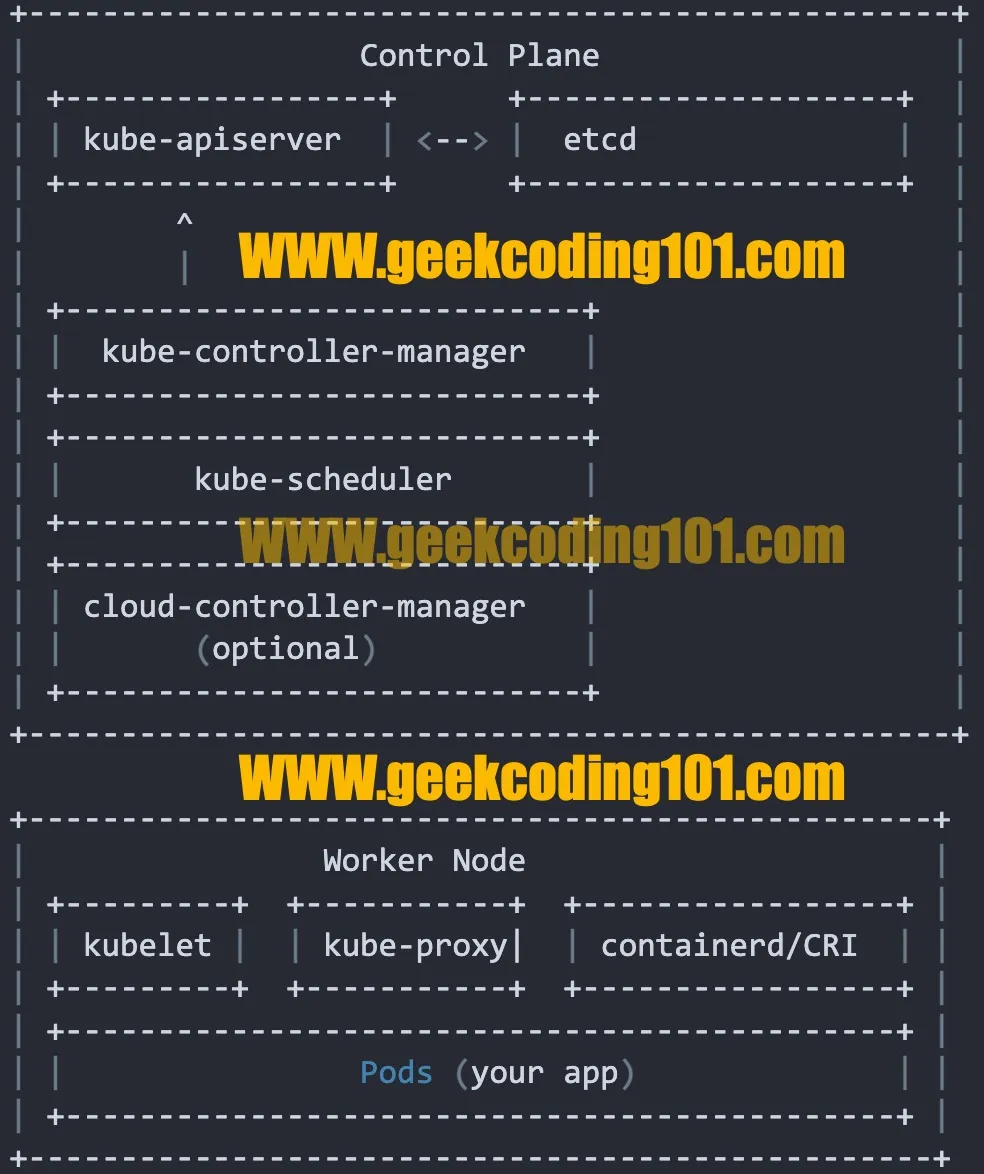
📦 Kubernetes Control Plan Components Diagram
+--------------------------------------------------+|                  Control Plane                   || +-----------------+      +--------------------+  || | kube-apiserver  | <--> |  etcd              |  || +-----------------+      +--------------------+  ||        ^                                         ||        |                                         || +----------------------------+                   || |  kube-controller-manager   |                   || +----------------------------+                   || +----------------------------+                   || |       kube-scheduler       |                   || +----------------------------+                   || +----------------------------+                   || | cloud-controller-manager   |                   || |       (optional)           |                   || +----------------------------+                   |+--------------------------------------------------+
+-------------------------------------------------+|                Worker Node                      || +---------+  +-----------+  +-----------------+ || | kubelet |  | kube-proxy|  | containerd/CRI  | || +---------+  +-----------+  +-----------------+ || +---------------------------------------------+ || |                Pods (your app)              | || +---------------------------------------------+ |+-------------------------------------------------+
I really like this simplifed diagram!
🧠 A Quick Reference
| Component | Purpose |
|---|---|
etcd | Key-value store (source of truth) |
kube-apiserver | Cluster API gateway |
kube-scheduler | Assigns pods to nodes |
kube-controller-manager | Maintains cluster state |
cloud-controller-manager | Connects to cloud provider |
kubelet | Manages node and runs pods |
kube-proxy | Handles networking and routing |
CoreDNS | Resolves internal service names |