GeekCoding101

Ray Serve is the model-serving library of the Ray framework. It puts models and plain Python logic behind HTTP endpoints, runs them as replicas across CPUs, GPUs and nodes, and scales those replicas up and down with traffic. Choose it over a hand-built FastAPI service or Ollama when you need several models, a multi-step inference pipeline, shared GPUs or more than one machine. For a single local LLM, Ollama is simpler.
Below we start with Ray itself, then cover Ray Serve’s building blocks with small code examples. After that come the three classic multi-model patterns and a straight comparison with Ollama and FastAPI.
On this page
- What is Ray?
- What Ray Serve actually does
- Core concepts: deployments, replicas, applications
- Your first Ray Serve deployment
- Autoscaling and fractional GPUs
- Request batching
- Application patterns: sequential, parallel and dynamic dispatch
- Ray Serve vs Ollama vs custom FastAPI
- Running Ray Serve in production
- FAQ
What is Ray?
Ray is an open-source distributed computing framework. Its goal is to let you take a program written for one machine and run it across a cluster. Typical uses are distributed model training, large-scale data processing and distributed inference.
Ray Core
Ray Core is the foundation. It provides distributed scheduling, task execution and resource management:
- A plain Python function becomes a distributed task with the
@ray.remotedecorator. - It suits distributed data processing and compute-heavy workloads.
Ray libraries
These are specialised tools built on top of Ray Core:
| Library | What it’s for |
|---|---|
| Ray Tune | Hyperparameter search and experiment tuning |
| Ray Train | Distributed model training |
| Ray Serve | Distributed model serving |
| Ray Data | Large-scale data loading and processing for ML |
In short, Ray Core is the engine, and Ray Serve is one of the modules that run on it.
What Ray Serve actually does
A common question: “Is Ray Serve just a backend that routes user requests to an LLM and returns the answer?”
You’re half right. Ray Serve does exactly that, but it’s more than a delivery boy. Its job is to receive requests, route them to the right model, use resources efficiently and scale as traffic changes. In practice, that means:
- Setting up model services. You point it at your model, for example a PyTorch model or an open-source LLM loaded with Hugging Face Transformers. It handles incoming requests, dispatches inference and can batch requests together.
- Handling traffic spikes. When requests flood in, it adds replicas. When traffic drops, it removes them.
- Serving several models at once. One application can host, say, a text-generation model and a spam classifier side by side.
- Keeping things running. It health-checks replicas and replaces ones that fail.
Core concepts: deployments, replicas, applications
| Concept | What it is |
|---|---|
| Deployment | A Python class or function decorated with @serve.deployment. It is the unit you scale. |
| Replica | One running copy of a deployment. Each replica is a separate Ray actor. |
| Application | One or more deployments bound together and exposed on a route. |
| Deployment handle | How one deployment calls another inside the same application. This is how you build pipelines. |
| Ingress | The deployment that receives HTTP traffic. It can be a plain class or a wrapped FastAPI app. |
Your first Ray Serve deployment
from ray import servefrom starlette.requests import Request

@serve.deployment(num_replicas=2, ray_actor_options={"num_cpus": 1})class Echo:    async def __call__(self, request: Request) -> dict:        payload = await request.json()        return {"echo": payload}

app = Echo.bind()
Start it locally while developing:
serve run echo_app:appRay Serve listens on http://localhost:8000 by default. Two replicas of Echo now share incoming requests.
Autoscaling and fractional GPUs
Use num_replicas to fix the replica count. To let traffic drive the count, give an autoscaling range and a target load per replica instead:
@serve.deployment(    autoscaling_config={        "min_replicas": 1,        "max_replicas": 5,        "target_ongoing_requests": 2,    },    ray_actor_options={"num_gpus": 0.5},)class Classifier:    def __init__(self):        self.model = load_model()  # your model loading code
    async def __call__(self, request):        data = await request.json()        return self.model.predict(data["inputs"])
Ray Serve adds replicas when requests pile up and removes them when traffic drops. The num_gpus: 0.5 setting reserves half a GPU per replica, so two small models can share one card instead of each holding a whole GPU.
Request batching
Many models are much faster on a batch than on one input at a time. @serve.batch collects concurrent requests into a single call:
@serve.deploymentclass TextModel:    @serve.batch(max_batch_size=8, batch_wait_timeout_s=0.05)    async def predict_batch(self, texts: list[str]) -> list[str]:        return self.model(texts)  # one call for the whole batch
    async def __call__(self, request):        text = (await request.json())["text"]        return await self.predict_batch(text)
max_batch_size caps the batch. batch_wait_timeout_s sets how long to wait for a batch to fill before running whatever has arrived.
Application patterns: sequential, parallel and dynamic dispatch
The diagrams in this section are from https://www.anyscale.com/glossary/what-is-ray-serve.
Modern AI systems often need more than one model per request, whether the input is images, text or a mix. Ray Serve handles the three classic patterns in plain Python, without large YAML routing configs.
Pattern 1: Sequential inference (chaining models)

Input passes through several models in turn, and each model’s output feeds the next. This is common in image processing and data transformation.
Example: an image enhancement pipeline runs:
- A denoising model (
Model_1) - A feature extraction model (
Model_2) - A classification model (
Model_3)
from ray import servefrom ray.serve.handle import DeploymentHandle

@serve.deploymentclass Denoise:    def __call__(self, image):        ...

@serve.deploymentclass Classify:    def __call__(self, features):        ...

@serve.deploymentclass Pipeline:    def __init__(self, denoise: DeploymentHandle, classify: DeploymentHandle):        self.denoise = denoise        self.classify = classify
    async def __call__(self, request):        image = await request.body()        clean = await self.denoise.remote(image)        return await self.classify.remote(clean)

app = Pipeline.bind(Denoise.bind(), Classify.bind())
Why Ray Serve helps here:
- Each stage is its own deployment, so a slow stage can get more replicas or a GPU without touching the others.
- Data moves between stages through Ray rather than through extra HTTP hops.
Pattern 2: Parallel inference (ensembling models)
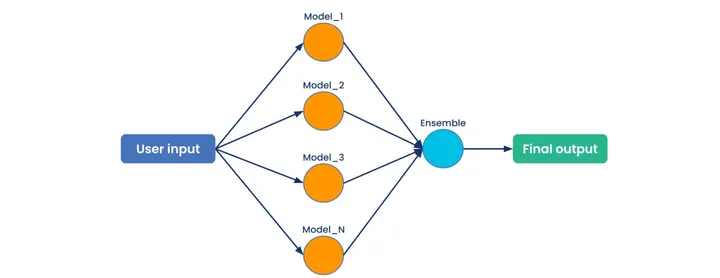
Input goes to several models at once, and each processes it independently. An ensemble step then combines the results. Recommendation systems and ensemble learning use this pattern.
Example: a recommender calls three models at the same time, then picks the final recommendation with business logic:
- Collaborative filtering (
Model_1) - A deep learning model (
Model_2) - A rule-based model (
Model_3)
Why Ray Serve helps here:
- You fire several
handle.remote()calls and await them together, so the models run concurrently. - Ray’s distributed scheduling spreads the load when many requests hit many models.
Pattern 3: Dynamic dispatch (routing to the right model)
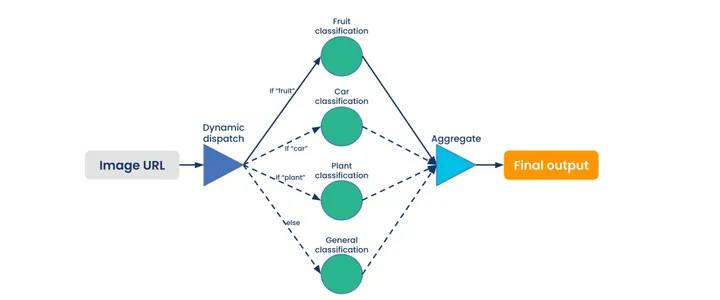
The model is chosen from the input’s characteristics, so only the needed model runs.
Example: an image classifier routes a fruit photo to a fruit model, a car photo to a car model and a plant photo to a plant model. It doesn’t call every model for every image.
Why Ray Serve helps here:
- No wasted compute, because only the required model is triggered.
- Routing rules are ordinary Python
if/elseor a lookup table inside your ingress deployment.
What sets Ray Serve apart for multi-model work
Dedicated model servers such as TensorFlow Serving focus on serving models efficiently. Ray Serve’s edge shows up when a request touches several models plus custom logic:
- Dynamic scheduling: resources and routing adjust to the workload.
- Efficient data passing: deployments exchange data through Ray instead of extra network calls.
- Fractional resources: a replica can reserve part of a CPU or GPU.
- Pythonic API: pipelines are Python code, not long YAML files.
Ray Serve vs Ollama vs custom FastAPI
Ollama: the lightweight LLM assistant
Ollama is built to get open-source LLMs such as LLaMA running locally, fast.
Strengths
- Plug-and-play: almost no configuration.
- LLM-focused, and works offline.
Weaknesses
- Narrow scope: it serves the LLMs and embedding models it supports. It doesn’t serve arbitrary models or custom Python pipelines.
- Single-machine focus: it isn’t designed for multi-node, high-concurrency deployments.
Custom FastAPI: the DIY option
FastAPI is a flexible web framework for building APIs, including ones that call models.
Strengths
- Full control over logic and routing.
- Lightweight and a good fit for small projects.
Weaknesses
- Scaling, load balancing, batching and multi-model management are all hand-built.
- Running across several machines needs extra tooling such as Kubernetes.
Ray Serve: the smart manager
Ray Serve keeps FastAPI-style flexibility (it can even wrap your FastAPI app) and adds distributed serving.
Strengths
- Hosts several models in one application.
- Autoscales replicas with traffic.
- Runs across multi-node clusters.
- Built-in request batching.
Weaknesses
- More to learn and configure than plain FastAPI or Ollama.
- Pulls in Ray, which can be overkill for a single small service on one machine.
Choosing the right tool
| Ray Serve | Ollama | FastAPI | |
|---|---|---|---|
| Multi-model support | Strong (any Python model or logic) | Moderate (supported LLMs and embedding models) | DIY |
| Multi-node deployment | Built in | Not its focus | Needs extra tooling |
| Autoscaling | Built in | No | Needs extra tooling |
| Request batching | Built in (@serve.batch) | Handled internally for LLMs | DIY |
| Learning curve | Moderate | Low | Low |
| Best for | Large-scale or multi-model serving, complex pipelines | Quick local LLMs | Small projects, custom APIs |
Keep FastAPI, add Ray Serve
You don’t have to choose between FastAPI and Ray Serve. @serve.ingress wraps an existing FastAPI app, so your routes stay the same and Ray Serve handles replicas and scaling:
from fastapi import FastAPIfrom ray import serve
api = FastAPI()

@serve.deployment(num_replicas=2)@serve.ingress(api)class MyAPI:    @api.get("/hello")    def hello(self, name: str = "geek"):        return {"message": f"Hello, {name}!"}

app = MyAPI.bind()
Running Ray Serve in production
serve run is for development. For production, describe the application in a YAML config file and push it to a running Ray cluster:
applications: - name: echo route_prefix: / import_path: echo_app:app deployments: - name: Echo num_replicas: 2serve deploy serve_config.yamlYou can change replicas and settings in the config and redeploy without touching the code. serve build can generate a starting config from your application.
On Kubernetes, the KubeRay operator manages Ray clusters. Its RayService resource deploys a Serve application and handles upgrades. Ray Serve also runs on a plain VM cluster or a single laptop.
Ray Serve FAQ
What is Ray Serve used for?
Ray Serve puts one or more models, or plain Python business logic, behind an HTTP endpoint. It scales them across CPUs and GPUs and composes several models into one inference pipeline. It is framework-agnostic: PyTorch, TensorFlow, scikit-learn and LLM engines all work.
How is Ray Serve different from FastAPI?
FastAPI is a web framework. It handles routing, validation and docs, but leaves multiple processes, load balancing, batching and multi-node scaling to you. Ray Serve is a serving layer that handles replicas, scheduling, batching and autoscaling across a cluster. The two work together: @serve.ingress lets Ray Serve run your FastAPI app.
Ray Serve or Ollama: which should I pick?
Pick Ollama to run a local open-source LLM on one machine with almost no setup. Pick Ray Serve when you need several models, custom pre- and post-processing, GPU sharing or more than one node.
Can Ray Serve serve LLMs?
Yes. You can load an LLM inside a deployment yourself. For LLMs at scale, Ray Serve can also sit in front of an inference engine such as vLLM, adding autoscaling and multi-model routing on top.
Can I run Ray Serve on Kubernetes?
Yes, with the KubeRay operator and its RayService resource, which deploys Serve applications and manages upgrades.
Conclusion
Ray Serve is more than a request router. It is a scheduler and scaler for models and the Python logic around them. For one local LLM, Ollama wins on simplicity, and for a small single-model API, plain FastAPI is enough. Once you are chaining models, running ensembles, routing by input, sharing GPUs or spreading across nodes, Ray Serve does the heavy lifting. And you can keep your FastAPI routes while you’re at it.