In this part we clone the Rocky Linux 9 base image from Part 1 into a new VM called localserver and turn it into the lab’s DNS server (BIND) and NTP server (Chrony). When we’re done, every node in the cluster can reach the others by hostname instead of IP, and they all take their time from one local source. 🚀
I thought about squeezing the Kubernetes master and worker setup into this post too, but it got way too long. The real cluster comes in Part 3. 😎
Kubernetes nodes (1 master + 4 workers, built in Part 3)
Gateway
172.16.211.2
VMware Fusion NAT gateway
Lab domain:dev.geekcoding101local.com
Subnet:172.16.211.0/24
info: This DNS server does not replace CoreDNS. CoreDNS runs inside Kubernetes for service discovery. This one is a plain local DNS server so the VMs on the private network can resolve each other’s hostnames. That way the master and workers talk by name, which makes cluster management much smoother.
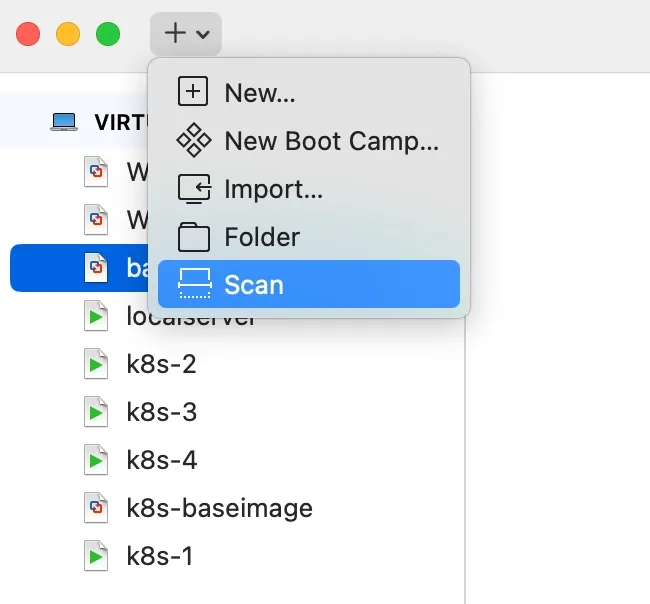
By default a clone shows up in VMware Fusion as Clone of baseimage-rocky9. The sed line renames it to localserver. (sed -i '' is the macOS form of in-place editing.)
Stop the baseimage VM and start localserver. The clone still has the base image’s IP, so running both at once causes a network conflict.
SSH in as root using the base VM’s IP: 172.16.211.3.
Create the input file for the /opt/share_tools/bin/configure_vm.yml playbook we built in Part 1. Save this as /opt/share_tools/init_data/localserver_vm_input.json:
{
"hostname": "localserver",
"ip": "172.16.211.100",
"subnet": "24",
"gateway": "172.16.211.2",
"dns1": "8.8.8.8",
"dns2": "8.8.4.4",
"domain": "dev.geekcoding101local.com",
"ansible_key_path": "~/.ssh/ansible_ed25519",
"ssh_key_path": "~/.ssh/ssh_ed25519"
}
Run the playbook from the VMware Fusion console, not over SSH. It changes the IP, which will drop your SSH session and can leave the run half-finished.
tip:allow-query { any; }; is fine on a private lab network that only lives on your laptop. If this server could ever be reached from outside, lock it down to allow-query { localhost; 172.16.211.0/24; };. The warning in the file above about DNS amplification is exactly why.
warning: Every time you modify a zone file, increment its serial number. The format is YYYYMMDD##. For example, if the current serial is 2024010101 and you’re making a second change the same day, change it to 2024010102. Then restart named (or run rndc reload).
All the nodes run on one laptop, so I want them to sync time from localserver instead of each one depending on the internet. Kubernetes components such as TLS certificates and etcd don’t like clock skew between nodes.
info: Chrony is an implementation of the Network Time Protocol (NTP). It’s an alternative to ntpd, the reference implementation of NTP.
Install it:
Terminal window
dnfinstallchrony-y
Edit /etc/chrony.conf. The key change is one allow line so the lab subnet can sync from this server:
...
# Let the lab VMs use this server for time
allow 172.16.211.0/24
# Optional: keep serving time to the lab if the internet drops
local stratum 10
...
local stratum 10 is optional. It lets localserver keep answering the other VMs when it can’t reach its upstream servers. That’s the whole point if your laptop goes offline.
Give Chrony a few minutes after a restart and run the command again. Once it has settled, one source should be marked * (current best). You can also run chronyc tracking to see the current offset.
Does this DNS server replace CoreDNS?
No. CoreDNS handles service discovery inside Kubernetes. This BIND server only resolves the VMs’ hostnames on the private 172.16.211.0/24 network.
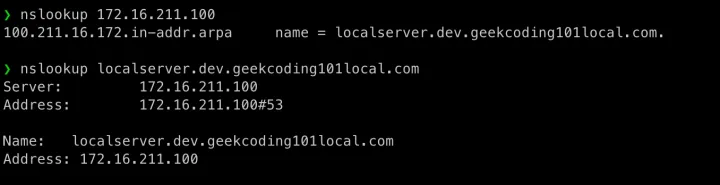
Why do I need a reverse zone?
Without it, looking up an IP such as 172.16.211.100 returns NXDOMAIN. The reverse zone maps IPs back to hostnames.
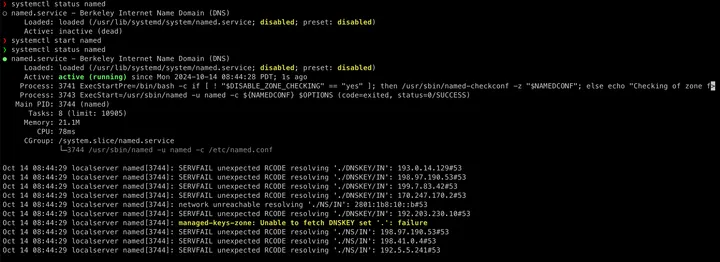
Is the “Unable to fetch DNSKEY” error a problem?
Not for this lab. You can ignore it.
Why isn’t my zone change showing up?
You probably forgot to bump the serial number. Use the YYYYMMDD## format, increase it on every edit, and restart named or run rndc reload.
Why run a local NTP server for a lab?
All the nodes run on one laptop. Syncing them from localserver keeps their clocks consistent, and Kubernetes components like certificates and etcd are sensitive to clock skew.
Thanks for reading my blog post! Feel free to check out my other posts or contact me via the social links in the footer.
 GeekCoding101