GeekCoding101

To unit test an Angular app, write your specs in Jasmine (describe, it, expect) and run them with Karma through ng test, which the Angular CLI sets up for you. This tutorial builds a small Pastebin project and walks through the whole loop. You’ll create the project, run tests in headless Chrome, add a class and a service backed by an in-memory web API, and write specs for both.
Hey! In my career I hadn’t spent much time on front-end programming, but now I had to! Learning Angular, Karma and Jasmine has been an exciting journey. This post is my learning path, cleaned up into a tutorial. Hope you find it useful ^^
Version note: everything here was written and run on Angular 13 (see Environment). Karma has since been deprecated by its maintainers, and recent Angular versions are moving new projects to a different test runner. The Jasmine specs and
TestBedcode below still apply. Check the official Angular testing guide for the runner your version uses.
Introductions
Angular testing utilities
Angular is a TypeScript-based, free and open-source web application framework led by the Angular team at Google and a community of individuals and companies. It is a complete rewrite of AngularJS by the same team.
The Angular testing utilities give you a library for building a test environment for your application. Classes such as TestBed and ComponentFixture, and helpers such as waitForAsync (formerly async) and fakeAsync, live in the @angular/core/testing package. You’ll need them to write tests that show how your components interact with their template, their services and other components.
Ref: Angular Testing Guide
Karma
Karma is a test runner that runs your specs in real browsers. It has launcher plugins for Chrome, Firefox, Safari and others. I prefer a headless browser: it has no GUI, so the test results stay in your terminal.
Ref: Karma on GitHub, Karma on npm
Jasmine
Jasmine is a popular behavior-driven testing framework for JavaScript. Specs read almost like sentences:
it('should have a defined component', () => { expect(component).toBeDefined();});Ref: Jasmine official website, Wikipedia
Steps
Environment
| Tool | Version |
|---|---|
| Node.js | 16.14.0 (via nvm) |
| npm | 8.3.1 |
| Angular CLI | 13.2.6 |
| Angular | 13.2.7 |
| RxJS | 7.5.5 |
| TypeScript | 4.5.5 |
| OS | macOS (darwin x64) |
You can check yours with node -v, npm -v and ng version.
Create a new Angular project
The Angular team has made the test setup easy. I use the Angular CLI, an all-in-one tool for creating, generating, building and testing Angular projects.
ng new Pastebin- Would you like to add Angular routing? → Yes
- Which stylesheet format would you like to use? → CSS
The files that matter for testing:
Pastebin/├── angular.json├── karma.conf.js # Karma configuration├── package.json├── tsconfig.spec.json # TypeScript config for specs└── src/ ├── test.ts # Test entry point: loads all *.spec.ts files └── app/ ├── app.component.ts ├── app.component.spec.ts # Generated spec ├── app.module.ts └── app-routing.module.tsLaunch the project
ng serve # or: npm start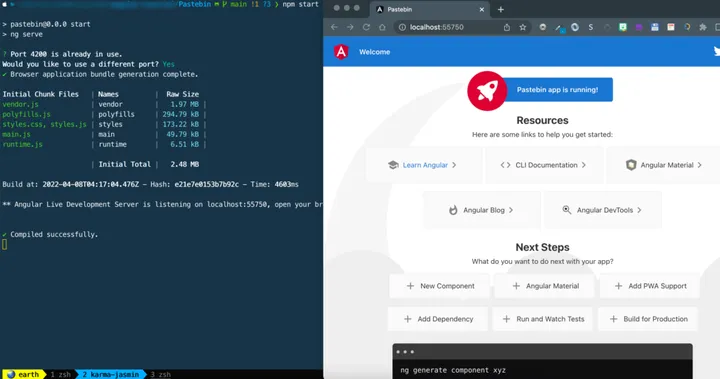
Open http://localhost:4200 to see the app.
Run the tests with Karma
ng test # or: npm test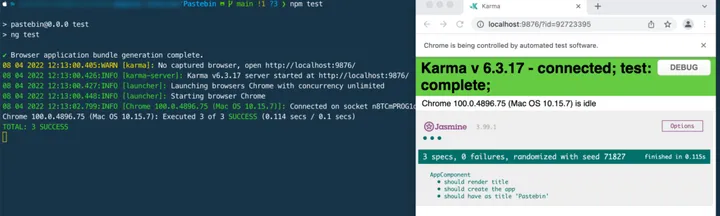
Karma opens Chrome, runs every *.spec.ts file, prints the results in the terminal and re-runs when you save a file. The generated app.component.spec.ts should already pass.
Run Karma in headless Chrome
To keep everything in the terminal, or to run tests in CI or a container, add a custom launcher to karma.conf.js:
browsers: ['Chrome'],customLaunchers: { ChromeNoSandboxHeadless: { base: 'ChromeHeadless', // already runs Chrome with the headless flags flags: ['--no-sandbox'], },},Then pick it on the command line:
ng test --browsers=ChromeNoSandboxHeadlessIf you prefer to build on plain Chrome, pass --headless, --disable-gpu and --remote-debugging-port=9222 yourself. Watch for stray spaces inside the flag strings, such as ' --remote-debugging-port=9222'. Without a remote debugging port, Chrome exits immediately. See the Cheatsheet for more ways to run tests.
Add a class
ng generate class Pastebinpastebin.ts:
export class Pastebin {  id = 0;  title = '';  language = '';  paste = '';
  constructor(values: Partial<Pastebin> = {}) {    Object.assign(this, values);  }}
export const Languages = ['Ruby', 'Java', 'JavaScript', 'C', 'Cpp'];
New Angular projects use TypeScript strict mode. Fields declared only as id: number; fail with “Property ‘id’ has no initializer…”, which is why each field gets a default value here.
pastebin.spec.ts:
import { Pastebin } from './pastebin';
describe('Pastebin', () => {  it('should create an instance of Pastebin', () => {    expect(new Pastebin()).toBeTruthy();  });
  it('should accept values', () => {    const pastebin = new Pastebin({      id: 111,      title: 'Hello world',      language: 'Ruby',      paste: 'print "Hello"',    });
    expect(pastebin.id).toEqual(111);    expect(pastebin.language).toEqual('Ruby');    expect(pastebin.paste).toEqual('print "Hello"');  });});
The second spec passes the values through the constructor, so it actually tests Object.assign. Assigning a plain object to the variable would skip the class entirely.
Set up angular-in-memory-web-api
We don’t have a server API for this app, so we simulate the server with InMemoryWebApiModule:
npm install angular-in-memory-web-apiIf npm reports a peer dependency conflict, install the release of angular-in-memory-web-api that matches your Angular major version.
Add services
ng generate service pastebinng generate service in-memory-dataPastebinService holds the logic for sending HTTP requests to the server.
pastebin.service.ts:
import { Injectable } from '@angular/core';import { HttpClient } from '@angular/common/http';import { lastValueFrom } from 'rxjs';import { Pastebin } from './pastebin';
@Injectable()export class PastebinService {  // The project uses InMemoryWebApi to handle the server API.  // "api/pastebin" simulates a server API URL.  private pastebinUrl = 'api/pastebin';
  constructor(private http: HttpClient) {}
  // getPastebin() performs http.get() and returns a promise  getPastebin(): Promise<Pastebin[]> {    return lastValueFrom(this.http.get<Pastebin[]>(this.pastebinUrl))      .catch(this.handleError);  }
  private handleError(error: any): Promise<never> {    console.error('An error occurred', error);    return Promise.reject(error.message || error);  }}
Two things to know if you’ve seen older Angular tutorials:
import 'rxjs/add/operator/toPromise'is RxJS 5 syntax and doesn’t exist in RxJS 7. UselastValueFrominstead.HttpClientalready parses JSON, so there is noresponse.json(). For requests that need headers, such as a POST, useHttpHeadersfrom@angular/common/http, not the browser’sHeaders.
in-memory-data.service.ts implements InMemoryDbService:
import { Injectable } from '@angular/core';import { InMemoryDbService } from 'angular-in-memory-web-api';import { Pastebin } from './pastebin';
@Injectable({ providedIn: 'root' })export class InMemoryDataService implements InMemoryDbService {  createDb() {    const pastebin: Pastebin[] = [      { id: 0, title: 'Hello world Ruby', language: 'Ruby', paste: 'puts "Hello World"' },      { id: 1, title: 'Hello world C', language: 'C', paste: 'printf("Hello world");' },      { id: 2, title: 'Hello world CPP', language: 'C++', paste: 'cout<<"Hello world";' },      { id: 3, title: 'Hello world JavaScript', language: 'JavaScript', paste: 'console.log("Hello world")' },    ];    return { pastebin };  }}
The collection name pastebin is what makes api/pastebin work.
Update app.module.ts
import { NgModule } from '@angular/core';import { BrowserModule } from '@angular/platform-browser';import { HttpClientModule } from '@angular/common/http';
import { AppRoutingModule } from './app-routing.module';import { AppComponent } from './app.component';
// In-memory web API to simulate an HTTP serverimport { InMemoryWebApiModule } from 'angular-in-memory-web-api';import { InMemoryDataService } from './in-memory-data.service';
import { PastebinService } from './pastebin.service';
@NgModule({  declarations: [AppComponent],  imports: [    BrowserModule,    HttpClientModule,    InMemoryWebApiModule.forRoot(InMemoryDataService), // must come after HttpClientModule    AppRoutingModule,  ],  providers: [PastebinService],  bootstrap: [AppComponent],})export class AppModule {}
Test the service
The in-memory API is for running the app with ng serve. In unit tests, mock HTTP instead with HttpClientTestingModule. That way you control the response and check exactly which request the service sent.
Replace the generated pastebin.service.spec.ts:
import { TestBed } from '@angular/core/testing';import {  HttpClientTestingModule,  HttpTestingController,} from '@angular/common/http/testing';import { PastebinService } from './pastebin.service';import { Pastebin } from './pastebin';
describe('PastebinService', () => {  let service: PastebinService;  let httpMock: HttpTestingController;
  beforeEach(() => {    TestBed.configureTestingModule({      imports: [HttpClientTestingModule],      providers: [PastebinService],    });    service = TestBed.inject(PastebinService);    httpMock = TestBed.inject(HttpTestingController);  });
  afterEach(() => {    httpMock.verify(); // fails if any request was not handled  });
  it('should be created', () => {    expect(service).toBeTruthy();  });
  it('should GET pastes from api/pastebin', async () => {    const mockPastes = [      new Pastebin({ id: 0, title: 'Hello world Ruby', language: 'Ruby', paste: 'puts "Hello World"' }),    ];
    const result = service.getPastebin();
    const req = httpMock.expectOne('api/pastebin');    expect(req.request.method).toBe('GET');    req.flush(mockPastes);
    expect(await result).toEqual(mockPastes);  });});
Run ng test again. The class, service and app component specs should all be green.
Cheatsheet
| Operation | Command | Comments |
|---|---|---|
| New Angular project | ng new <project_name> | |
| Generate a class | ng generate class <name> | |
| Generate a service | ng generate service <name> | |
| Generate a component without specs | ng generate component <name> --skip-tests | |
| Launch the project | ng serve or npm start | |
| Run unit tests | ng test or npm test | Watches files and re-runs |
| Run tests once (CI) | ng test --watch=false | |
| Run tests in a specific browser | ng test --browsers=ChromeNoSandboxHeadless or npm test -- --browsers=ChromeNoSandboxHeadless | The launcher must be defined in karma.conf.js |
| Run a specific spec file | ng test --include "src/**/your_file_name.component.spec.ts" | |
| Run a spec by relative path | ng test --include "src/app/pastebin.spec.ts" | Starting the path with ./ didn’t work for me, so start it with src/… |
| Code coverage report | ng test --code-coverage | |
| Focus or skip a spec | fdescribe / fit, xdescribe / xit | Jasmine runs only focused specs; remove them before committing |
FAQ
Is Karma still used for Angular testing?
Karma has been deprecated by its maintainers, and recent Angular versions are moving new projects to a different test runner. Projects on older versions, like the Angular 13 setup here, still run Karma through ng test. Your Jasmine specs and TestBed setup stay relevant either way.
How do I run Karma without opening a browser window?
Use headless Chrome. Define a custom launcher with base: 'ChromeHeadless' in karma.conf.js, then run ng test --browsers=<launcher name>. Add --watch=false in CI so the run exits when it finishes.
Why does my generated service spec fail with “NullInjectorError: No provider for HttpClient”?
The spec created by ng generate service configures an empty test module, so a service that injects HttpClient has nothing to inject. Import HttpClientTestingModule in TestBed.configureTestingModule, as in Test the service.
How do I run a single spec file?
Use ng test --include "src/app/your_file.spec.ts" with a path starting from src/. For a single describe or it, temporarily rename it to fdescribe or fit.
Why do I get “Property ‘id’ has no initializer” in my class?
New Angular projects turn on TypeScript strict mode, which requires class fields to be initialized. Give each field a default value (id = 0;), as the Pastebin class does.
References
- Angular Testing Guide
- Karma on GitHub
- Karma on npm
- Jasmine official website
- Angular unit testing tutorial with examples
Thanks for reading! Feel free to check out my other posts or contact me via the links in the footer.