GeekCoding101
FastMCP is a Python framework for building MCP (Model Context Protocol) servers: you write ordinary functions, decorate them, and FastMCP turns them into tools, resources and prompts that an MCP client such as Claude Code can use. This guide covers FastMCP in Python from scratch: install, a first server, testing without any LLM, and the Claude Code setup.
The server is a small local text-utilities example with no network calls and no API keys. I checked the facts below against PyPI and the FastMCP docs on 2026-11-26. The Claude Code step verifies that the server is registered and connected; it does not show a chat session, and the last section suggests what to ask Claude next.
What is FastMCP, and how does it relate to the mcp SDK?
The naming is confusing, so here is the short version:
- Official
mcpPython SDK, v1 shipped a class called FastMCP 1.0, imported asmcp.server.fastmcp.FastMCP. - Official
mcpSDK, v2 renamed that class toMCPServer. - The
fastmcppackage is a separate, standalone framework that builds on SDK v2 and adds a client, a CLI, authentication and server composition.
So when a tutorial says from mcp.server.fastmcp import FastMCP, it is using the older class from the official SDK. When it says from fastmcp import FastMCP, it is using the standalone package, which is what this guide uses. If you already have code on the SDK v2 MCPServer, moving over is mostly renaming, as the upgrade guide explains.
If you want to see what a server looks like when written by hand with the official SDK, read What Is an MCP Server?. For where MCP fits next to a normal REST API, see MCP vs API.
Install FastMCP
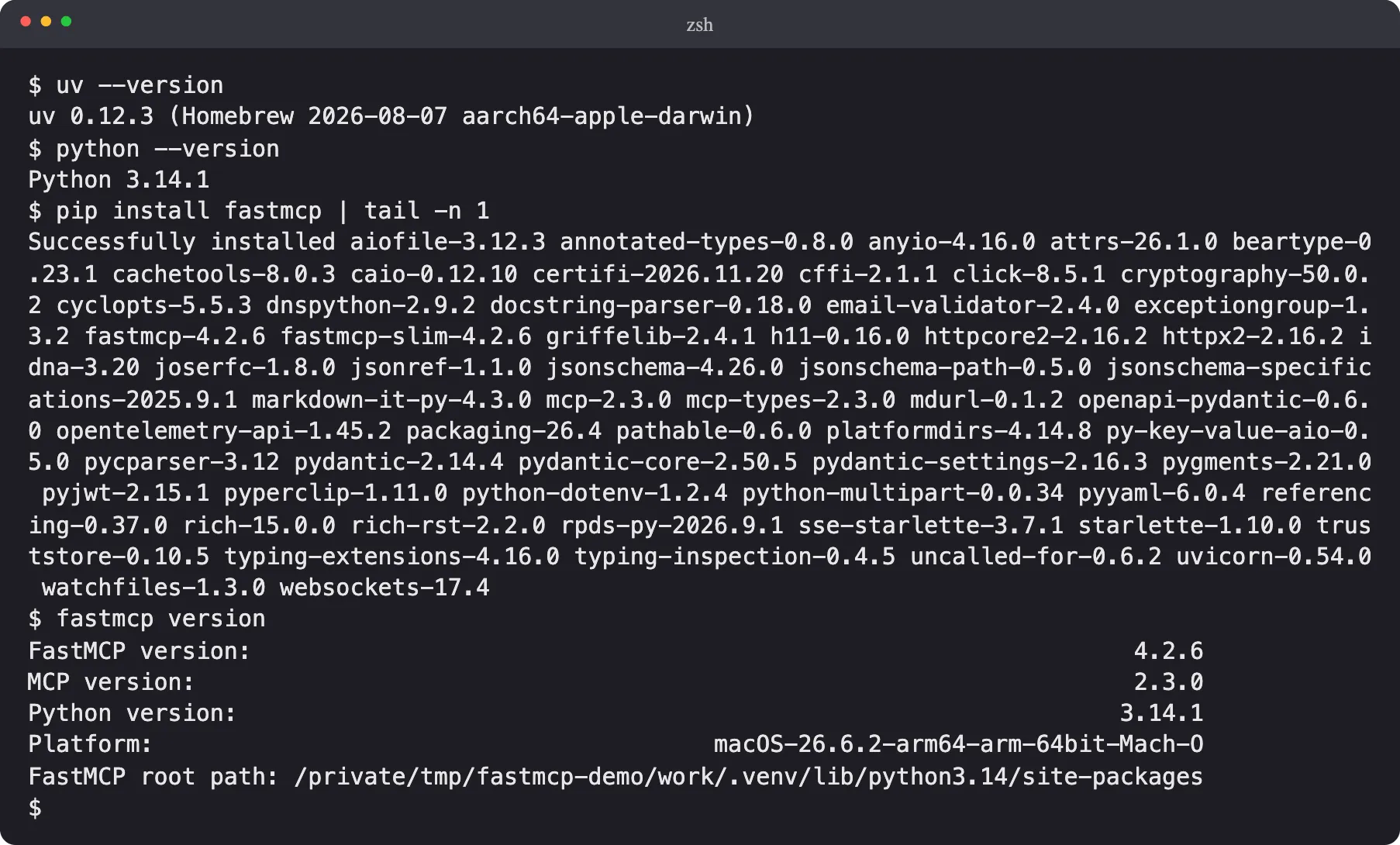
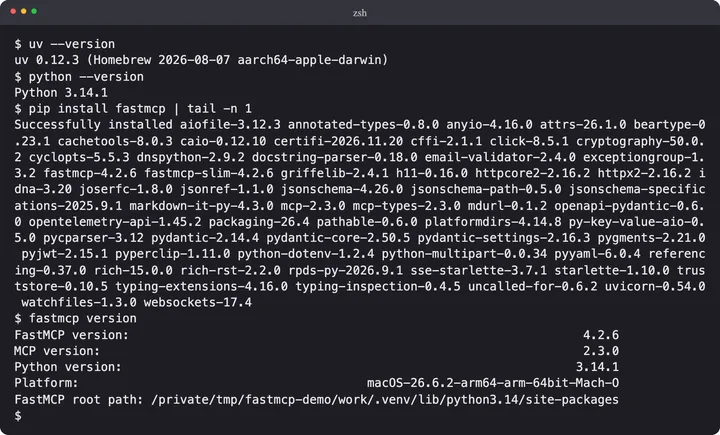
According to PyPI, the current release at the time of writing is fastmcp 4.2.6 (released 2026-11-25), and it requires Python 3.11 or newer. Install it with uv or pip, following the installation page:
uv add fastmcppip install fastmcpThen check that the CLI works:
fastmcp versionHere is a real run in a fresh virtual environment, with uv 0.12.3 and Python 3.14.1. The | tail -n 1 keeps only the last line of the pip output, which lists everything that was installed, including fastmcp 4.2.6:
Write your first FastMCP server
Create server.py. It has two tools, one resource and one prompt.
import re
from fastmcp import FastMCP
mcp = FastMCP("Text Utils")

@mcp.tooldef word_count(text: str) -> int:    """Count the words in a piece of text."""    return len(text.split())

@mcp.tooldef slugify(title: str) -> str:    """Turn a title into a lowercase, hyphen-separated URL slug."""    slug = re.sub(r"[^a-z0-9]+", "-", title.lower())    return slug.strip("-")

@mcp.resource("notes://{name}")def read_note(name: str) -> str:    """Return a short placeholder note by name."""    return f"This is the note called '{name}'."

@mcp.promptdef summarize(text: str) -> str:    """Ask the model for a three-bullet summary of some text."""    return f"Summarize the following text in three bullet points:\n\n{text}"

if __name__ == "__main__":    mcp.run()
Each decorator does a specific job:
@mcp.toolexposes a function the model can call. The type hints become the JSON Schema for the arguments, and the docstring becomes the tool description the model reads.@mcp.resource("notes://{name}")exposes read-only data. The{name}in the URI makes it a template, so the client can requestnotes://todoornotes://ideasand the value is passed to the function.@mcp.promptexposes a reusable prompt template that a client can offer to the user.
Because the docstrings are what the model sees, write them for the model: say what the tool does in one plain sentence.
stdio vs HTTP transport
mcp.run() with no arguments uses stdio. The client starts your script as a subprocess and talks to it over standard input and output. This is the right choice for a local server used by one client, and it is what Claude Code will use below.
For a server that other machines or several clients connect to, run it over HTTP:
if __name__ == "__main__": mcp.run(transport="http", port=8000)According to the running-server docs, the endpoint is then served at the /mcp path, so locally that is http://localhost:8000/mcp. When I started it, the startup log printed http://127.0.0.1:8000/mcp, and from a second terminal this command listed both tools:
fastmcp list http://localhost:8000/mcpYou can also skip the __main__ block and pick the transport from the command line. fastmcp run imports the object you name and ignores the __main__ block entirely:
fastmcp run server.py:mcpfastmcp run server.py:mcp --transport http --port 8000Test the server without an LLM
You do not need a model to know whether your server works. FastMCP gives you two ways to test it.
Option 1: the fastmcp command line
The CLI acts as an MCP client. List what the server exposes, including resources and prompts:
fastmcp list server.py --resources --promptsThen call a tool with key=value arguments:
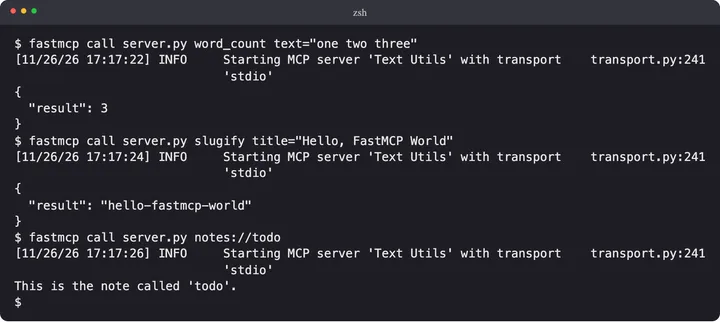
fastmcp call server.py word_count text="one two three"fastmcp call server.py slugify title="Hello, FastMCP World"fastmcp call server.py notes://todo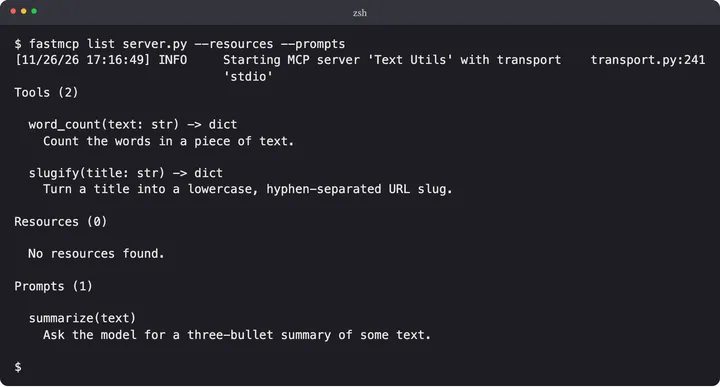
Two details in this output can be surprising. First, it says Resources (0) even though the server defines notes://{name}: that is a resource template, and in fastmcp 4.2.6 list --resources shows only concrete resources. Reading a URI that matches the template, such as notes://todo, works. Second, both tools are listed as returning dict, and call prints the value wrapped in a result key:
Add --input-schema to list to see the JSON Schema generated from your type hints, or --json for machine-readable output. See the CLI client docs for the full set of flags.
Option 2: an in-memory test script
For repeatable tests, use the Client class and pass your server object straight to it. No subprocess and no network are involved.
import asyncio
from fastmcp import Client
from server import mcp

async def main():    async with Client(mcp) as client:        count = await client.call_tool("word_count", {"text": "one two three"})        assert count.data == 3
        slug = await client.call_tool("slugify", {"title": "Hello, FastMCP World"})        assert slug.data == "hello-fastmcp-world"
        print("word_count ->", count.data)        print("slugify    ->", slug.data)        print("all assertions passed")

asyncio.run(main())python test_client.pyThe .data attribute on the result holds the returned Python value, as described in the client docs. The same pattern drops straight into pytest.

For another way to check a server from outside your own code, see MCP Inspector CLI.
Connect FastMCP to Claude Code
The shortest route is the built-in installer, which calls claude mcp add for you:
fastmcp install claude-code server.py --name text-utilsThe --name flag matters here. Without it, the installer used the server name Text Utils, and Claude Code rejected it: names can only contain letters, numbers, hyphens, and underscores. With the flag, it registered the server with the absolute path to server.py.
It accepts --with (extra packages), --env and --env-file (environment variables) and --name (the name Claude Code shows). Details are on the Claude Code integration page.
You can also register it yourself instead. If you already ran the installer, run claude mcp remove text-utils first. Everything after the -- is the command Claude Code runs to start your server:
claude mcp add text-utils -- uv run --with fastmcp fastmcp run server.pyThen confirm it is registered and connected:
claude mcp listWith Claude Code 2.1.332, the server is added to the local config for the current project, and the list reports it as connected:
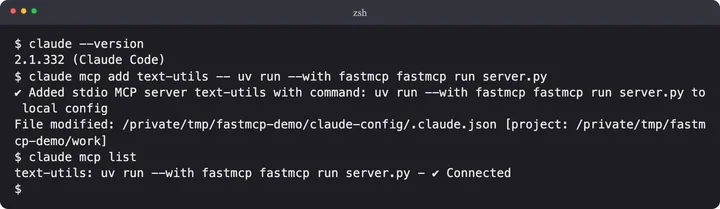
The command above uses the relative path server.py, so it depends on the folder you start Claude Code in. Use the absolute path if you want it to be independent of that.
Once it shows as connected, start Claude Code in a project and try prompts such as “Use the text-utils tools to count the words in this paragraph” or “Make a URL slug for this title”. Claude should ask permission before calling a tool the first time.
Common mistakes
- Printing to stdout in a stdio server. With stdio transport, standard output carries the protocol messages, so a stray
print()can corrupt them. Print to stderr or use logging instead. - Missing type hints or docstrings. The hints define the argument schema and the docstring is the description the model uses to decide when to call the tool. Without them the tool is harder for the model to use correctly.
- Using the wrong import.
from mcp.server.fastmcp import FastMCPis the old SDK v1 class, whilefrom fastmcp import FastMCPis the standalone package. Mixing tutorials leads to confusing errors. - Running on an older Python. The
fastmcppackage requires Python 3.11 or newer. Ifpip installfails or picks an old version, checkpython --version. - Relative paths in the registered command. Claude Code starts the server from its own working directory, so use an absolute path to
server.pyif the server is not found. - Forgetting the
--with fastmcpflag. In the manualuv runcommand,--with fastmcpmakes sure the package is available in the temporary environment.
FAQ
What is FastMCP used for?
It is used to build MCP servers in Python. You expose functions as tools, data as resources and templates as prompts, and any MCP client can then discover and use them.
Is FastMCP the same as the official MCP Python SDK?
No. The official mcp SDK v1 included an earlier FastMCP 1.0 class, and SDK v2 renamed it MCPServer. The standalone fastmcp package is a separate framework built on SDK v2 that adds a client, CLI, authentication and composition.
Do I need an API key or an LLM to test a FastMCP server?
No. fastmcp list, fastmcp call and the in-memory Client all talk to your server directly, so you can test tools, resources and prompts without any model.
Should I use stdio or HTTP?
Use stdio for a local server that one client launches, such as Claude Code on your own machine. Use HTTP when the server must be reachable by several clients or from another machine; it is served at /mcp.