GeekCoding101
MCP does not replace APIs. An API is a contract written for programmers, while MCP (Model Context Protocol) is an open protocol that lets AI applications discover and call tools, and MCP servers usually sit on top of ordinary APIs.
The easiest way to see the difference is to build the same small capability twice. I made a tiny notes search, exposed it as a REST endpoint and as an MCP tool, and compared what the caller needs to know in each case. If you want a step-by-step MCP build first, read What Is an MCP Server.
One honest caveat: this is a small local demo. I ran it with Python 3.12.12 and the MCP Python SDK, version 2.3.0. The notes are three hard-coded strings, there is no auth, no database and no real AI app involved, and the MCP side is exercised by a short Python client rather than a model. It shows the shape of the two approaches, not how either behaves in production.
Short answer: MCP vs API
Use an API when a developer is writing code against your service. Use MCP when you want AI apps and agents to find and use your capability without custom glue for each one. You can, and often should, have both.
| REST API | MCP | |
|---|---|---|
| What it is | A contract for one service (endpoints, params, responses) | An open protocol for connecting AI apps to tools and data |
| Designed for | Programmers who read docs | AI applications (hosts) and the models inside them |
| Discovery | You read documentation, then hard-code endpoints | The client asks the server what it offers at runtime |
| Description of inputs | OpenAPI or prose docs, if the provider wrote them | Tool names, descriptions and JSON Schema sent by the server |
| Message format | Whatever the API defines, often JSON over HTTP | JSON-RPC 2.0, UTF-8 |
| Transports | HTTP | stdio or Streamable HTTP |
| Auth | Whatever the API chooses | Optional on HTTP, based on OAuth 2.1; stdio servers read credentials from the environment |
| Relationship | Often the thing being wrapped | Often a thin layer over existing APIs |
How MCP is put together
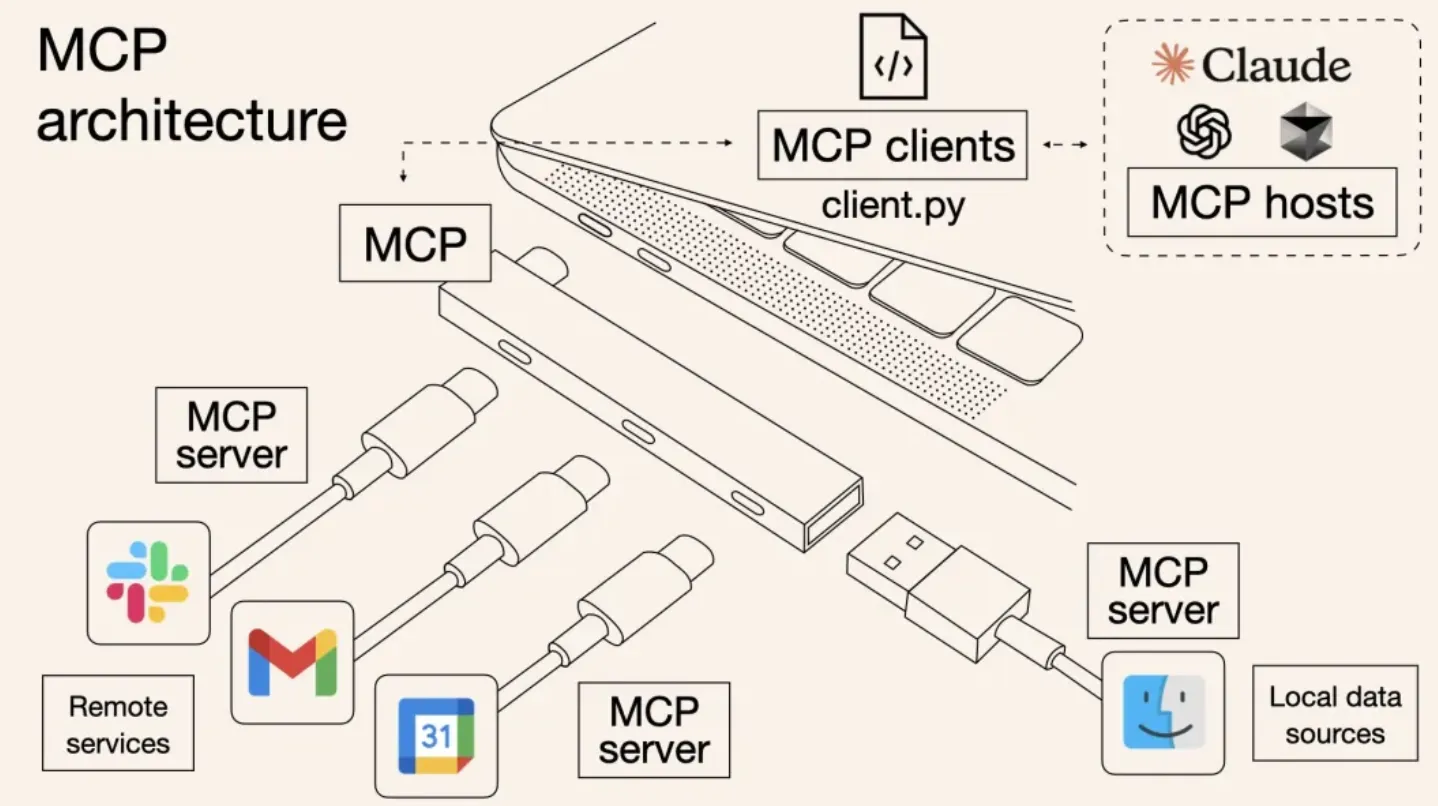
According to the MCP specification, there are three roles: the host (the AI application), the client (the connector the host runs for each server) and the server (the program exposing capabilities).
Servers offer three kinds of primitives:
- Tools: functions the model can call, such as
search_notes. - Resources: data the application can read.
- Prompts: reusable prompt templates.
Messages are JSON-RPC 2.0. The two standard transports are stdio, where the client launches the server as a subprocess and they exchange newline-delimited messages, and Streamable HTTP, where the client sends HTTP POST requests to a single endpoint and the server replies with JSON or a request-scoped SSE stream. The older HTTP+SSE transport is deprecated.
A version note: the latest spec revision, 2026-07-28, drops the initialize handshake. Each request carries its protocol version and client capabilities (on HTTP, also an MCP-Protocol-Version header), and servers implement server/discover. Revision 2025-11-25 and earlier used an initialize handshake. Which one you get depends on your SDK, so check its docs. The demo below uses the SDK’s high-level API and does not depend on that detail.
Hands-on: the same notes search, exposed two ways
The capability is simple: given a query string, return the notes that contain it. I used the MCP Python SDK for the MCP half and only the standard library for the REST half.
Version 1: a REST endpoint
Save this as rest_notes.py. It serves GET /notes?query=... and returns JSON from an in-memory list.
import jsonfrom http.server import BaseHTTPRequestHandler, HTTPServerfrom urllib.parse import urlparse, parse_qs
NOTES = [    "Buy oat milk and coffee beans",    "Draft the MCP vs API post",    "Renew the domain before Friday",]
class Handler(BaseHTTPRequestHandler):    def do_GET(self):        url = urlparse(self.path)        if url.path != "/notes":            self.send_response(404)            self.end_headers()            return        query = parse_qs(url.query).get("query", [""])[0].lower()        results = [n for n in NOTES if query in n.lower()]        body = json.dumps({"results": results}).encode()        self.send_response(200)        self.send_header("Content-Type", "application/json")        self.end_headers()        self.wfile.write(body)
HTTPServer(("127.0.0.1", 8000), Handler).serve_forever()
Start it in one terminal, then call it from another:
python rest_notes.pycurl "http://127.0.0.1:8000/notes?query=mcp"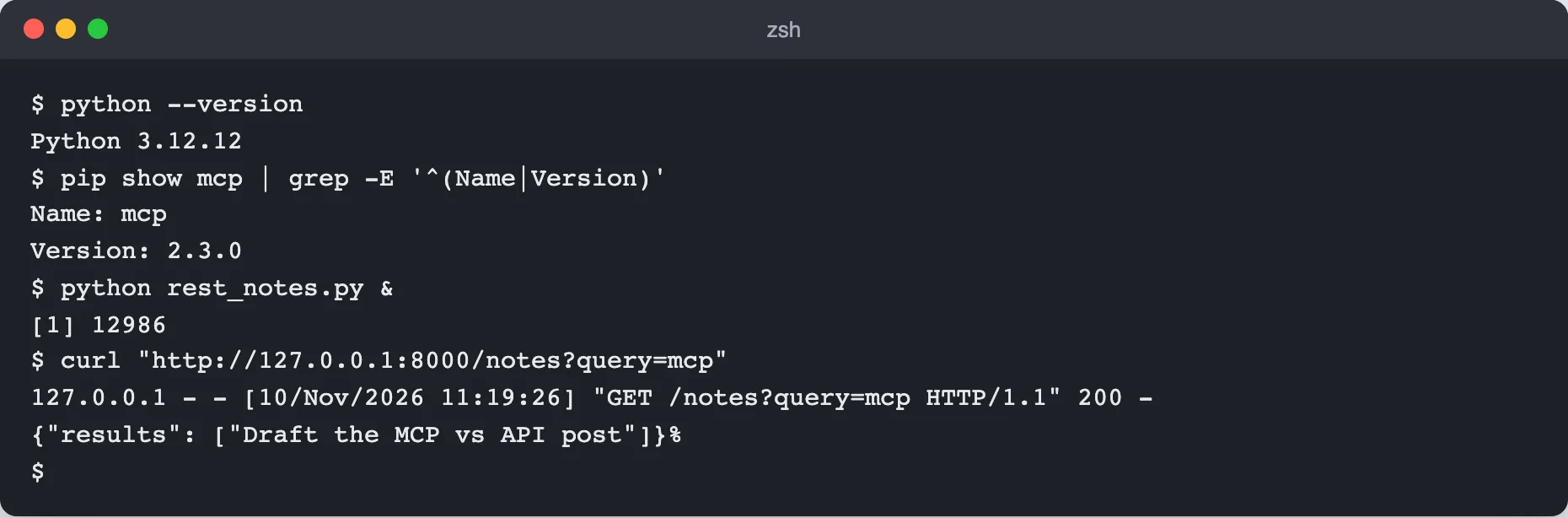
The server logged the request and curl printed {"results": ["Draft the MCP vs API post"]}.
To use this, the caller had to know the path (/notes), the HTTP method, the parameter name (query) and the shape of the response. All of that came from me, not from the server. A human or a developer read it somewhere and wrote code to match.
Version 2: the same lookup as an MCP tool
Save this as mcp_notes.py. It uses the high-level server class from the official SDK (MCPServer in version 2.x) and runs over stdio. Install the SDK first with pip install mcp.
from mcp.server.mcpserver import MCPServer
mcp = MCPServer("notes", log_level="WARNING")
NOTES = [    "Buy oat milk and coffee beans",    "Draft the MCP vs API post",    "Renew the domain before Friday",]
@mcp.tool()def search_notes(query: str) -> list[str]:    """Return the notes that contain the query text (case-insensitive)."""    return [n for n in NOTES if query.lower() in n.lower()]
if __name__ == "__main__":    mcp.run(transport="stdio")
A note on SDK versions: this class was called FastMCP (imported from mcp.server.fastmcp) in the 1.x releases. In 2.3.0 that import raises an error telling you it was renamed to MCPServer, which is why the code above differs from older tutorials. The log_level argument only keeps the server’s request logging off the terminal.
There is no routing, no query-string parsing and no JSON encoding in this file. The function name becomes the tool name, the docstring becomes the description, and the type hints become the input schema.
Now a short client that launches the server as a subprocess, lists its tools and calls one. Save it as client.py:
import asyncioimport sysfrom mcp import ClientSession, StdioServerParametersfrom mcp.client.stdio import stdio_client
params = StdioServerParameters(command=sys.executable, args=["mcp_notes.py"])
async def main():    async with stdio_client(params) as (read, write):        async with ClientSession(read, write) as session:            await session.initialize()
            tools = await session.list_tools()            for tool in tools.tools:                print("name:", tool.name)                print("description:", tool.description)                print("input schema:", tool.input_schema)
            result = await session.call_tool("search_notes", {"query": "mcp"})            print("result:", result.content)
asyncio.run(main())
Run it from the same virtual environment (sys.executable makes the client launch the server with the same Python that has the SDK installed):
python client.py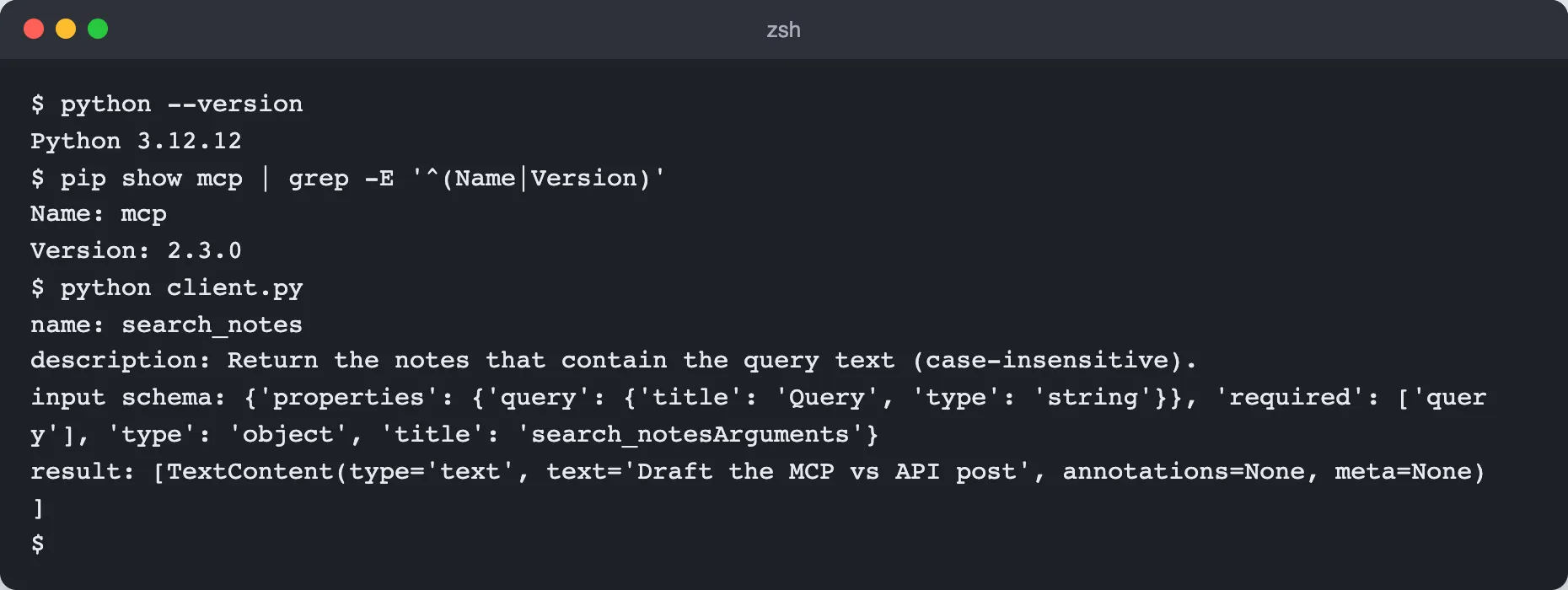
The server sent back the tool name, the docstring as the description, and a JSON Schema with one required string parameter, query. The call result comes back as a list of TextContent objects, and the text is the same note the REST endpoint returned.
Note that the client never needed to be told the tool’s name, parameter or types in advance for the listing step. It asked the server, and the server answered with a name, a description and a JSON Schema. That is the part a model uses to decide whether and how to call the tool. The session.initialize() call, tool.input_schema and result.content all worked as shown with SDK 2.3.0. If your SDK version differs, check its docs, since attribute names changed between 1.x and 2.x (inputSchema became input_schema).
What the caller has to know
Put the two side by side and the difference is about who does the learning.
- REST: the developer learns the contract from docs, then writes code. If the endpoint changes, the code breaks until someone updates it.
- MCP: the client learns the contract from the server at runtime. A model can read the tool descriptions and schemas and decide for itself what to call.
That is the real point of MCP. It standardizes how an AI app asks “what can you do?” and “do it”, so one server works with any compliant host instead of needing a custom integration per app.
The MCP server is usually a thin wrapper
In my demo both versions read the same in-memory list, which hides an important point. In real setups the MCP server often just calls an existing API.
Swapping the body of search_notes for an HTTP call to the REST endpoint would give you exactly that:
import jsonimport urllib.requestfrom urllib.parse import quote
def search_notes_via_api(query: str) -> list[str]:    url = f"http://127.0.0.1:8000/notes?query={quote(query)}"    with urllib.request.urlopen(url) as resp:        return json.load(resp)["results"]
The API stays the source of truth, with its own auth, rate limits and business logic. MCP adds a standard description and calling convention on top, for AI apps. This is why “MCP vs API” is a slightly misleading framing: they sit at different layers.
When to use which
- Building a normal app or service integration: call the API directly. A fixed program that always does the same thing gains little from runtime discovery.
- Making a capability usable by many AI apps and agents: wrap it as an MCP server so each host can connect without custom glue.
- Both: keep your API for developers and add an MCP server for AI clients. They coexist fine.
If you are heading toward agents that choose their own tools, see What Is an AI Agent and How to Build One.
Does MCP replace REST APIs?
No. MCP is a protocol for AI applications to discover and call tools and data sources. Those tools frequently call REST APIs underneath, so the APIs keep doing their job.
Is MCP just function calling?
They are related but not the same. Function calling is a model feature where the model asks the app to run a function you described. MCP standardizes how an app finds and connects to tools living in separate servers, so the descriptions and calls follow one protocol across hosts.
Can an MCP server call my existing API?
Yes, and this is the most common pattern. The tool function makes an ordinary HTTP request to your API and returns the result, as in the wrapper snippet above.
Do I need MCP for a single app?
Usually not. If one application of yours calls one service, a direct API call is simpler. MCP pays off when several AI hosts or agents should be able to use the same capability.
Is MCP secure?
It depends on how you run it. Authorization for HTTP transports is optional and based on OAuth 2.1, with the MCP server acting as an OAuth resource server, while stdio servers take credentials from their environment. My demo has no auth at all, so it is not a pattern to deploy as is. For the HTTP case, read MCP authorization with OAuth 2.1.