GeekCoding101

Kubernetes orchestration means you declare the state you want (for example, “three copies of this container, reachable at one address”) and the control plane continuously works to make the cluster match it. That covers scheduling containers onto machines, replacing failed ones, scaling, rolling out new versions with rollback, and routing traffic to the right containers.
Below you’ll get the concepts in plain terms, then run six short steps on your laptop with only Docker installed, so you can watch each behaviour happen. If you want the component-level detail afterwards, see Kubernetes Control Plane Components.
What is container orchestration, and why do containers need it?
Running one container on one machine is easy: docker run and you’re done. Running dozens of containers across several machines is not. Someone has to decide which machine runs what, restart things that crash, add copies under load, ship new versions without downtime, and make sure other services can find them as addresses change.
Container orchestration is the automation of that work. If you are new to containers themselves, start with Docker Notes.
What Kubernetes orchestrates
According to the Kubernetes overview, Kubernetes is a portable, extensible, open source platform for managing containerized workloads and services. The same page lists the capabilities that make up orchestration:
- Scheduling (automatic bin packing): you say how much CPU and memory containers need, and Kubernetes places them on nodes that fit.
- Self-healing: failed containers are restarted or replaced.
- Horizontal scaling: change the replica count by command or automatically.
- Automated rollouts and rollbacks: change the version gradually, and go back if it goes wrong.
- Service discovery and load balancing: pods get a stable name and address in front of them.
- Secret and configuration management: configuration and credentials are stored and delivered separately from container images.
How does Kubernetes orchestration work? The reconciliation loop
The core idea is the control loop. You submit desired state (a Deployment that says “3 replicas of nginx”). Kubernetes records it, then controllers compare it with the current state and act on any difference. The Controllers documentation describes this as a non-terminating loop that regulates the state of the system.
Three pieces do most of the visible work:
- kube-controller-manager runs the controllers. The Deployment and ReplicaSet controllers notice “only 2 pods exist, 3 wanted” and create another pod object.
- kube-scheduler sees a pod with no node and picks a node for it.
- kubelet runs on each node, starts the containers for pods assigned to it, and reports their status.
You never tell Kubernetes “start a container on node 2”. You state the goal, and these parts converge on it. The Deployment documentation covers the object we’ll use below.
Try it: a single-node cluster on your laptop
You only need Docker. This runs k3s, a lightweight Kubernetes distribution, inside a container. It is for learning, not a production setup.
docker run -d --name k3s --privileged rancher/k3s:v1.33.6-k3s1 serverGive it a short while to start. Every command below runs kubectl inside that container, so you don’t need a kubeconfig on your machine. First confirm the client and server versions:
docker exec k3s kubectl version
Step 1: check the node is Ready
docker exec k3s kubectl get nodes
Step 2: create a Deployment with three replicas
docker exec k3s kubectl create deployment web --image=nginx:1.27 --replicas=3docker exec k3s kubectl get pods -o wide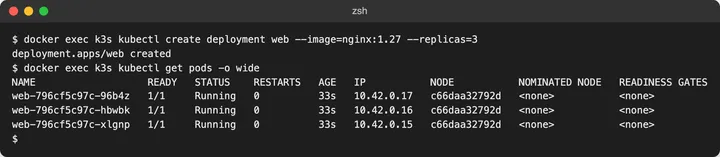
You asked for an outcome, not individual containers. The scheduler assigned each pod to a node, and the kubelet started them. Here there is only one node, but with several the scheduler would spread them according to available resources.
Step 3: watch self-healing
Delete one pod. The label app=web was added automatically by kubectl create deployment, so you can pick a pod without copying its name by hand:
POD=$(docker exec k3s kubectl get pods -l app=web -o jsonpath='{.items[0].metadata.name}')docker exec k3s kubectl delete pod "$POD"docker exec k3s kubectl get pods -l app=web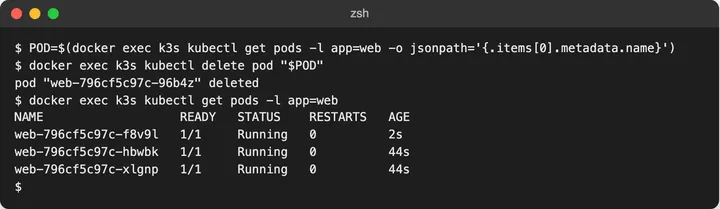
The ReplicaSet controller saw two pods where the desired state said three, and created a replacement. Nobody ran a restart command.
Step 4: scale up
docker exec k3s kubectl scale deployment web --replicas=5docker exec k3s kubectl get deployment web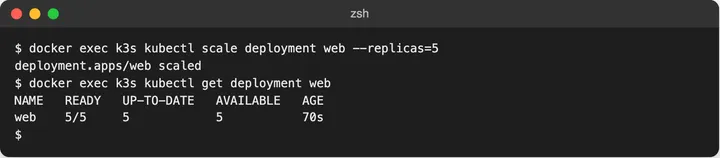
You changed one number in the desired state. The same loop that replaced the deleted pod now added two more.
Step 5: roll out a new version, then roll it back
Change the image of the container named nginx (the name kubectl create deployment derives from the image):
docker exec k3s kubectl set image deployment/web nginx=nginx:1.28docker exec k3s kubectl rollout status deployment/webdocker exec k3s kubectl rollout history deployment/web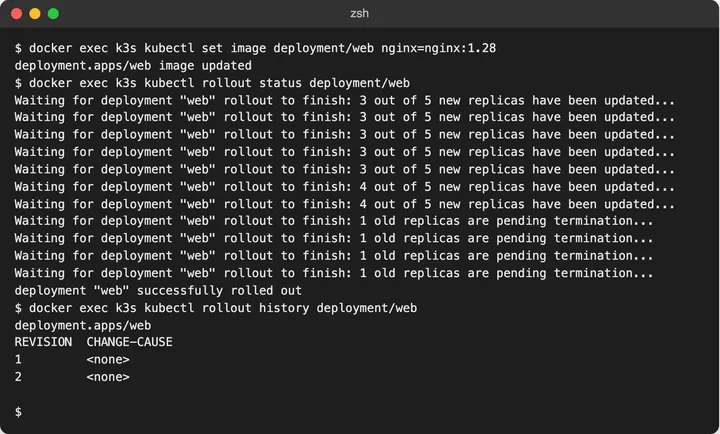
By default a Deployment replaces pods gradually, so the app stays available during the change. Now undo it:
docker exec k3s kubectl rollout undo deployment/webdocker exec k3s kubectl rollout status deployment/web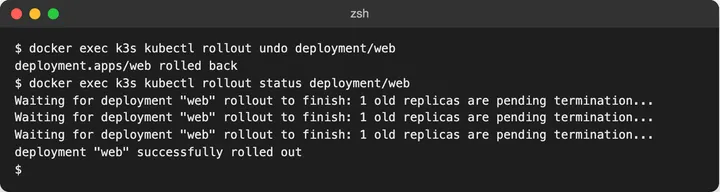
See the kubectl rollout reference for pausing, restarting and rolling back to a specific revision.
Step 6: service discovery
Pods come and go, and their IPs change. A Service gives them one stable front door:
docker exec k3s kubectl expose deployment web --port=80docker exec k3s kubectl get endpointslices -l kubernetes.io/service-name=web -o jsonpath='{range .items[*].endpoints[*]}{.addresses[0]}{"\n"}{end}'docker exec k3s kubectl get pods -o wide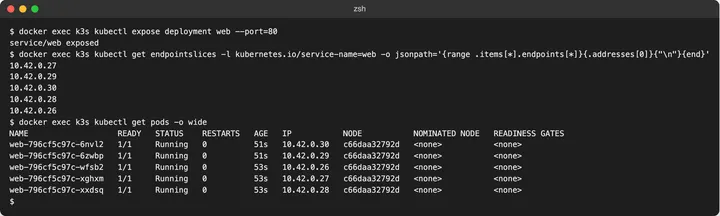
The five addresses listed for the Service are the same five pod IPs from get pods -o wide. (Plain kubectl get endpoints is deprecated in Kubernetes 1.33 and truncates long lists, so this reads the EndpointSlice instead.) The Service selects pods by label and keeps its list of endpoints up to date as pods are replaced or scaled. To learn the different Service types, read NodePort vs ClusterIP.
Clean up
docker rm -f k3sKubernetes vs Docker Compose vs Docker Swarm
| Docker Compose | Docker Swarm | Kubernetes | |
|---|---|---|---|
| Typical scope | One machine | A cluster of Docker hosts | A cluster of nodes |
| Setup effort | Lowest | Moderate | Highest |
| Self-healing and rollouts | Limited | Built in | Built in, with extensive controls |
| Ecosystem and extensibility | Small | Smaller | Very large and extensible |
| Good fit | Local dev, simple single-host apps | Small clusters that want Docker-native simplicity | Multi-service apps that need the full orchestration feature set |
Treat this table as a rough, qualitative guide. Check each project’s current documentation for exact features.
When you do not need Kubernetes
Kubernetes adds concepts to learn and a system to operate. You can reasonably skip it if:
- Your app is one or two containers on a single server, where Docker Compose is enough.
- You have no need for automated scaling, rolling updates or multi-node scheduling.
- A managed platform that runs your containers for you covers your needs.
Reach for Kubernetes when you run many services across several machines and the manual work it automates has started to hurt.
Where to go next
- Build a multi-node cluster on a Mac: Kubernetes Tutorial Part 1
- Set up a cluster with kubeadm: Kubernetes Cluster Setup
- Work with more than one cluster: kubectl set-context
FAQ
What does Kubernetes orchestrate?
Containers, grouped as pods. It schedules them onto nodes, restarts or replaces failed ones, scales replica counts, rolls out new versions, routes traffic through Services, and delivers configuration and secrets to them.
What is the difference between Kubernetes and Docker?
Docker builds and runs containers, typically on one host. Kubernetes orchestrates containers across a cluster of machines, deciding where they run and keeping them in the state you declared.
What is the Kubernetes reconciliation loop?
It is the cycle in which controllers compare the desired state you stored with the current state of the cluster and take action to close any gap. Self-healing, scaling and rollouts are all this loop at work.
Is Kubernetes the same as container orchestration?
Kubernetes is one container orchestration platform, and the most widely used. Docker Swarm is another, and other tools exist. Container orchestration is the general idea; Kubernetes is an implementation.