GeekCoding101
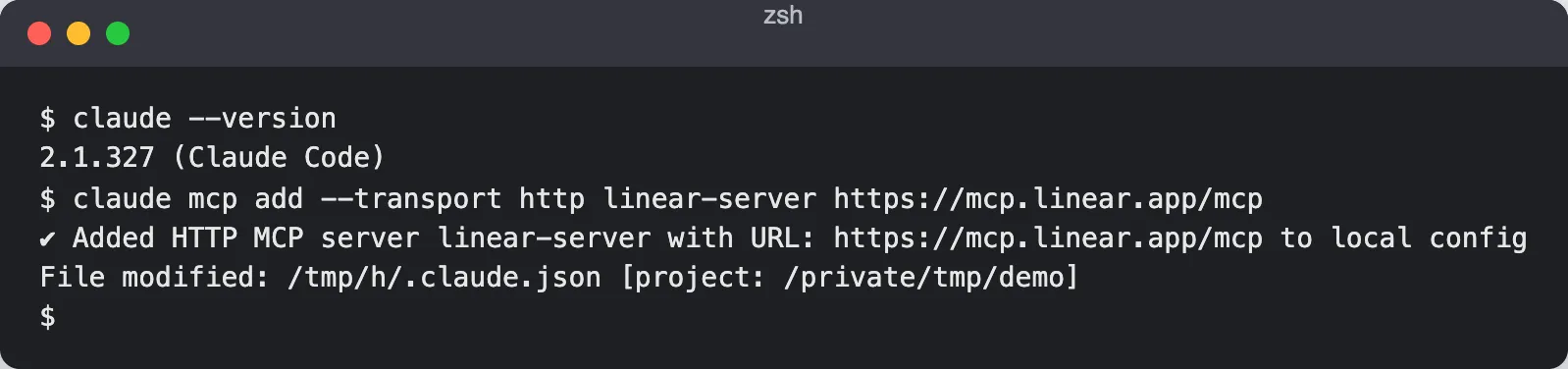
The Linear MCP server is Linear’s official, hosted MCP endpoint at https://mcp.linear.app/mcp, and you connect it to Claude Code with claude mcp add --transport http linear-server https://mcp.linear.app/mcp. After that you run /mcp inside a Claude Code session, sign in with Linear in your browser, and Claude can search, create and update issues as you.
Below: the exact commands, how authentication and scope work, what to ask Claude to do, how to fix a connection that won’t authenticate, and what to be careful about. The setup follows Linear’s MCP docs (checked 2026-11-18).
What the Linear MCP server is and where it runs
Linear hosts the server for you. It is a remote MCP server, so there is nothing to install or keep running on your machine. Your MCP client (Claude Code here) connects to the URL over HTTP and talks to Linear through it.
If MCP itself is new to you, start with What Is an MCP Server?. For why you would use it instead of calling Linear’s API from your own code, see MCP vs API. For a different MCP example, see Ghidra MCP for AI reverse engineering.
How it works
Three pieces are involved:
- Claude Code is the MCP client. It keeps a list of servers you have registered.
- The Linear MCP server at
https://mcp.linear.app/mcpexposes Linear actions as tools Claude can call. - Your Linear account authorizes the connection through OAuth.
When you ask Claude to “list my open issues”, it picks a tool from the Linear server, calls it, and uses the result in its answer. The server acts as the Linear user who authorized it, so it sees and changes only what that user can.
Add the Linear MCP server to Claude Code
First check that Claude Code is installed:
claude --versionThen register the server:
claude mcp add --transport http linear-server https://mcp.linear.app/mcplinear-server is just the local name. --transport http tells Claude Code this is a remote HTTP server, not a local process.
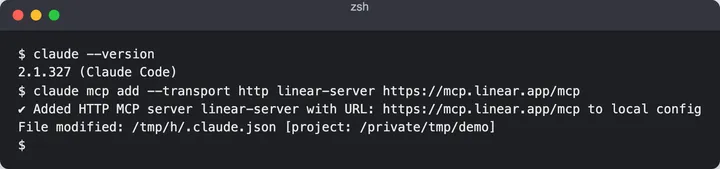
The output says the server was added “to local config”, which is the default scope explained next.
Local scope or user scope
By default, claude mcp add registers the server for the project you are in. If you run Claude Code from a different directory later, it may not see the server. To make Linear available everywhere, add it with user scope:
claude mcp add --scope user --transport http linear-server https://mcp.linear.app/mcpUse the default when only one repository needs Linear. Use --scope user if you want it in every project on your machine. Pick one; registering the same name in two scopes is a common cause of confusion (see troubleshooting).
Check that the server is registered
List your servers:
claude mcp listBefore you sign in, linear-server appears in the list with the status “Needs authentication” instead of “Connected”. That is expected: adding the server only saves its address.
For the details of one server (scope, status, type and URL):
claude mcp get linear-server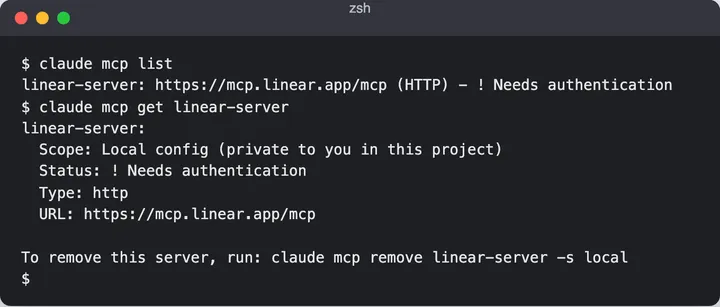
Sign in with OAuth
Start a Claude Code session:
claudeInside the session, run:
/mcpSelect linear-server and choose to authenticate. Claude Code opens your browser to Linear’s sign-in and consent page. Approve it, return to the terminal, and the server should show as connected.
Linear’s docs describe the authorization as OAuth 2.1, and the server acts as the user who authorized it. If you want to understand what happens in that browser step, read MCP Authorization and OAuth 2.1 and the OAuth 2.0 authorization code flow. You never paste an API key into this setup.
Still in /mcp, open the Linear server and look at the tools it lists. That is the authoritative list of what Claude can do, and it is better than any list in a blog post because it matches your server version.
What to ask Claude to do
Once connected, plain-language prompts work. Some examples to adapt to your own team keys and issue numbers:
Create a Linear issue in team ENG titled "Fix login redirect on Safari" with a short description of the bug.List my open issues.Move ENG-12 to In Progress.Add a comment to ENG-12 saying the fix is in review.Search Linear for issues about the billing page.
Replace ENG and ENG-12 with a real team key and issue from your workspace. A good habit is to ask for something read-only first, such as listing your issues, to confirm the connection before you write anything.
Coding workflows are where this helps most. You can ask Claude to read an issue, work on the fix in your repository, and then update the issue, all in one session.
Safety: it has your permissions
The server acts as you. Anything your Linear account can change, Claude can change, and writes are real: a created issue, a status change or a comment appears in your workspace immediately.
- Review before bulk edits. If you ask Claude to update many issues, tell it to list what it will change first and approve that list.
- Keep approvals on. Claude Code asks before running tools. The flag covered in Claude Code dangerously-skip-permissions turns those prompts off, which makes writes to Linear unattended. Avoid it when a live workspace is connected.
- Be specific. “Close the stale issues” is vague. “Close ENG-12 and ENG-15” is not.
Troubleshooting
The server shows “needs authentication”. Run claude, then /mcp, select linear-server and authenticate again. This is the normal state before first sign-in.
The server shows “failed”. Run claude mcp get linear-server and confirm the type is HTTP and the URL is exactly https://mcp.linear.app/mcp. A typo or a missing --transport http is the usual cause.
Nothing works after sign-in. Remove and re-add the server, then authenticate again:
claude mcp remove linear-serverclaude mcp add --transport http linear-server https://mcp.linear.app/mcpThe server exists in one folder but not another. That is scope. A server added with the default scope belongs to the project where you added it. Re-add it with --scope user, or run claude mcp list from the directory where you are having trouble.
If a problem persists, check Linear’s MCP page for current instructions, since the official docs are the source of truth.
Remove the server
To clean up:
claude mcp remove linear-serverTo confirm it is gone, claude mcp get linear-server now reports that no server has that name.
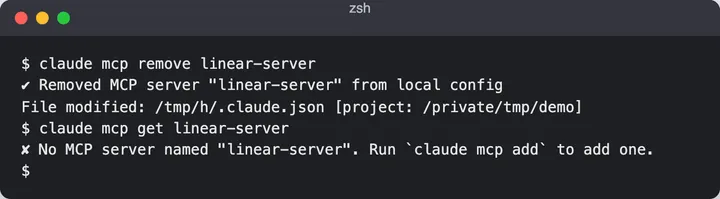
Removing the server only deletes Claude Code’s entry. The OAuth grant you approved lives on Linear’s side, so check your Linear account for authorized applications if you want to revoke it too.
Official server vs community servers
Other Linear MCP servers exist. Community projects usually run locally and authenticate with a Linear API key. They can work, but the official hosted server avoids running extra software and storing a long-lived key, so it is the one to start with.
FAQ
What is the Linear MCP server?
It is Linear’s official remote MCP server at https://mcp.linear.app/mcp. It lets MCP clients such as Claude Code work with your Linear issues through tools, using your own Linear login.
Do I need an API key for Linear MCP?
Not for the official server. You authorize through OAuth in your browser when you run /mcp. API keys are mainly used by community servers that run locally.
Why does claude mcp list say the server needs authentication?
Adding the server only registers its URL. Open a Claude Code session, run /mcp, and sign in to Linear. After that the status should change to connected.
Can Claude change things in Linear without asking?
Only if you allow it. By default Claude Code asks before using tools, but the server does have your permissions, so writes are real. Review bulk changes and avoid disabling permission prompts on a live workspace.