GeekCoding101
You get back two tokens from an OpenID Connect login, both look like xxxxx.yyyyy.zzzzz, and it is tempting to send either one wherever a token is needed. That works in some demos and fails, or quietly becomes a security hole, in real systems.
This post explains the difference, then proves it with a small local demo: I decoded both tokens and ran each one through the check its intended reader would make. If you want the bigger picture first, read OAuth grant types and the authorization code flow.
One honest caveat: this is a local demo. I generated my own RSA key, the issuer (auth.example.com) and audience (api.example.com) are placeholders, and there is no real authorization server or login behind it. The token lifetimes (5 minutes and 1 hour) are my choice, not something the specs require.
Short answer: ID token vs access token
An ID token tells your client application who the user is and how they authenticated. An access token tells your API what the caller is allowed to do. Your client reads the ID token; your API reads the access token, and neither should be used in the other’s place.
| ID token | Access token | |
|---|---|---|
| Purpose | Proves the user signed in; carries identity claims | Grants access to a protected API |
| Spec | OpenID Connect Core 1.0 | OAuth 2.0 (RFC 6749); JWT format profiled in RFC 9068 |
aud | The client’s own client_id | The API (resource server) |
| Who reads it | The client application | The resource server (API) |
| Format | Always a JWT | Any format; often an opaque string, sometimes a JWT |
| Where it goes | Stays in your client, never sent to your API | Authorization: Bearer header on API calls |
What an ID token is
An ID token is part of OpenID Connect, the identity layer on top of OAuth 2.0. According to the OpenID Connect Core spec, it is a JWT containing claims about the authentication of the end user.
Five claims are required: iss, sub, aud, exp and iat. Two more matter in practice:
noncemust be included if the client sent one in the authentication request. The client uses it to tie the token to the request it made.auth_timeis required when the client asked formax_ageor requestedauth_timeas an essential claim.
The key rule is that aud must contain the client_id of the relying party, which is your app. That makes the ID token a message addressed to your client, not to your API. The spec describes the full validation steps in section 3.1.3.7.
Claims like email and name are what your app uses to show “signed in as Alice”. For the JWT structure itself, see JWT authentication.
What an access token is
RFC 6749, section 1.4 defines an access token as a credential used to access protected resources, and it is usually opaque to the client. The client treats it as a string to carry, not a document to read.
The API that receives it decides how to validate it. An opaque token can be checked with token introspection (RFC 7662). A JWT access token can be verified locally, and RFC 9068 defines a profile for that:
- The header
typmust beat+jwt. - Required claims are
iss,exp,aud,sub,client_id,iatandjti. - Resource servers must verify the
typand reject other types.
That last rule is why my demo API turns away the ID token before it even looks at the audience. Sent as a Bearer token, it is the wrong kind of token.
Where the refresh token fits
A refresh token is neither of the above. Per RFC 6749, section 1.5, it is used to obtain new access tokens, and it is never sent to resource servers. It goes only to the authorization server’s token endpoint.
So the three tokens have three different audiences: the ID token is for your client, the access token is for your API, and the refresh token is for the authorization server. The demo below does not mint a refresh token.
Hands-on: decode both tokens, then validate them
I used Python 3.12.12 and PyJWT 2.15.1 with cryptography, in a throwaway virtual environment. Four scripts:
mint.pygenerates an RSA-2048 key and signs both tokens with RS256 (kidisdemo-key-1).decode.pyprints a token’s header and payload without verifying the signature.api.pyplays the resource server.client.pyplays the client application.
import time, uuid, jwtfrom cryptography.hazmat.primitives.asymmetric import rsafrom cryptography.hazmat.primitives import serialization as s
key = rsa.generate_private_key(public_exponent=65537, key_size=2048)open("private.pem", "wb").write(key.private_bytes(    s.Encoding.PEM, s.PrivateFormat.PKCS8, s.NoEncryption()))open("public.pem", "wb").write(key.public_key().public_bytes(    s.Encoding.PEM, s.PublicFormat.SubjectPublicKeyInfo))
now = int(time.time())ISS, SUB = "https://auth.example.com", "user-123"
id_claims = {"iss": ISS, "sub": SUB, "aud": "my-spa-client",             "iat": now, "exp": now + 3600, "auth_time": now,             "nonce": "n-0S6_WzA2Mj", "email": "alice@example.com", "name": "Alice"}at_claims = {"iss": ISS, "sub": SUB, "aud": "https://api.example.com",             "iat": now, "exp": now + 300, "client_id": "my-spa-client",             "scope": "read:orders", "jti": str(uuid.uuid4())}
def sign(claims, typ):    return jwt.encode(claims, key, algorithm="RS256",                      headers={"typ": typ, "kid": "demo-key-1"})
open("id_token.txt", "w").write(sign(id_claims, "JWT"))open("access_token.txt", "w").write(sign(at_claims, "at+jwt"))print("wrote private.pem public.pem id_token.txt access_token.txt")
import sys, json, jwt
token = open(sys.argv[1]).read().strip()print("-- decoded, not verified --")print("header:", json.dumps(jwt.get_unverified_header(token), indent=2))print("payload:", json.dumps( jwt.decode(token, options={"verify_signature": False}), indent=2))a) Decode the ID token
$ python --version; pip show pyjwt 2>/dev/null | head -2Python 3.12.12Name: PyJWTVersion: 2.15.1$ python mint.pywrote private.pem public.pem id_token.txt access_token.txt$ python decode.py id_token.txt-- decoded, not verified --header: { "alg": "RS256", "kid": "demo-key-1", "typ": "JWT"}payload: { "iss": "https://auth.example.com", "sub": "user-123", "aud": "my-spa-client", "iat": 1794165132, "exp": 1794168732, "auth_time": 1794165132, "nonce": "n-0S6_WzA2Mj", "email": "alice@example.com", "name": "Alice"}$(The 2>/dev/null just hides a BrokenPipe warning caused by head.)
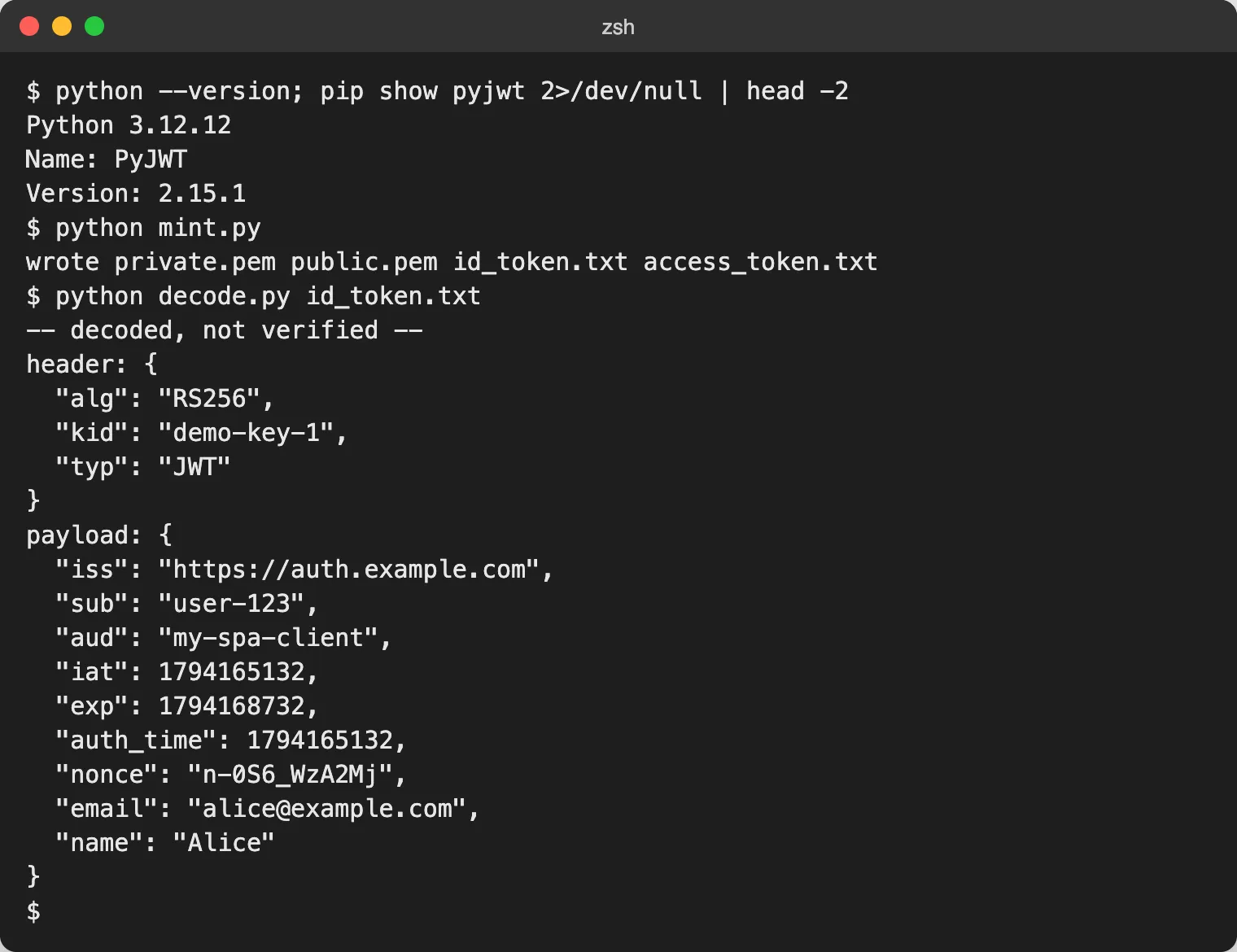
The aud is the client (my-spa-client), the payload carries identity (email, name) and the nonce, and the lifetime is one hour (exp minus iat is 3600 seconds).
b) Decode the access token
$ python decode.py access_token.txt-- decoded, not verified --header: { "alg": "RS256", "kid": "demo-key-1", "typ": "at+jwt"}payload: { "iss": "https://auth.example.com", "sub": "user-123", "aud": "https://api.example.com", "iat": 1794165132, "exp": 1794165432, "client_id": "my-spa-client", "scope": "read:orders", "jti": "cb371455-befe-4e74-a1e7-0e09ed7f8dc0"}$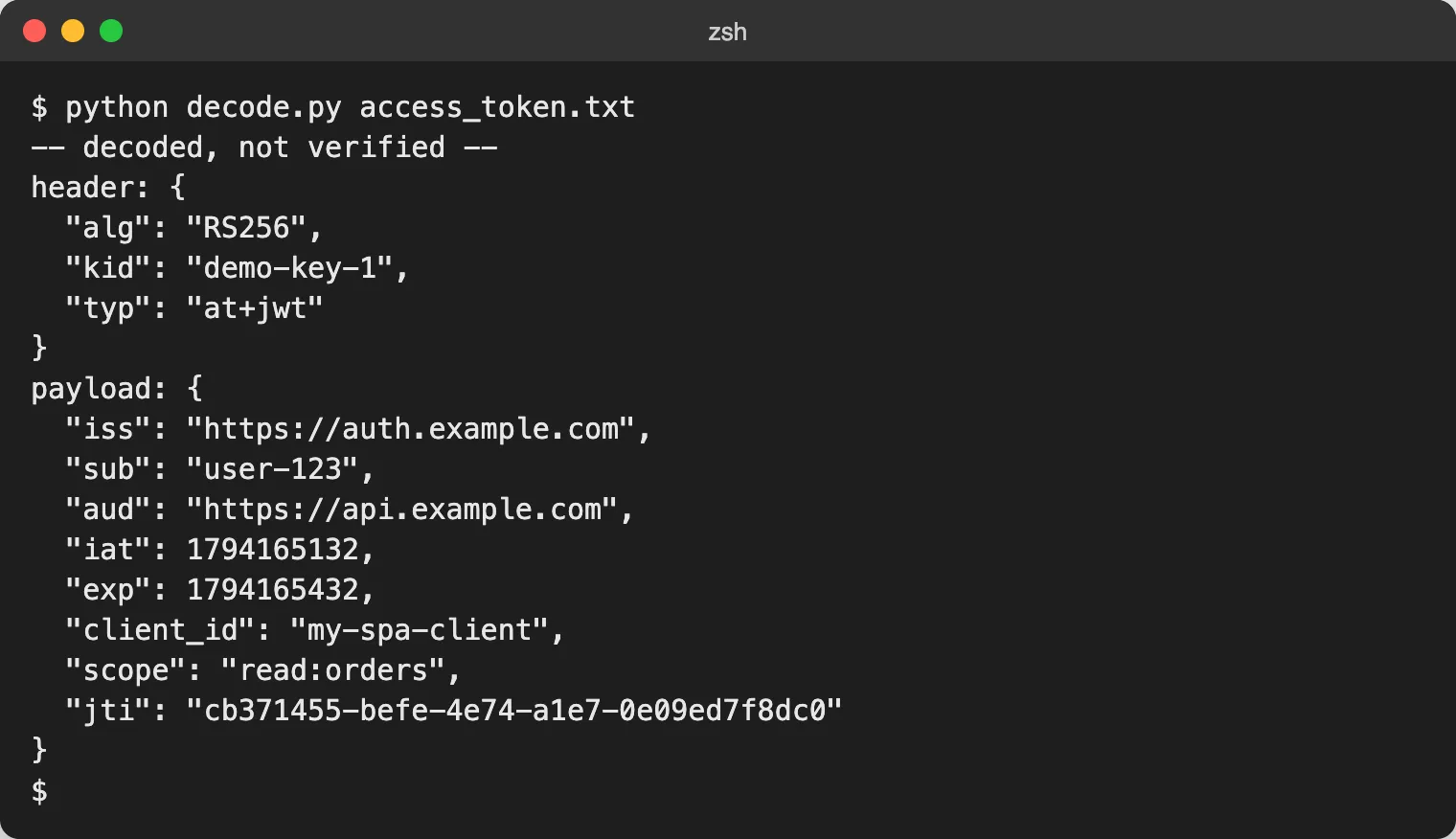
Same issuer, same key and same user, but a different audience (the API), a different typ (at+jwt), a scope instead of profile data, and a shorter life of five minutes. There is no email or nonce here. This token says what the caller may do, not who is looking at the screen.
c) The API accepts only the access token
This is api.py, a minimal resource server check:
import sys, jwt
token = open(sys.argv[1]).read().strip()pub = open("public.pem").read()try: typ = jwt.get_unverified_header(token).get("typ") if typ != "at+jwt": raise ValueError(f'typ is "{typ}", expected "at+jwt"') c = jwt.decode(token, pub, algorithms=["RS256"], audience="https://api.example.com") if "read:orders" not in c.get("scope", "").split(): raise ValueError("missing scope read:orders") print(f'ACCEPT: sub={c["sub"]} scope={c["scope"]}')except (jwt.PyJWTError, ValueError) as e: print(f"REJECT: {e}") sys.exit(1)$ python api.py id_token.txt; echo "exit=$?"REJECT: typ is "JWT", expected "at+jwt"exit=1$ python api.py access_token.txt; echo "exit=$?"ACCEPT: sub=user-123 scope=read:ordersexit=0$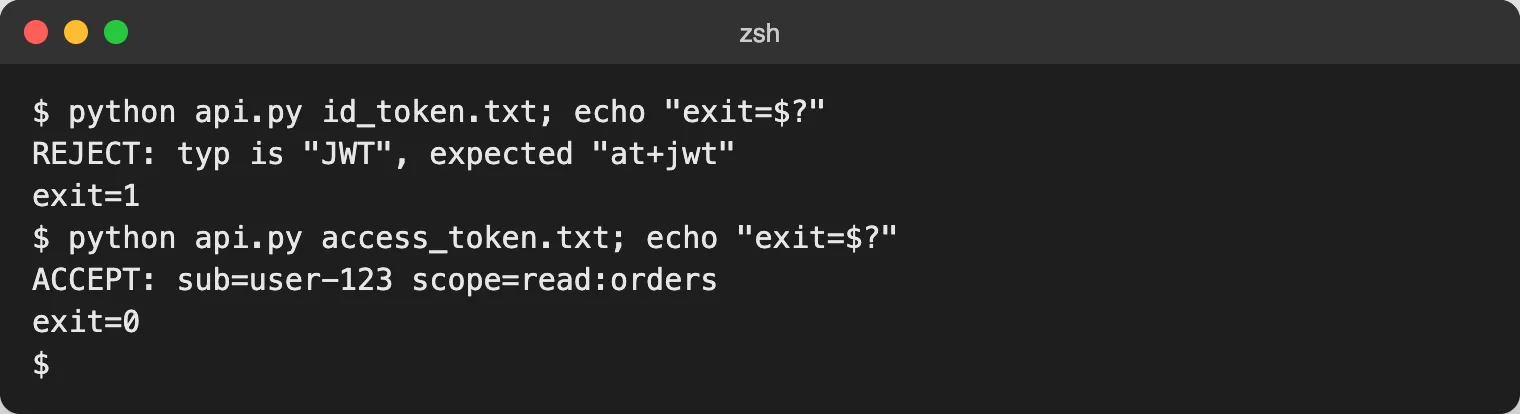
The ID token has a valid signature from the same key, yet the API rejects it. It fails the typ check first, and it would also fail the audience check, since its aud is the client, not the API.
d) The client validates the ID token, not the access token
This is client.py, the check a client app does after login:
import sys, jwt
token = open(sys.argv[1]).read().strip()pub = open("public.pem").read()try: c = jwt.decode(token, pub, algorithms=["RS256"], audience="my-spa-client") if c.get("nonce") != "n-0S6_WzA2Mj": raise ValueError("nonce mismatch") print(f'OK: signed in as {c["email"]}')except (jwt.PyJWTError, ValueError, KeyError) as e: print(f"REJECT: {e}") sys.exit(1)$ python client.py id_token.txtOK: signed in as alice@example.com$ python client.py access_token.txtREJECT: Audience doesn't match$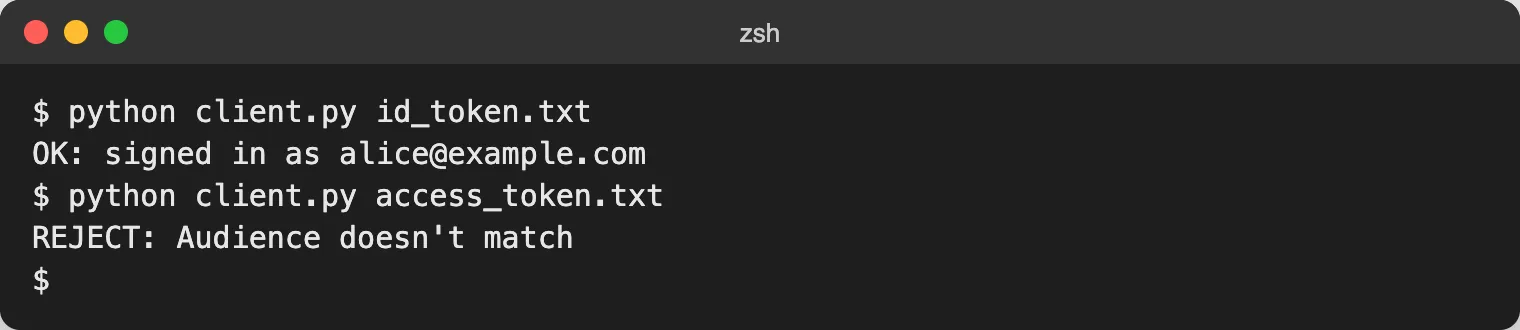
The client checks the signature, the audience (its own client_id) and the nonce. The access token is not addressed to the client, so it fails. In a real client you would also validate iss and exp and follow the full list in the OpenID Connect spec; this demo keeps only the checks that show the point.
Common mistakes
Sending the ID token as a Bearer token to your API. It often appears to work because both are signed JWTs from the same issuer. But the ID token is addressed to the client, and an API that accepts it is not checking what it should. The correct API check is shown in demo c.
Reading the access token in the client to find out who the user is. The client should treat the access token as opaque, as RFC 6749 describes. Use the ID token for identity, or call the UserInfo endpoint with the access token.
Skipping aud or nonce checks. Without the audience check, a token meant for another client can be accepted. Without the nonce check, you lose the link between the token and the login request you started.
Assuming access tokens are always JWTs. Many providers issue opaque strings, and the API validates them by introspection instead. Code that decodes them will break the day the format changes.
Which one do I send?
- Calling your own API: send the access token as
Authorization: Bearer <token>. For comparison with other schemes, see HTTP Basic authentication. - Showing who is signed in: read the ID token in the client, after validating it.
- Getting more profile data: call the UserInfo endpoint with the access token.
- Access token expired: send the refresh token to the authorization server’s token endpoint, and nowhere else.
- Protecting a server that clients call with tokens: validate the access token, including its audience. The same pattern applies to MCP authorization.
FAQ
Can I use an ID token to call my API?
No. The ID token’s audience is the client application, not your API. Have the API accept access tokens issued for it, and check the audience (and, for JWT access tokens, the typ).
Is an access token always a JWT?
No. RFC 6749 says access tokens are usually opaque to the client, and the format is up to the authorization server. RFC 9068 defines a JWT profile for providers that choose JWTs. An ID token, on the other hand, is always a JWT.
Do I need the UserInfo endpoint if I have an ID token?
Not always. The ID token carries the basic identity claims. UserInfo is for fetching extra claims, and per OpenID Connect Core, section 5.3 it is called with the access token.
Does the refresh token replace the access token?
No. It is a way to get a new access token from the authorization server when the old one expires. It is never sent to a resource server.
Should my single-page app decode the access token?
It should not rely on it. The access token is meant for the API, and its format and contents can change without notice. If the app needs the user’s identity, use the ID token or UserInfo.
Which token do I verify first on the API side?
For JWT access tokens, check the header typ is at+jwt as RFC 9068 requires, then the signature, issuer, audience, expiry and scope. This order rejects an ID token immediately, as demo c shows.