GeekCoding101
Playwright MCP is an MCP server from Microsoft that gives an AI client browser tools such as navigate, type, click and snapshot. To use it with Claude Code, you register it with one claude mcp add command, then check it with claude mcp list.
This guide covers that setup and a small local test on a one-field page. One distinction matters up front, so here it is first.
What was tested and what was not
- Actually run (smoke test): a Python script starts the real
@playwright/mcp@0.0.86server over stdio, speaks JSON-RPC to it, and drives a local form: navigate, find fresh refs, type “Ada”, click Greet, read a snapshot containingHello, Ada!, close. This verifies the server and the browser. - Not tested: an interactive Claude Code session. The
claude mcp addcommand,claude mcp list,/mcpand the sample prompt below come from the Claude Code MCP documentation. They were not exercised here, and nothing in this article is a Claude conversation.
So the smoke test does not show that a model picks the right tools. It shows that, once a client connects, the tools behave as expected on this fixture. For background, see What Is an MCP Server? and MCP vs API.
Facts below were checked on 2026-11-23 against the Playwright MCP repository.
Prerequisites
- Python 3
- Node.js 20 or newer (the Playwright MCP requirement), with
npx - Google Chrome installed (the server is started with
--browser chrome, which uses your installed Chrome)
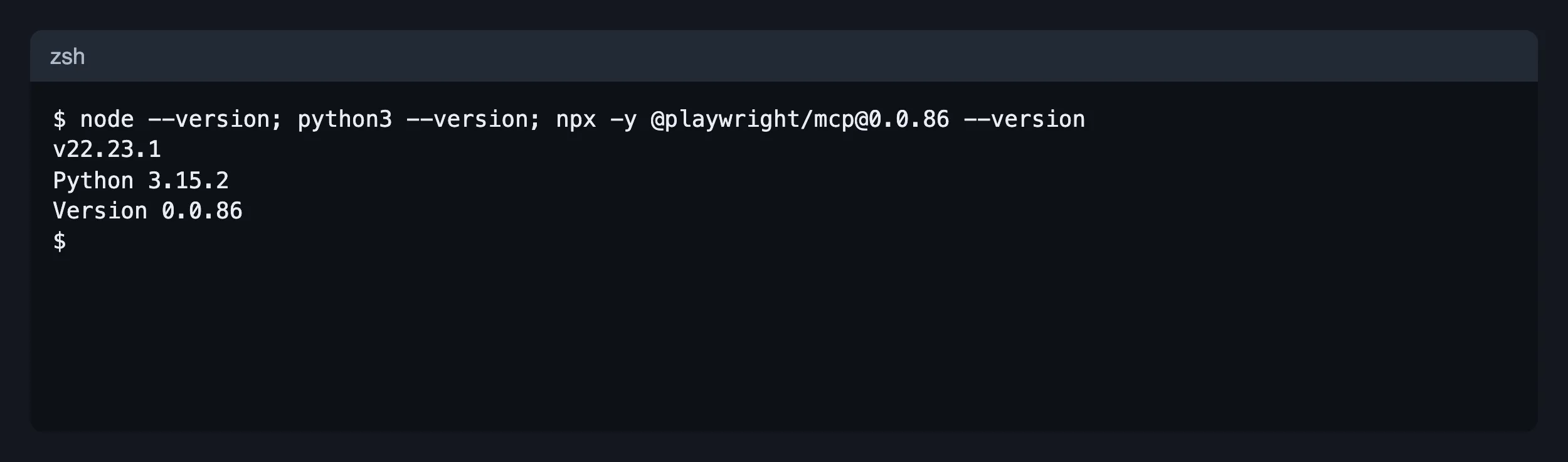
Check the versions. The tested package reports a serverInfo of Playwright 1.66.0-alpha-2026-11-18.
node --versionnpx -y @playwright/mcp@0.0.86 --version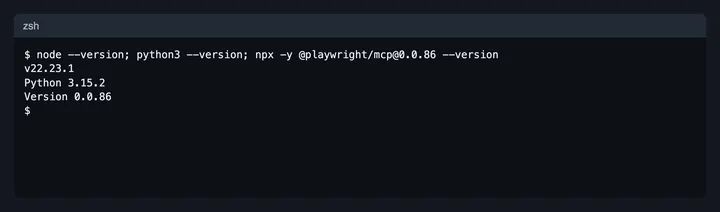
The screenshots in this article are a real tmux run rendered as terminal images.
Configure Playwright MCP in Claude Code
The repository suggests npx @playwright/mcp@latest. This guide pins 0.0.86 so the steps stay reproducible. According to the Claude Code docs, a local stdio server is added like this:
claude mcp add --transport stdio playwright -- npx -y @playwright/mcp@0.0.86 --headless --isolated --browser chromeThe flags mean:
--headless: no visible browser window.--isolated: a separate, ephemeral browser profile, so your personal profile, cookies and logins are not used.--browser chrome: use the installed Chrome.
Then verify the registration:
claude mcp listInside a new Claude Code session, run /mcp to see the server’s status. Again, this setup is documented by Anthropic but was not run interactively for this article.
Create the test fixture
Make an empty lab directory with two files. The first is index.html, a one-field greeting form:
<!doctype html><html lang="en"><meta charset="utf-8"><title>MCP browser lab</title><link rel="icon" href="data:,"><h1>Greeting lab</h1><form><label>Name <input name="name" required></label><button>Greet</button></form><p role="status"></p><script>document.querySelector('form').onsubmit=e=>{e.preventDefault();document.querySelector('[role=status]').textContent='Hello, '+document.querySelector('input').value+'!';};</script></html>The second is mcp-smoke.py:
import json, subprocess, re, pathlib
server = subprocess.Popen(['npx', '-y', '@playwright/mcp@0.0.86', '--headless', '--isolated', '--browser', 'chrome'], stdin=subprocess.PIPE, stdout=subprocess.PIPE, stderr=open('mcp-stderr.log', 'w'), text=True)counter = 0def rpc(method, params):    global counter    counter += 1    server.stdin.write(json.dumps({'jsonrpc':'2.0','id':counter,'method':method,'params':params})+'\n'); server.stdin.flush()    while True:        line=server.stdout.readline()        if not line: raise RuntimeError('MCP server exited; inspect mcp-stderr.log')        msg=json.loads(line)        if msg.get('id')==counter:            if 'error' in msg: raise RuntimeError(msg['error'])            result=msg['result']            if result.get('isError'): raise RuntimeError(result)            return resultdef call(name, args):    result=rpc('tools/call', {'name':name, 'arguments':args})    text='\n'.join(x['text'] for x in result.get('content',[]) if x['type']=='text')    snapshot=re.search(r'\[Snapshot\]\(([^)]+)\)',text)    if snapshot:        text += '\n' + pathlib.Path(snapshot.group(1)).read_text()    print(text, flush=True)    return texttry:    info=rpc('initialize',{'protocolVersion':'2024-11-05','capabilities':{},'clientInfo':{'name':'local-smoke','version':'1.0'}})    print('Server:',info['serverInfo'],flush=True)    server.stdin.write(json.dumps({'jsonrpc':'2.0','method':'notifications/initialized'})+'\n'); server.stdin.flush()    tools=rpc('tools/list',{})['tools']    schemas={t['name']:t['inputSchema'] for t in tools}    text=call('browser_navigate',{'url':'http://127.0.0.1:8917/'})    def target(role, label):        return re.search(r'- '+role+r' "'+label+r'"[^\n]*?\[ref=([^\]]+)\]',text).group(1)    field=target('textbox','Name'); button=target('button','Greet')    # Tool schema is discovered at runtime; current release uses ref or target.    def args_for(tool, ref, **more):        key='target' if 'target' in schemas[tool].get('properties',{}) else 'ref'        return {key:ref, **more}    call('browser_type',args_for('browser_type',field,text='Ada'))    call('browser_click',args_for('browser_click',button))    snapshot=call('browser_snapshot',{})    assert 'Hello, Ada!' in snapshot    print('PASS: MCP browser interaction returned Hello, Ada!',flush=True)    call('browser_close',{})finally:    server.terminate()    server.wait(timeout=15)
Run the smoke test
In the first terminal, from the lab directory, serve the page on localhost only:
python3 -m http.server 8917 --bind 127.0.0.1In a second terminal, from the same directory:
python3 mcp-smoke.pyWhen it finishes, stop the HTTP server with Ctrl-C in the first terminal.
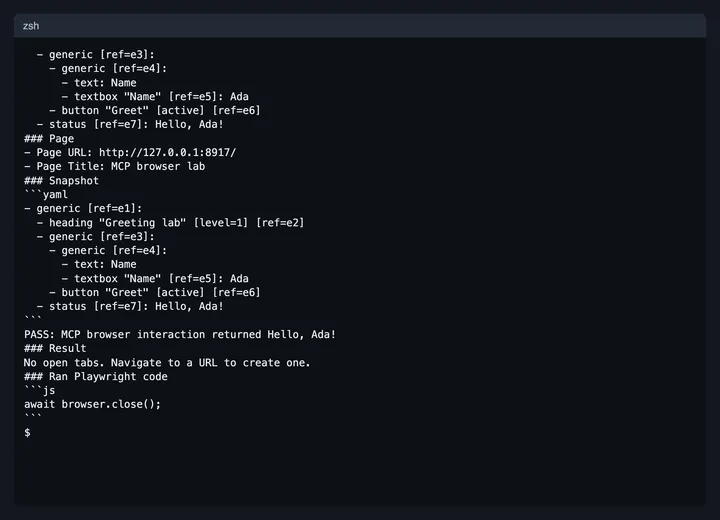
The image shows the final 27 lines (python3 mcp-smoke.py | tail -n 27); the full command above prints every tool response.
The final snapshot and the PASS line are the part to look for. The script exits with an error if Hello, Ada! is missing from the snapshot.
What the script does
The Playwright MCP server exposes tools including browser_navigate, browser_type, browser_click, browser_snapshot and browser_close. The script uses all five.
- It starts the server over stdio and sends
initialize, then theinitializednotification. - It calls
tools/listand stores each tool’s input schema. Tool schemas vary between releases, so the script checks at runtime whether a tool takestargetorref. - It navigates to
http://127.0.0.1:8917/and reads the Name textbox and Greet button refs from the returned snapshot. - It types
Ada, clicks Greet, and takes a new snapshot. - It asserts the snapshot contains
Hello, Ada!, printsPASS, and closes the browser.
Snapshot refs are specific to a session, so never hard-code them. Read them from a fresh snapshot each time, as the script does. Newer responses may link to a YAML snapshot file instead of inlining it, which is why call reads the linked file when it finds a [Snapshot](...) link.
A prompt to try in Claude Code
After setup, you can try this prompt. It is provided for you to run; it was not run as a model session for this article:
Open http://127.0.0.1:8917, snapshot, enter Ada in Name, click Greet, verify status Hello, Ada!, report browser console errors.Keep the HTTP server from the previous step running, and expect Claude Code to ask for approval before using the tools, depending on your permission settings.
Smoke check vs regression test
This script is a one-off check that the wiring works. It is not a committed, repeatable regression suite, and it makes no claim of regression coverage. For tests you keep in a repository, use Playwright Test with its own actions and assertions; see writing tests and test assertions.
The repository also notes that modern coding agents may prefer a CLI plus skills. MCP is most useful when you want a persistent browser the agent can introspect.
Troubleshooting
- “Connected” does not mean a browser launched. The server can respond to
initializeandtools/listbefore any browser starts. The firstbrowser_navigateis the real test. - Chrome missing. Confirm Google Chrome is installed, since
--browser chromeuses it. - Stale or missing refs. Take a fresh snapshot and use the refs from it.
- Server exits early. The script raises an error; read
mcp-stderr.login the lab directory. - Tools not appearing in Claude Code. Run
claude mcp listand/mcp, and check scope and approval prompts. - Use fixtures, not your own profile. Keep
--isolatedand test against local pages. Isolated mode gives an ephemeral profile; it is not a network security sandbox, and the browser can still reach any site you point it at.
FAQ
What is Playwright MCP?
It is an MCP server from Microsoft, run with npx @playwright/mcp@latest, that exposes browser tools such as navigate, type, click and snapshot to an MCP client like Claude Code.
How do I add Playwright MCP to Claude Code?
Run claude mcp add --transport stdio playwright -- npx -y @playwright/mcp@0.0.86 --headless --isolated --browser chrome, then claude mcp list, and /mcp in a new session. This is from the official docs and was not run interactively here.
Does the smoke test prove Claude Code will use the tools correctly?
No. It talks to the server directly over JSON-RPC, so it verifies the server and browser on this fixture only, not the model’s tool choices.