GeekCoding101
The Blender AI MCP addon (Blender MCP) is a two-part tool: a Blender addon that opens a local socket server inside Blender, and an MCP server that Claude Code launches with uvx and that talks to that socket. Once both are running, you can tell Claude Code to create objects, materials and scenes in your live Blender session.
This guide covers the macOS route with uv, the blender mcp claude code setup, a first real prompt, and the safety side. We tested on macOS with Blender 5.2.1 LTS, Claude Code 2.1.x and uv 0.12. The details come from the official blender-mcp README (checked 2026-11-21). The AI 3D model generators (Meshy, Tripo, Hyper3D Rodin, Hunyuan3D) need API keys or paid tiers, so we skip them here.
What the Blender MCP addon is
If MCP is new to you, What Is an MCP Server? explains the idea. In short, an MCP server gives an AI client a list of tools it can call.
Blender MCP has two pieces:
addon.py: a Blender addon that starts a socket server inside Blender. By default it listens on localhost, port 9876.- The MCP server: a small program started with
uvxthat Claude Code connects to. It forwards tool calls to the addon’s socket.
The tools include get_scene_info, execute_blender_code (runs arbitrary Python in your open Blender), and search_assets / import_asset for Poly Haven, Sketchfab and Poly Pizza. It is the same pattern as Ghidra MCP for AI reverse engineering: a desktop app, an addon inside it, and Claude Code on the outside.
One naming note: the PyPI package was renamed to mcp-for-blender. The old uvx blender-mcp command still runs, but new installs should use mcp-for-blender, and so does everything below.
Check your prerequisites
You need Blender, uv and Claude Code. Install uv with the official installer or Homebrew, not pip install uv:
brew install uvThen confirm both tools respond. Blender prints a long build report, so we keep only the first line:
/Applications/Blender.app/Contents/MacOS/Blender --version | head -n 1uvx --version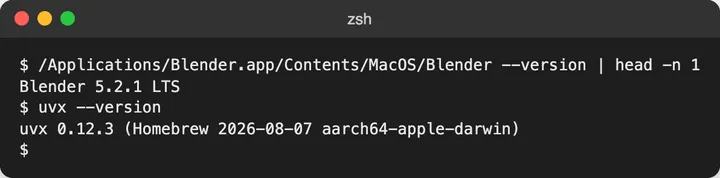
Install the Blender MCP addon
The quickest way is to let the package install the addon for you:
uvx mcp-for-blender install-addonIt prints the path of the addon file it wrote, which sits inside your Blender user folder (Library/Application Support/Blender/<version>/scripts/addons/ on macOS), so we do not show the output here. It then tells you to disable and re-enable Interface: MCP for Blender in Preferences > Add-ons, or restart Blender.
If you prefer to do it by hand, get addon.py from the GitHub repo, then in Blender open Preferences > Add-ons, install addon.py, and tick Interface: MCP for Blender to enable it.
Register it in Claude Code
From the folder where you run Claude Code, add the server. The README’s one-liner is claude mcp add blender uvx mcp-for-blender. We prefer project scope so the setup stays with the project:
claude mcp add --scope project blender -- uvx mcp-for-blenderclaude mcp get blenderThe -- separates Claude Code’s own flags from the command it should run. claude mcp get blender prints what was registered.
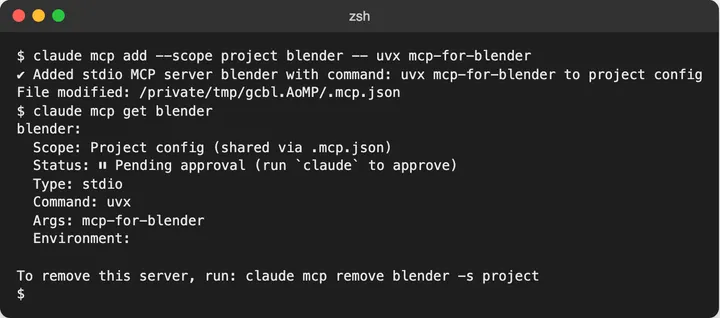
Note the status line. A project-scoped server shows Pending approval until you approve it the first time you start claude in that folder.
Run only one MCP server instance at a time. If another client (Claude Desktop, Cursor and so on) also has Blender MCP configured and running, close or disable it first.
Start the server inside Blender
Registering the server does not start the Blender side. The README says the addon starts its server when Blender opens. On our machine, once the addon was enabled, the port was already listening right after Blender launched. If yours is not, start it by hand:
- Open Blender and hover over the 3D viewport.
- Press N to open the sidebar.
- Open the MCP for Blender tab.
- Click Start MCP Server.
Check that it is listening
Back in a terminal, ask macOS what is listening on the default port:
lsof -nP -iTCP:9876 -sTCP:LISTEN | awk '{print $1, $2, $9, $10}'The awk part prints only the command, process ID and address columns, leaving out the user column.
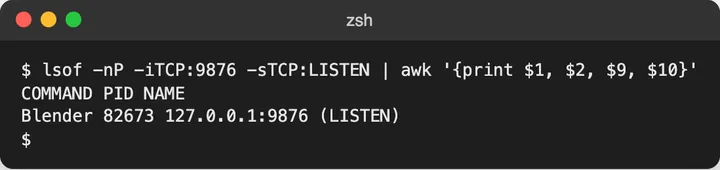
If this prints nothing, the server is not running in Blender yet, and Claude Code will not be able to reach it.
Run your first prompt
Save your .blend file first (more on why in the next section). Then try a small task that proves the whole chain works. We used a headless run so the full prompt and answer fit in one screenshot. Run it from the folder that holds .mcp.json:
claude -p "Use the blender MCP tools: create a cube named Crate with a red material, then call get_scene_info and summarize the objects. Reply in English." --mcp-config .mcp.json --allowedTools "mcp__blender"--mcp-config .mcp.json loads the server from the file without the interactive approval step, and --allowedTools "mcp__blender" lets the headless run call the Blender tools without stopping to ask.
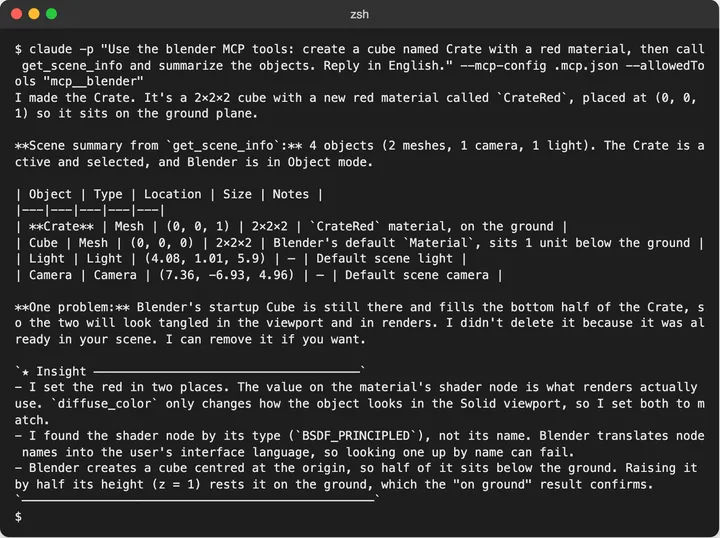
Claude reported four objects: the new Crate with a red CrateRed material, plus the default Cube, Light and Camera. We also queried the addon’s get_scene_info directly over the socket and it listed Crate alongside the default objects, so the cube really was in the open Blender session. Claude also pointed out that the default Cube overlaps the new one, since both are 2x2x2 and the Crate was placed at z = 1.
Be aware that --allowedTools "mcp__blender" pre-approves every Blender tool, including execute_blender_code. That was fine for a throwaway scene. For real work, start claude interactively in the same folder instead, approve the server once, and read each approval prompt.
Once that works, the same pattern scales up: ask for several objects, materials, lighting, or a Poly Haven asset, then ask for get_scene_info to check what actually ended up in the scene.
Is it safe?
Treat it like giving someone a Python console in your Blender session, because that is what execute_blender_code is. It runs arbitrary Python in your live Blender, and the README warns you to save your work first. A bad script can delete objects, overwrite files or touch anything your user account can.
A few habits that help:
- Save your .blend before every session, and keep versions.
- Know it is local. The socket server listens on localhost by default. Leave
BLENDER_HOSTalone unless you have a reason to change it. - Read what Claude Code asks to run. Do not use
--dangerously-skip-permissionswithexecute_blender_code. That flag removes the prompts that let you catch a bad script. - Be careful with downloaded assets. Text that comes from outside, such as an asset description, can contain instructions aimed at the model. That is the prompt-injection risk covered in What Is an MCP Server?. If you want the wider tradeoffs, see MCP vs API.
Telemetry is opt-in and off by default, so nothing is sent unless you turn it on.
Troubleshooting
- Claude Code cannot see Blender tools. Run
claude mcp get blenderand check the entry exists in the folder you are working in. Project-scoped servers belong to that project. - The server shows Pending approval. Start
claudeinteractively in that folder and approve the project server, or use--mcp-config .mcp.jsonfor a headless run. - Tools are listed but calls fail. Check the server is started in Blender (N panel, MCP for Blender, Start MCP Server) and that the
lsofcommand shows port 9876 listening. - Port conflicts or odd behavior. Make sure only one MCP server instance is running. The README documents
BLENDER_HOST(defaultlocalhost) andBLENDER_PORT(default9876); if you change one, make sure both ends agree. - Addon not in the panel. Confirm Interface: MCP for Blender is enabled under Preferences > Add-ons.
- Old
blender-mcpcommand. It still runs, but switch tomcp-for-blenderfor new setups.
FAQ
Is the Blender MCP addon free?
The addon and MCP server are open source on GitHub. Some optional features, such as the AI 3D model generators, need API keys or paid tiers from those providers. The basic scene tools in this guide do not.
Do I have to use Claude Code?
No. It is an MCP server, so other MCP clients can use it. This guide covers Claude Code because it is a quick path to a working setup.
What changed with the blender-mcp name?
The PyPI package was renamed to mcp-for-blender. According to the README, the old uvx blender-mcp still runs, but new installs should use the new name.
Why does Claude Code not remember Blender between projects?
claude mcp add --help lists three scopes: local (the default), user and project. We used --scope project, which writes a .mcp.json file in that folder, so the server is only available there and can be committed and shared with a team. The default local scope keeps the registration private to you but still tied to the current project. Use --scope user if you want Blender available in every project, or register it again in each folder where you need it.